

Choosing between Facebook Image Ads, Video Ads, Reels, Carousel Ads, Lead Ads, and other formats can quickly become confusing, especially when each one serves a different campaign goal. Using the wrong ad type may limit creative performance, waste budget, or make it harder for Meta to optimize toward the result you actually want. In this article, I’ll explain everything you need to know about the main types of Facebook Ads, how they work, and how to choose the right one for your campaign.
Quick summary:
- Facebook Ads include different creative formats, placements, and campaign solutions designed for different advertising goals.
- Image, Video, Carousel, and Collection Ads are among the most commonly used formats for reaching and engaging Facebook users.
- Stories and Reels Ads require mobile-first creative, especially vertical formats that fit the way users consume content.
- Lead Ads, Click-to-Message Ads, and Advantage+ Catalog Ads are better suited to specific goals such as lead generation, conversations, and ecommerce sales.
- The best Facebook ad type depends on your campaign objective, customer journey, creative assets, and the action you want users to take.
Why you should advertise on Facebook?
Advertising on Facebook offers numerous advantages for businesses looking to expand their reach and connect with their target audience. Here are several compelling reasons why advertising on Facebook is beneficial:
A large and diverse audience
Facebook remains one of the world’s most widely used social platforms. According to DataReportal’s Digital 2026 Mid-Year Global Update, 56.3% of internet users aged 16 and above used Facebook in the previous month, giving advertisers access to a broad and diverse audience across markets.
Precise targeting options
Facebook offers flexible targeting options that let advertisers define key audience controls such as age, location, and interests. At the same time, tools like Advantage+ audience use AI-powered delivery to expand beyond these signals when Meta predicts that doing so can improve campaign performance.
Engagement and interaction
Facebook is a platform where users actively engage with content. Advertisers can leverage this engagement by creating interactive and shareable content, encouraging users to like, comment, share, and interact with the brand.
Cost-effective advertising
Facebook advertising is often cost-effective, particularly for businesses with limited budgets. Advertisers can set daily or lifetime budgets, control bid strategies, and optimize campaigns based on performance, maximizing the return on investment.
Versatile ad formats
Facebook supports a variety of ad formats, including image ads, video ads, carousel ads, slideshow ads, etc., which will be explained in detail right below. This versatility allows businesses to choose the format that best suits their content and goals, making campaigns more engaging and visually appealing.
Types of Facebook Ads You Need to Know
Facebook offers different types of ads to help businesses achieve specific advertising goals, from building awareness and engagement to generating leads and driving sales. Here are the main Facebook ad types and Facebook Ads Sizes you need to know.
Photo Ads
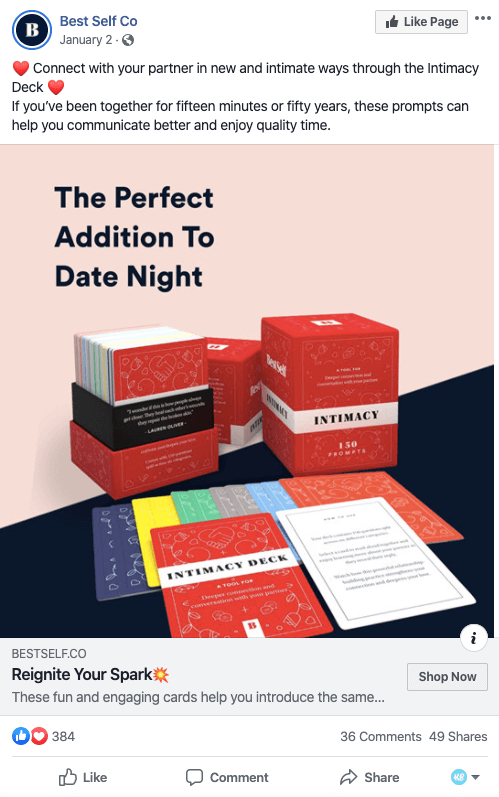
Facebook Photo Ads, or Image Ads, feature a high-quality still image along with text copy and a call to action (CTA) button. These are the simplest forms of ads and among the most common ones you will see when scrolling through the Facebook Feed. You can use boosted posts or create dedicated image ads through Meta Ads Manager.
A single image often speaks louder about your business positioning and goals than pages full of text, facts, and statistics. Facebook image ads are a powerful tool for achieving various campaign objectives. Whether you want to increase brand awareness, drive traffic, or promote products, image ads can help you reach your target audience and deliver your message.
Specifications:
- For Facebook Feed, Meta currently recommends a 4:5 aspect ratio at 1440 × 1800 pixels.
- For Stories and Reels placements, use a 9:16 vertical creative at 1440 × 2560 pixels.
- Square 1:1 creatives remain suitable for placements such as Carousel, Marketplace, and the right column.
- File types should be JPG or PNG.
Video Ads
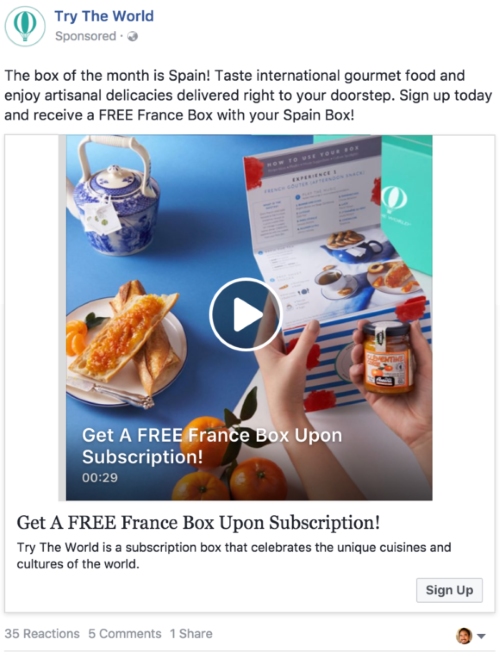
Facebook Video Ads are similar to image ads, with the key difference being the use of video as the main creative. Businesses can use video ads to demonstrate a product, explain a service, share customer stories, or communicate their brand personality in a more dynamic way.
Video ads can appear across placements such as Facebook Feed, Stories, and Reels. However, there is no single video size that works best for every placement, so advertisers should prepare creative based on where the ad will appear.
Specifications:
- File types: MP4 or MOV.
- Facebook Feed: 4:5 aspect ratio, with 1440 × 1800 pixels recommended.
- Stories and Reels: 9:16 vertical format, with 1440 × 2560 pixels recommended.
- H.264 compression, square pixels, fixed frame rate, progressive scan, and AAC audio are recommended.
- Maximum file size: 4GB.
- Video duration varies depending on the placement.
Stories Ads
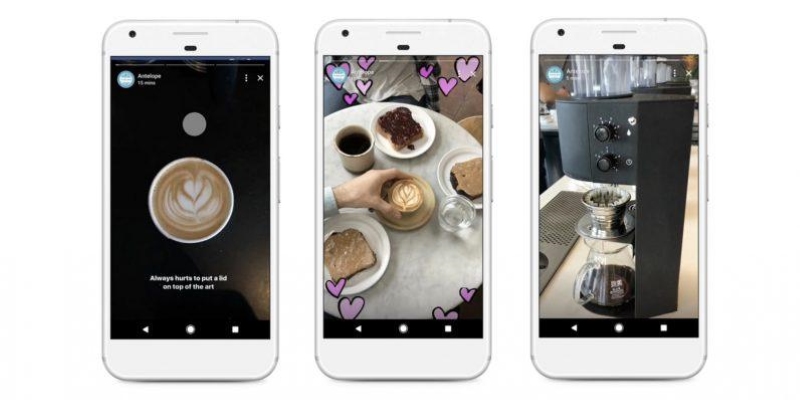
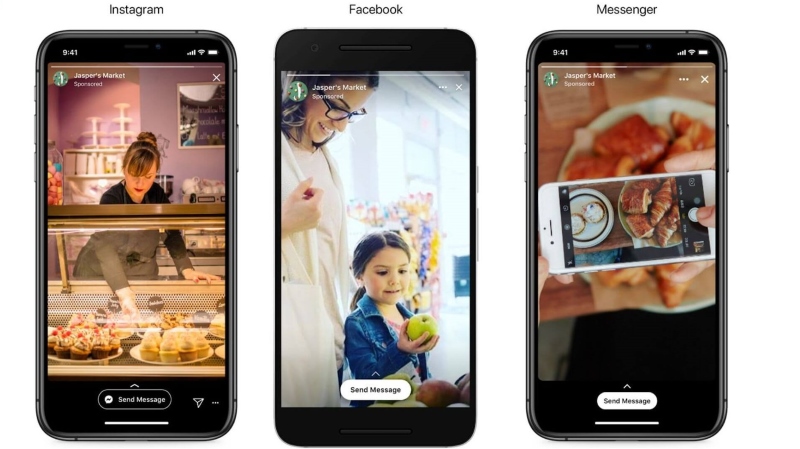
Facebook Stories Ads are full-screen ads that appear between organic Stories content. Because Stories are designed primarily for mobile viewing, advertisers should create vertical 9:16 images or videos specifically for this placement rather than simply resizing Feed creatives.
The primary element of Facebook Stories ads is visual content. Advertisers can use images or short videos to communicate their message, but the creative should capture attention quickly as users can easily tap or swipe to the next Story.
Stories ads can also be delivered across Meta placements such as Facebook and Instagram Stories, depending on your campaign settings and placement strategy.
Reels Ads
Reels Ads are immersive, mobile-first advertisements that appear within the Facebook Reels experience. They allow businesses to reach users while they consume short-form video content and can be used across different campaign objectives.
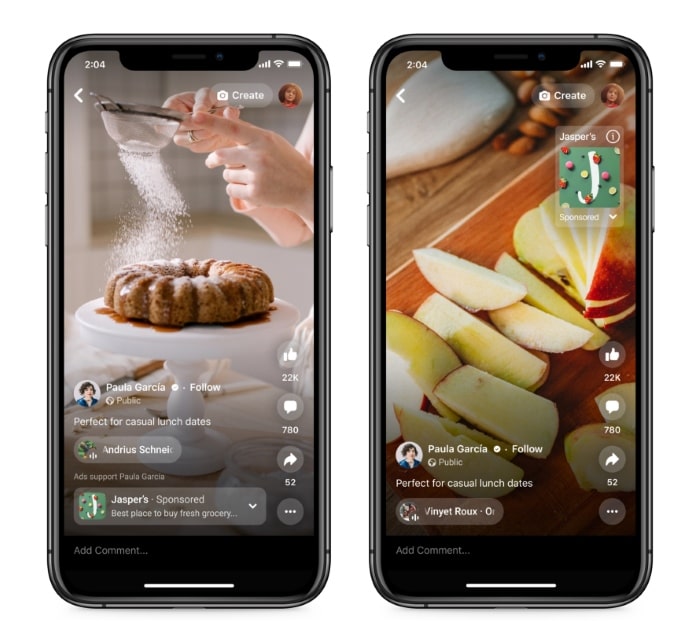
For Reels, Meta recommends using vertical 9:16 creative with audio and keeping key messages within the safe zone. Advertisers can include Facebook Reels through Advantage+ placements or select Reels manually at the ad set level.
Reels Ads are particularly suitable for product demonstrations, creator-style content, UGC, tutorials, and short videos designed to capture attention quickly.
Specifications:
- File type: MP4 or MOV.
- Ratio: 9:16.
- Resolution: 1440 × 2560 pixels is recommended.
- Video captions and sound are highly recommended.
- Keep important text, logos, and other key elements within the Reels safe zone.
Carousel Ads
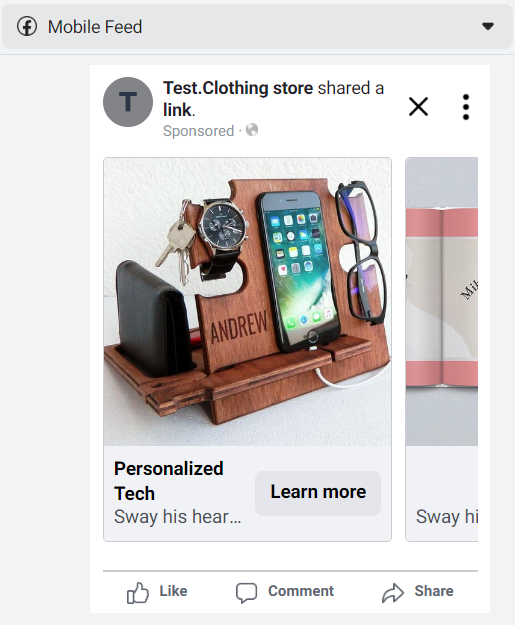
Carousel Ads are a type of ads that allows businesses to showcase up to 10 images or videos within a single ad. When users stumble upon these ads, they can swipe through a series of images or videos horizontally. Each card in the Carousel can link to a different destination URL. Advertisers can guide users to specific product pages, landing pages, or other relevant content based on the content of each card.
This ad type provides more creative space within an ad, allowing businesses to highlight different products, showcase specific details about one product, service, or promotion, or even tell a story about their brand that develops across each carousel card.
Slideshow Ads
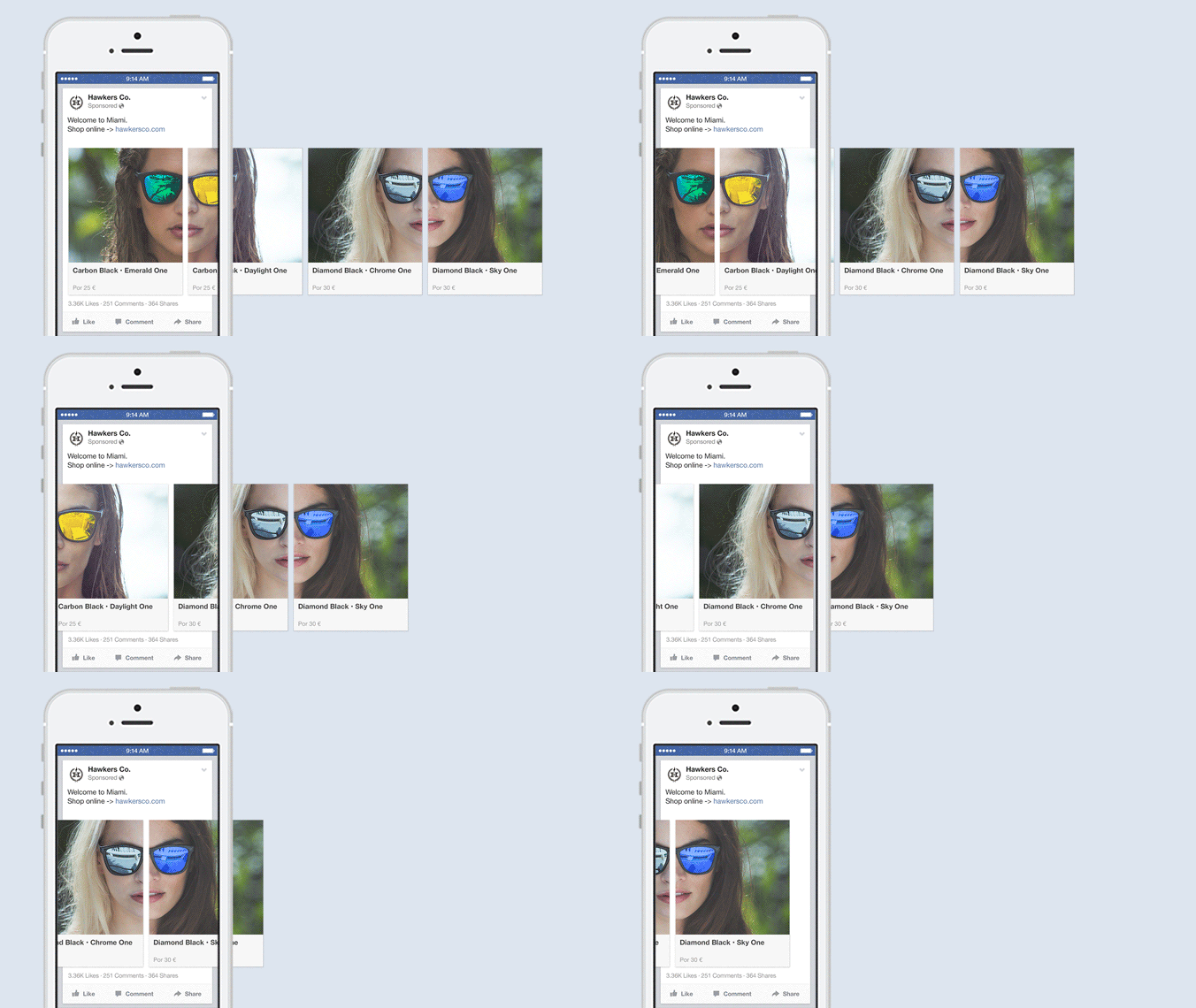
Slideshow Ads are a video-like ad format created from a series of still images or existing video assets. They provide motion without requiring the same production resources as a traditional video ad.
Facebook slideshows can be useful when you don’t have enough video production resources or want to turn existing image assets into motion-based creative. If you already have high-performing Facebook image ads, for example, you can repurpose them into a slideshow to test a different creative experience.
Slideshow Ads are effective for product showcases, allowing advertisers to highlight different features, use cases, or variations of a product within a short, visually appealing sequence.
Specifications:
- Slideshow Ads can include 2 to 15 images.
- Common aspect ratios include 1:1 and 16:9.
- Use high-resolution images to maintain visual quality when they are combined into the slideshow.
Collection Ads
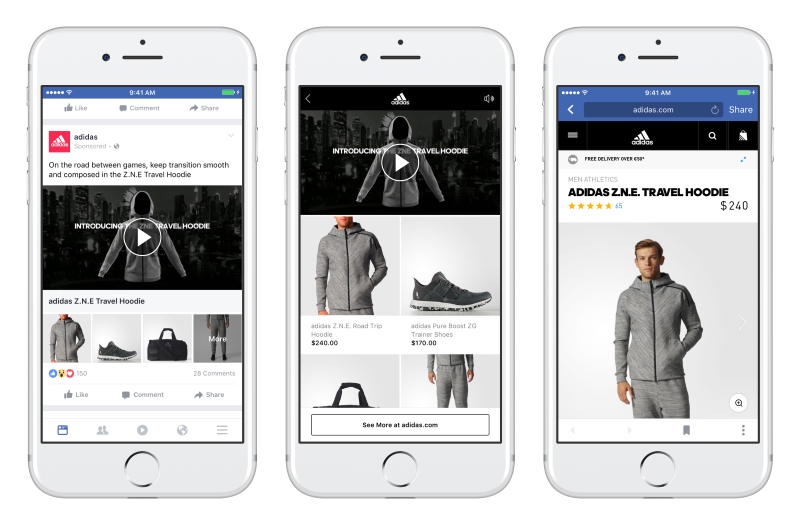
Collection Ads allow users to discover, browse, and purchase products directly from their News Feed. These ads have a main featured image or video, as well as 2 (or more) smaller images underneath. When someone clicks on a collection ad, they’re taken to an Instant Experience, a fullscreen landing page that drives engagement and nurtures interest.
As the name suggests, these ads enable you to display an entire product collection, bridging the gap between discovery and purchase. They offer extensive customization options and are especially effective if you want to display a diverse range of products.
There are different templates available for your collection ad:
- Instant Storefront: This template is best for showcasing more than four products in your catalog. You can display your products in a grid so people can browse them in one place.
- Instant Lookbook: The lookbook template is useful for brands that want to tell a story and show their catalog in action. It’s ideal for creating a digital version of an existing product catalog.
- Instant Customer Acquisition: This template connects your ad with a mobile-optimized Instant Experience designed to encourage users to take a specific action.
Click-to-Message Ads
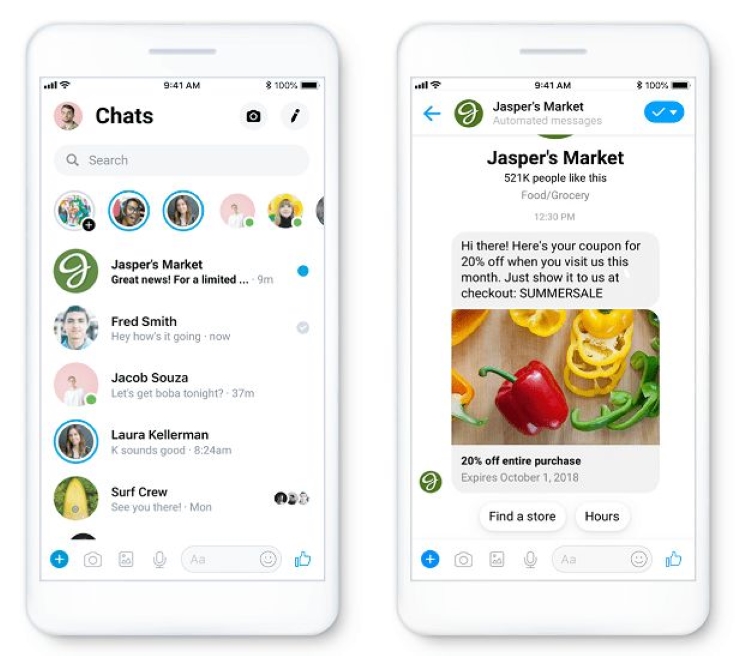
Facebook Messenger Ads have changed significantly. Meta stopped delivering ads to the Messenger Inbox placement on November 11, 2025, so advertisers should no longer treat Messenger Inbox Ads as a current standalone placement.
Instead, businesses can use click-to-message ads to encourage people to start conversations through supported messaging destinations such as Messenger, Instagram Direct, or WhatsApp. This type of advertising is particularly useful when customers need to ask questions, request consultations, or communicate with a business before converting.
Lead Ads
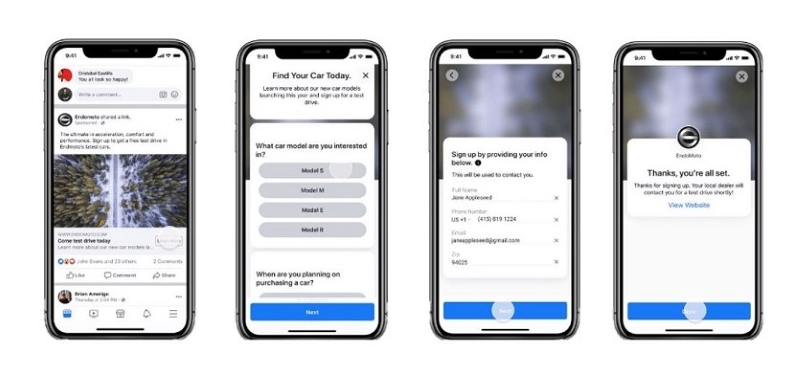
Lead Ads are designed to collect information from potential customers, such as email addresses and phone numbers. They’re ideal for newsletter sign-ups, consultation requests, event registrations, appointment bookings, and other lead-generation campaigns.
One common option is Meta Instant Forms, which allow users to submit their information without leaving the platform. Some information can be pre-filled, reducing the number of steps required to complete the form. Depending on your campaign setup, Meta lead campaigns can also direct prospects to websites, messaging experiences, or calls.
By reducing friction in the conversion journey, Lead Ads can make it easier for prospects to submit their information. However, advertisers should also monitor lead quality rather than optimizing only for the lowest cost per lead.
Advantage+ Catalog Ads
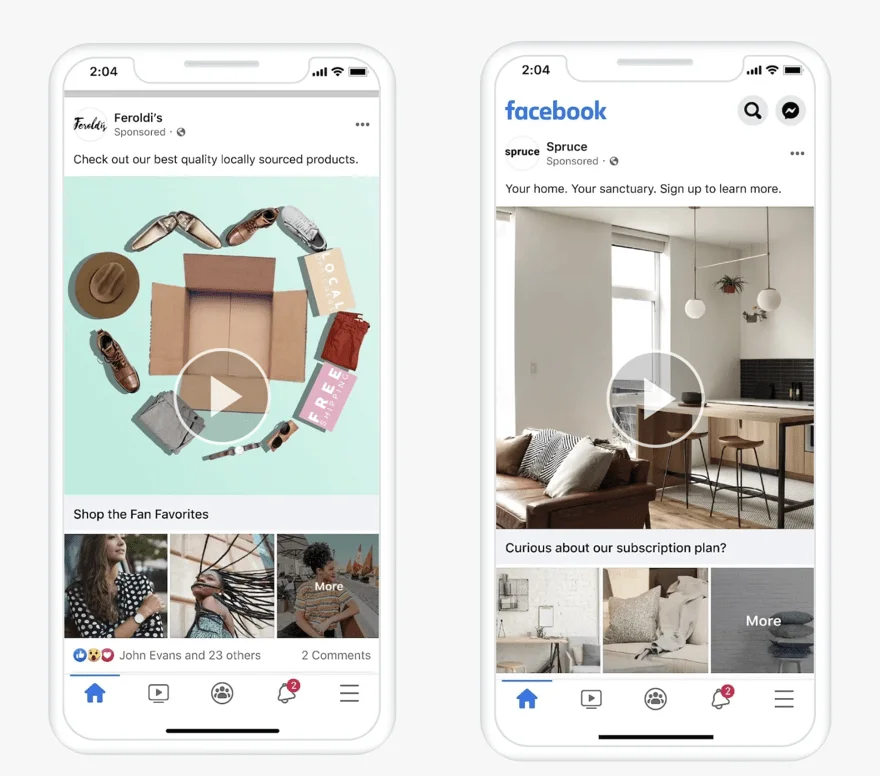
Previously commonly known as Facebook Dynamic Ads, Meta now positions this catalog-based advertising solution as Advantage+ Catalog Ads.
Advantage+ Catalog Ads connect your advertising campaigns with a product catalog and dynamically deliver personalized products and recommendations based on users’ interests, intent, and actions. Instead of manually creating a separate ad for every product, Meta can automatically select relevant catalog items for different users.
This format is particularly useful for ecommerce businesses with large product catalogs. It can support use cases such as retargeting people who previously interacted with products, reaching new potential customers, cross-selling related products, and upselling existing customers.
Playable Ads
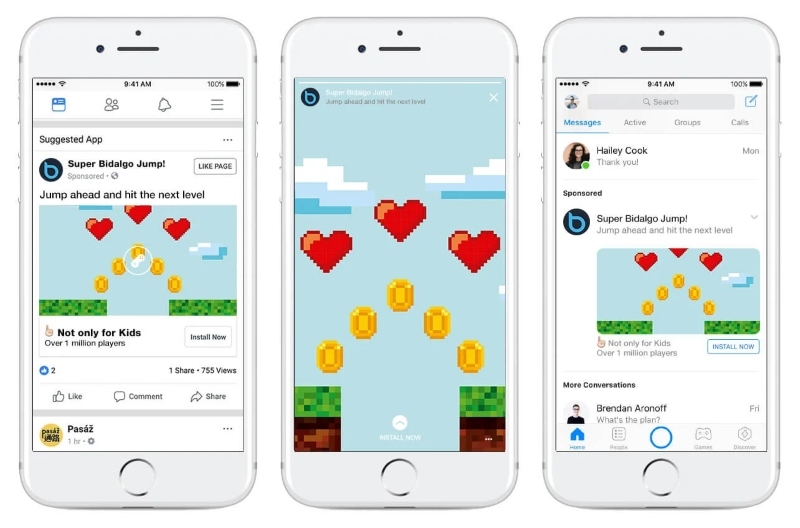
Playable Ads offer users an interactive experience that allows them to preview an app or game before installing it. Users can interact with a short demonstration of the experience, giving them a better idea of what the actual app or gameplay is like.
Playable Ads are primarily a specialized format for mobile app and gaming campaigns, rather than a format that most Facebook advertisers need to use. They are especially useful when allowing users to experience part of the product can help drive higher-quality app installs.
How to choose the right ad types on Facebook?
Choosing the right Facebook ad type is crucial for the success of your advertising campaign. Here are some detailed steps to guide you in making the right choice:
Define your campaign goal
The first step is to decide on the goal of your campaign. This could be increasing brand awareness, driving website traffic, generating leads, or boosting online sales. Your campaign goal will guide your choice of ad type, as different ad types are designed to achieve different objectives.
Understand the ad types
Familiarize yourself with the different Facebook ad types and their uses. Each ad type serves a unique purpose and is designed to help you achieve specific campaign goals. For instance:
- Image ads are simple but powerful that can be used for many purposes.
- Video ads can show your story in a more immersive way.
- Carousel ads can showcase up to 10 images or videos in a single ad, each with its own link, and so on.
Once you have defined your campaign goal and understood the different ad types, choose the ad types that are most relevant to your goal.
Target the right audience
After choosing the ad type, it’s important to reach the right audience. Facebook allows advertisers to use audience controls, Custom Audiences, customer data, and signals such as age, location, and interests. With Advantage+ audience, Meta can also use AI-powered delivery to expand beyond your audience suggestions when it predicts that other users are more likely to achieve your campaign objective.
Test, analyze, and repeat
Finally, test your ads regularly, analyze performance, and adjust your campaigns based on the results. Instead of focusing only on clicks or engagement, track metrics that reflect your actual business goals, such as cost per acquisition (CPA), qualified lead rate, purchase conversion rate, and return on ad spend (ROAS). Use these insights to refine your creatives, audiences, placements, and budget allocation over time.
FAQs about Types of Facebook Ads
There is no fixed budget that works for every campaign. A practical approach is to test a few strong formats first and allocate enough budget for each one to generate meaningful delivery and conversion data.
Yes. Using multiple compatible formats can give Meta more creative options to match with different users, placements, and browsing behaviors, which may help improve overall delivery efficiency.
There is no fixed schedule for refreshing creatives. You should consider updating them when performance starts to decline, especially when CPA increases, CTR drops, or frequency rises steadily.
Yes, because the customer journey is often different. B2C campaigns usually benefit from visually engaging, product-focused formats, while B2B campaigns may need more educational creatives that support longer consideration cycles.
Read more: 18 Outstanding Facebook Ad Examples (and Why it Worked)
Wrap-up
Facebook offers a wide range of ad formats, but the right choice always depends on your campaign objective, audience, creative assets, and conversion journey. Instead of trying to use every format, focus on the options that best support your business goals and use performance data to refine your campaigns over time.
If you need support with campaign structure, creative strategy, or Facebook Ads optimization, Mega Digital can help you build a more effective advertising approach based on your specific goals.