

Getting more app installs is not enough if users download your app or game without understanding what they are getting. Facebook Playable Ads help reduce this gap by letting users experience the product before installing it. In this guide, you’ll learn how Playable Ads work, their requirements, how to create them, and the best practices to follow.
Quick summary:
- Facebook Playable Ads let users try a short interactive preview of an app or game before installing it.
- They are mainly used for mobile app and game acquisition campaigns to attract more relevant users.
- Playable assets typically use HTML5 and must meet Meta’s technical requirements.
- Effective playable ads should accurately represent the real app or game experience.
- Advertisers should evaluate performance based on install quality and downstream actions, not just clicks or interactions.
What is Playable Ads?
Playable ads are a Facebook ad type that incorporates interactive previews of a game or app. They allow users to experience a game or app before downloading it, which can lead to higher-quality installs. Facebook introduced playable ads in 2018, and they’ve been a game-changer in the advertising industry.
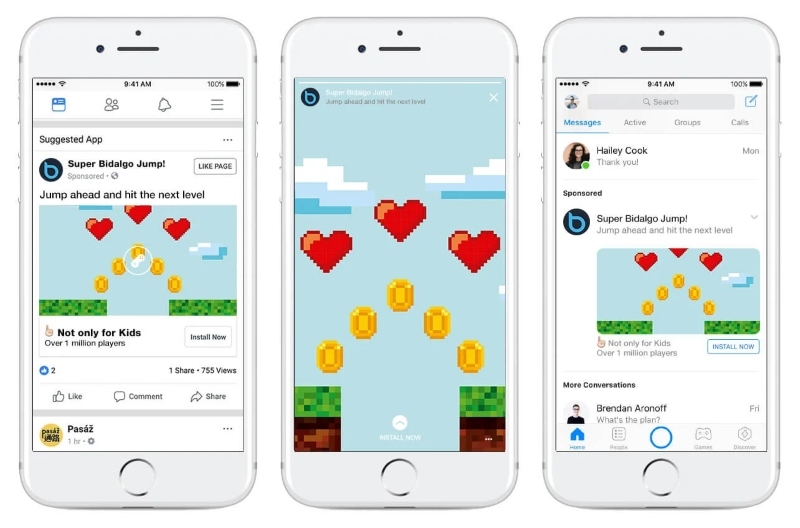
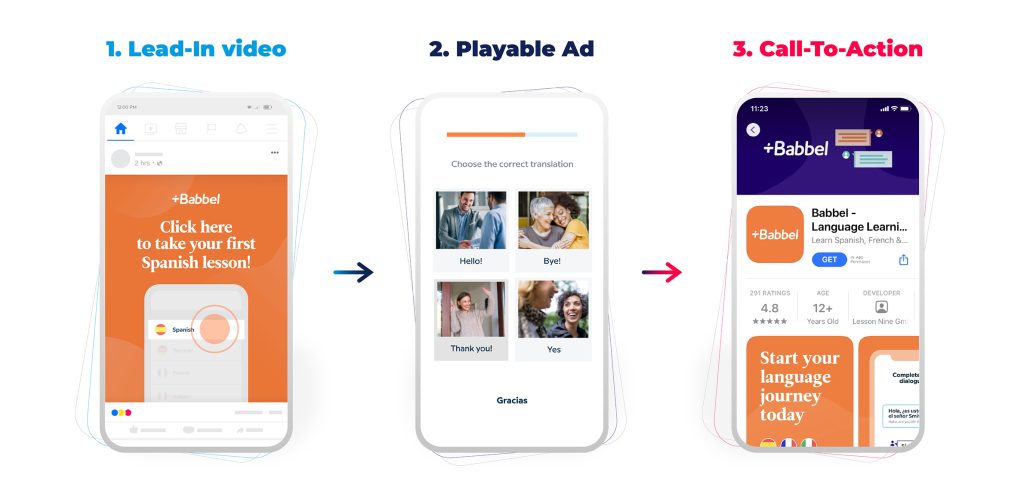
Here’s how Playable Ads typically work:
- Lead-in video: Playable ads begin with a short video of your demo, with “Try Now” below to indicate that your ad is interactive. This auto-plays as someone scrolls through their News Feed, with an overlaying game controller icon and a tap-to-try indicator.
- Full-screen playable ad: When a person taps on a playable ad, they will be able to play a short, interactive, and full-screen demo of your game without having to install anything.
- Call-to-action (CTA): Following the demo, a CTA lets people tap to install the app from the App Store or Google Play Store.
Playable Ads Specs
Facebook Playable Ads have specific Facebook Ads Sizes and technical requirements for playable assets.
Playable HTML5 Assets
- The playable should use HTML5, with an .html or .htm file.
- All required assets should be included within the playable package rather than loaded dynamically from external sources.
- The playable should not require mraid.js.
- The playable should not make external HTTP requests.
- JavaScript redirects are not permitted.
- The playable should be designed primarily for portrait viewing and remain responsive across different screen sizes and device resolutions.
- For a single-file playable, assets such as JavaScript, CSS, images, and sounds should be embedded within the HTML file using data URIs.
- Use the FbPlayableAd.onCTAClick() JavaScript function when users interact with the call to action.
- Keep the HTML or index.html file under 2 MB for upload compatibility.
ZIP Files
Meta also supports playable assets packaged as ZIP files.
- The ZIP archive must contain an index.html file at the root level.
- The total ZIP file size should not exceed 5 MB.
- The package should contain no more than 100 files.
- The index.html file should remain under 2 MB.
- External or dynamically loaded assets should not be required for the playable to function.
Lead-In Video
The lead-in video introduces the playable experience and encourages users to interact with the ad. Use a video format and aspect ratio that fits your selected Meta placements, with mobile-friendly vertical creative especially suitable for full-screen environments.
Who can use Playable Ads on Facebook?
Facebook Playable Ads are primarily designed for businesses that promote mobile apps or games and want users to experience part of the product before installing it.
They are particularly suitable for:
- Game developers and publishers: Playable Ads let potential players try a simplified version of the gameplay before downloading the full game.
- Mobile app developers: Non-gaming apps can also use playable experiences when their core features can be demonstrated interactively before installation.
- User acquisition teams: Performance marketers can use Playable Ads to attract users who better understand the app or game before deciding to install it.
- Digital marketing agencies: Agencies managing app or game acquisition campaigns can develop and test playable creatives for their clients.
Playable Ads may also work for businesses in industries such as e-commerce or education if they are promoting a mobile app with features that can be meaningfully demonstrated through an interactive preview. They are generally less relevant for businesses whose primary goal is driving users to a website rather than generating app installs.
Benefits of using Facebook Playable Ads
Facebook Playable Ads let users experience part of an app or game before installing it, helping advertisers attract users with stronger intent.
- Interactive and engaging: Users can interact with a simplified app or game experience instead of only viewing a static or video ad.
- Higher-intent installs: Users understand the product before downloading it. Meta reported that playable-ad users opened the app 60% more often and were 6 times more likely to make an in-app purchase.
- Better product qualification: Playable Ads show real gameplay or features before installation, helping set clearer expectations.
- Stronger user acquisition value: Interactive previews can attract users who are more interested in the actual product. Gogii Games achieved 79% higher average revenue per person in one Meta case study.
- Useful beyond gaming apps: Non-gaming apps can also use Playable Ads when a core feature can be demonstrated through a short interactive experience.
How to Make Playable Ads?
Once your playable asset and lead-in video are ready, you can set up the ad directly in Meta Ads Manager.
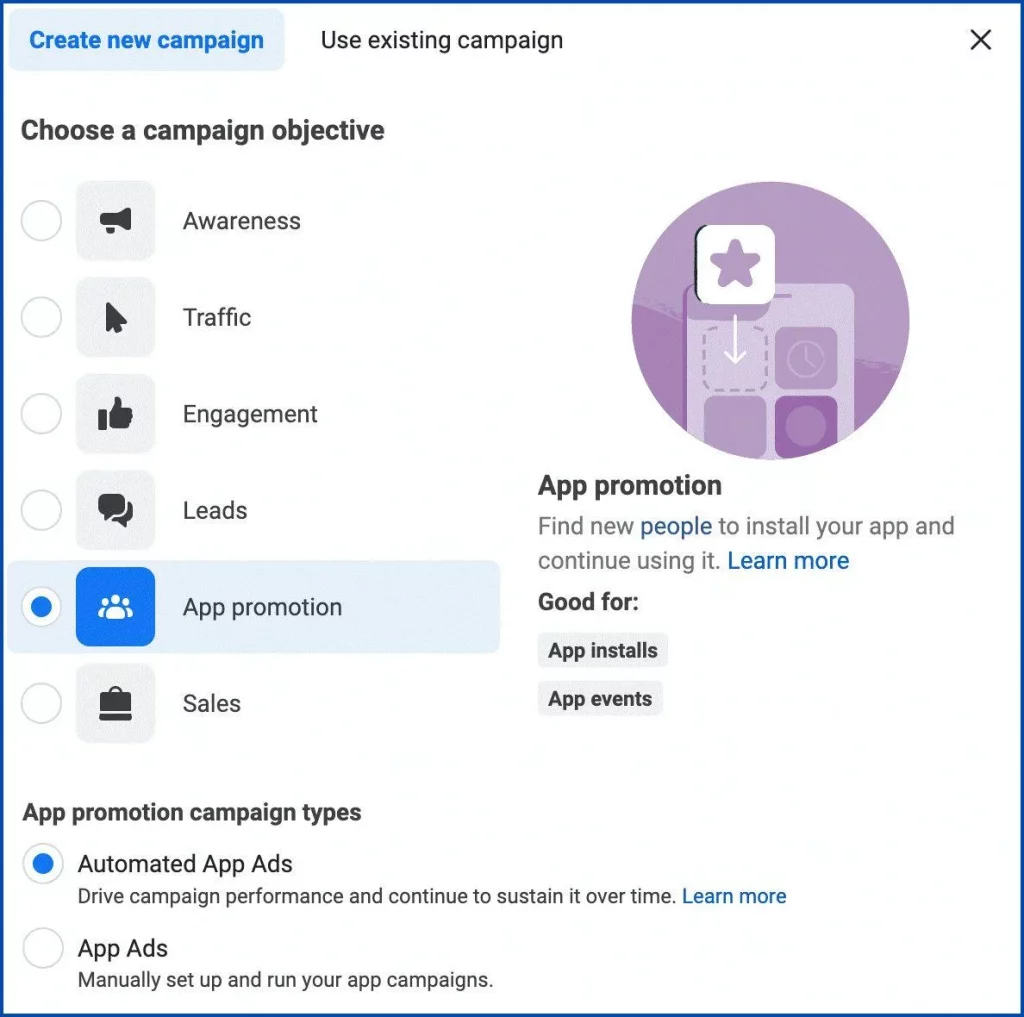
Step 1: Create an App promotion campaign
Open Meta Ads Manager, click Create, and select App promotion as your campaign objective.
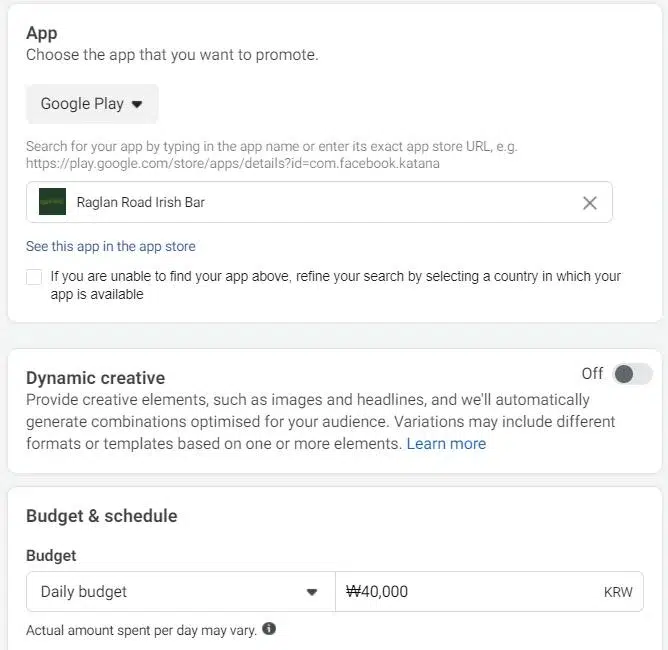
Step 2: Select your app
At the Ad Set level, choose the registered app you want to promote. Then configure your audience, optimization, budget, and placements.
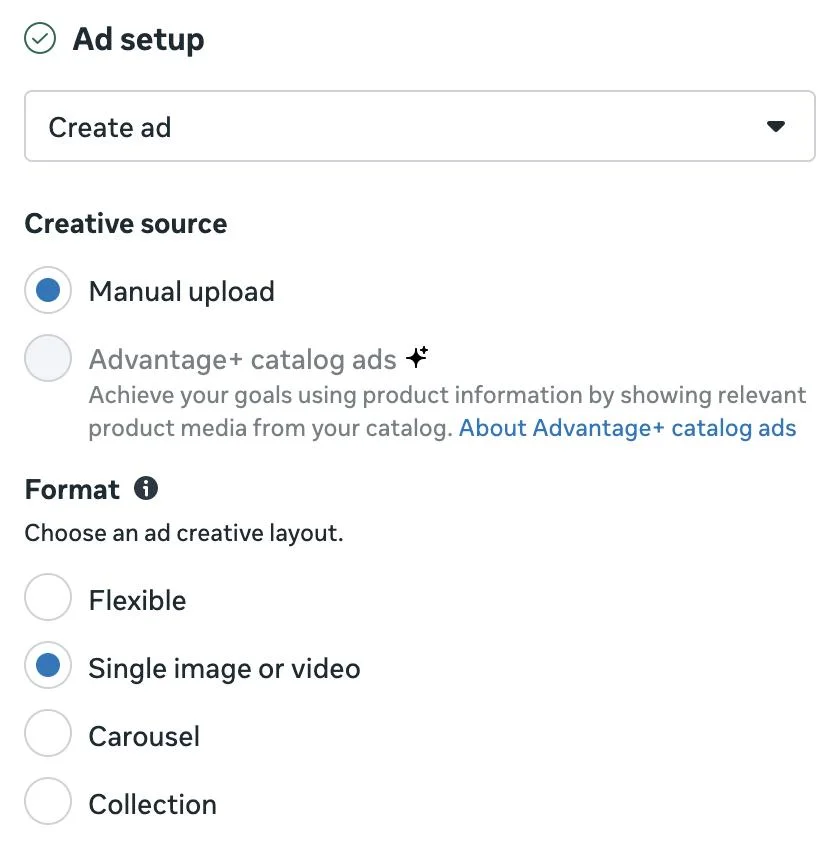
Step 3: Set up your ad creative
At the Ad level, select Single image or video and upload the lead-in video that introduces the playable experience.
Step 4: Add the playable asset
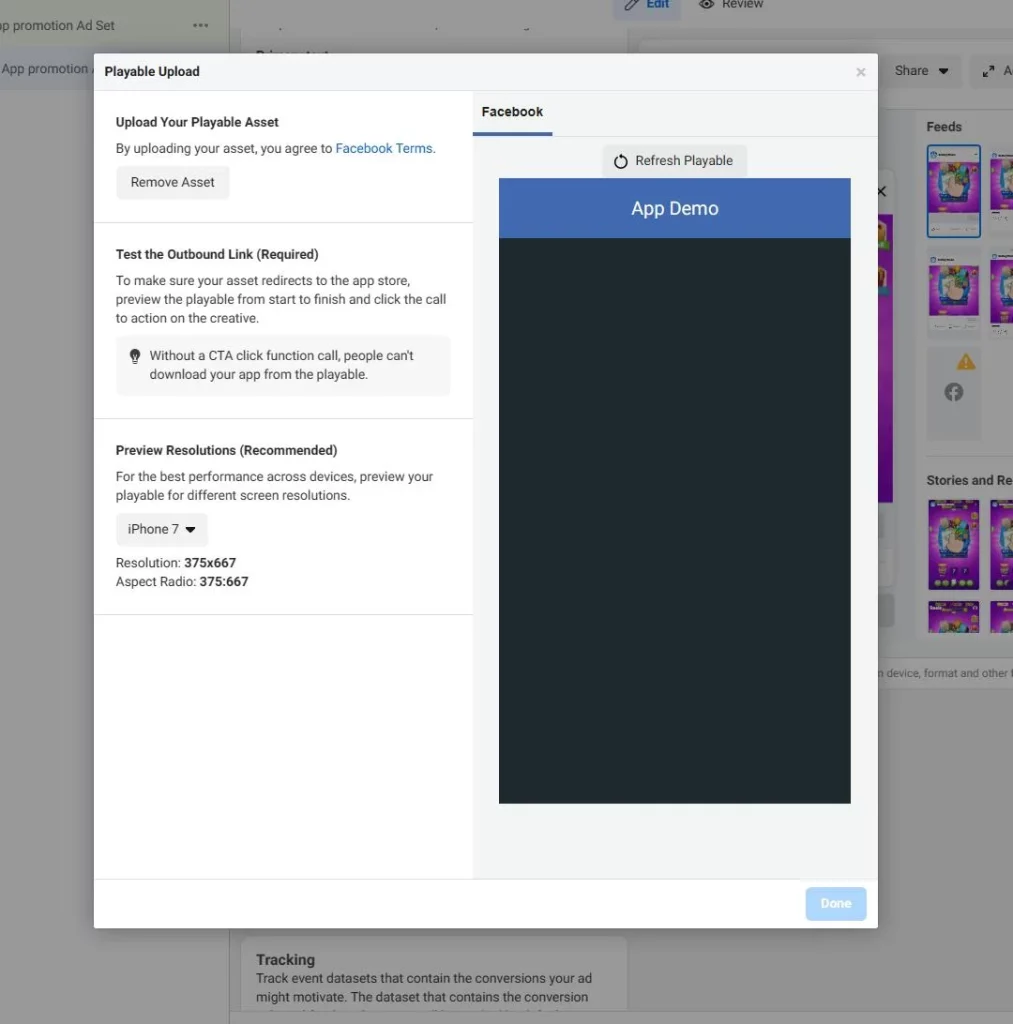
Under Destination, select Playable source, click Set up playable ad, and upload your HTML5 or ZIP playable file.
Step 5: Preview and test the playable
Use the preview to check that the playable loads correctly, responds to interactions, and directs users to the app store when they tap the CTA.
Step 6: Complete and publish your ad
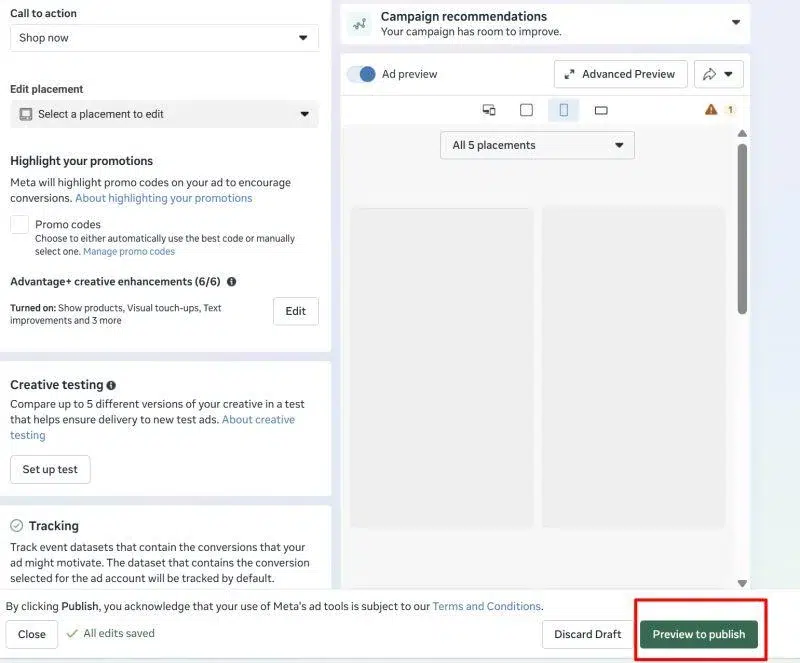
Add your Primary text, Headline, and CTA, review the full ad experience, then click Publish.
Playable Ads Examples
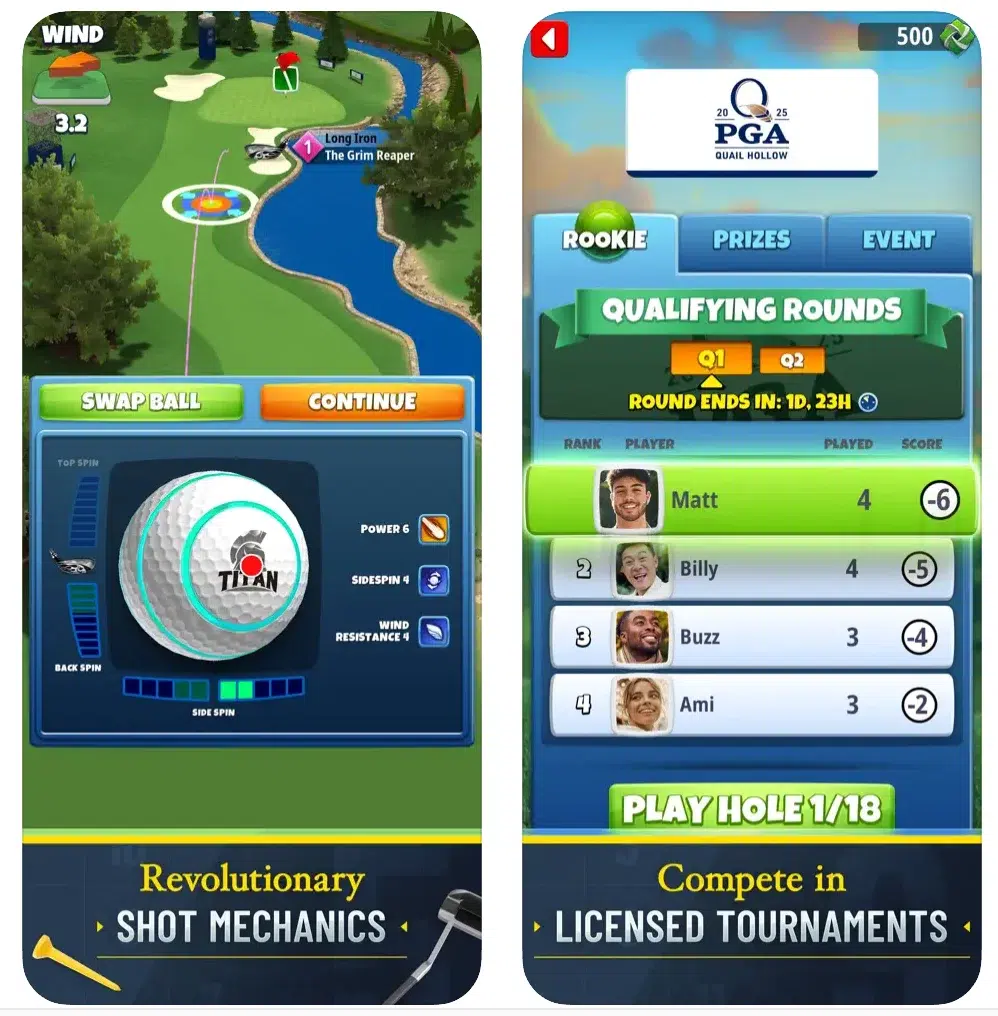
Here is an example of a successful Playable Ads campaign. Playdemic used Playable Ads to promote Golf Clash, allowing potential players to interact with the game experience before installing it. After expanding its playable ads to additional placements, Playdemic reported a 46% reduction in cost per install (CPI) and a 20% increase in ROI. This example shows how Playable Ads can help game advertisers attract more engaged users and improve user acquisition efficiency.
Playable Ads Best Practices
Playable Ads are a powerful tool for engaging users and driving app installs. But crafting a playable ad that truly hooks users and drives conversions requires strategic planning and meticulous execution. Here’s your guide to playable ad best practices:
#1 Capture attention with the lead-in video
The lead-in video is the first thing users see when encountering your ad. It’s crucial to make this count. Use high-quality graphics and engaging content to immediately grab the user’s attention. The video should provide a sneak peek or a short tutorial of your app or game, enticing users to interact with the ad.
#2 Make your app demo clear
The playable ad is essentially a demo of your app or game. It’s important to make this demo as clear as possible. You can do this by providing text or image instructions at the beginning of the preview. This ensures that users understand how to interact with the ad, reducing confusion and enhancing their experience.
#3 Ensure your video and demo match
It’s important to set accurate expectations for the user. The lead-in video and the demo should accurately represent your app or game. If there’s a mismatch between the video and the demo, users might feel misled, which could negatively impact their experience.
#4 Consider new players
When designing your playable ad, keep in mind that not all users will be familiar with your game or app. Users, especially new ones, typically prefer simplicity when interacting with ads. Therefore, the ad should be designed in a way that is easy to understand and play, even for new players. This could involve simplifying gameplay elements or providing clear instructions. Ideally, users should be able to understand how to interact with the ad in just a few steps.
#5 Test multiple assets
Different users respond to different things. What works for one user might not work for another. Therefore, it’s important to test different assets to see what encourages more people to interact with your ad. This could involve testing different designs, calls to action, or gameplay elements.
#6 Show a CTA throughout the demo
A CTA encourages users to take a specific action. In the case of playable ads, this could be downloading the app or game. It’s a good practice to show the CTA throughout the demo, giving users the option to download your app at any time.
FAQs about Facebook Playable Ads
No. Playable Ads are most common in mobile gaming, but non-gaming apps can also use them when a core feature can be demonstrated through a short interactive experience.
Playable Ads typically use HTML5 and can be uploaded as a single HTML file or a supported ZIP package. The asset must meet Meta’s technical requirements for file structure, responsiveness, and external requests.
There is no single ideal duration for every app or game. Keep the experience short enough to understand quickly while still giving users enough interaction to see the product’s core value.
Look beyond clicks and playable interactions. Focus on downstream metrics such as install rate, CPI, retention, in-app actions, purchases, and overall user quality.
Read more: Facebook Video Ads: Complete Setup Guide & Best Practices
Conclusion
Facebook playable ads are a powerful tool for advertisers. They increase user engagement, lead to better conversion rates, and reduce ad fatigue. Whether you’re promoting a game or an app, playable ads can help you achieve your advertising goals.
Remember, crafting the perfect playable ad requires a strategic blend of creativity, technical expertise, and a deep understanding of your target audience. That’s where Mega Digital comes in. As a leading Facebook Ads agency, we’ve mastered the art of crafting playable ads that captivate, convert, and drive tangible results. Contact us today and let’s turn your marketing goals into playful victories!