

Facebook Reels Ads can help brands reach users through short-form video, but simply placing an ad in the Reels feed is not enough to drive results. Advertisers still need the right creative format, technical setup, and content approach to capture attention and encourage action. This guide explains how Facebook Reels Ads work, their key benefits and use cases, ad specs, setup steps, best practices, examples, and how they compare with Facebook Video Ads.
Quick summary:
- Facebook Reels Ads are paid placements that appear alongside organic Reels content and support goals such as awareness, engagement, and conversions.
- Brands can use Reels Ads for product demonstrations, promotions, educational content, storytelling, UGC, and influencer collaborations.
- Reels creatives should follow the correct video specifications, including vertical formatting, appropriate resolution, file size, and audio requirements.
- Strong Reels Ads use an attention-grabbing opening, concise messaging, mobile-friendly visuals, and engaging short-form content.
- The article also covers how to set up Reels Ads, a real-world example, and the differences between Facebook Video Ads and Reels Ads.
What are Facebook Reels Ads?
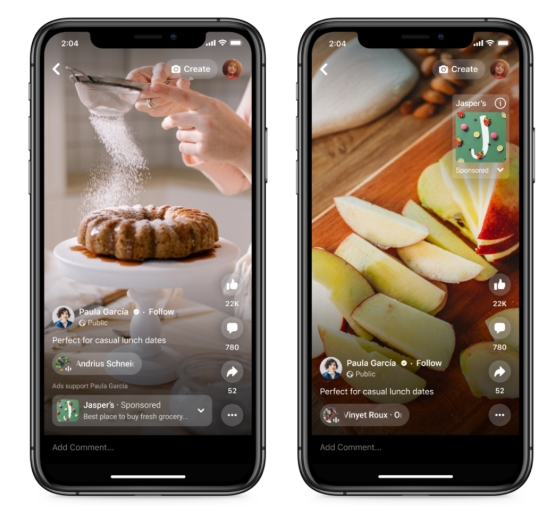
Facebook Reels ads refer to paid advertising placements within the Reels feature on the Facebook platform. Reels is a short-form video feature that allows users to create and share engaging video content with their followers, similar to platforms like TikTok.
With the introduction of ads on Reels Facebook, businesses and advertisers can place their promotional content directly within the Reels feed, reaching a wide audience of users as they scroll through short, entertaining videos. These ads can appear seamlessly alongside organic Reels content, providing advertisers with a valuable opportunity to capture the attention of users and drive brand awareness, engagement, and conversions.
Why should Brands use Facebook Reels Ads?
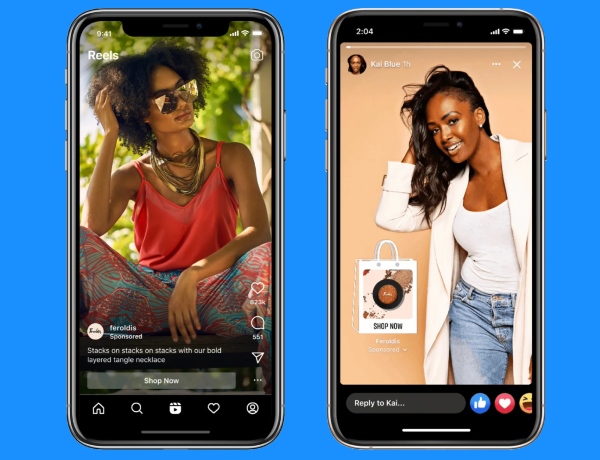
As one of the most immersive Facebook ad types, Reels Ads offer brands more ways to reach and engage potential customers through short-form video.
- Reach a Wider Audience: Reels have gained immense popularity among Facebook users, allowing brands to connect with a vast and diverse audience and tap into new demographics and market segments.
- Engage with Short-form Content: Short-form video content has become increasingly popular on social media, giving brands a way to capture attention with quick, engaging videos.
- Stay Relevant and Trendy: Brands can incorporate current trends, popular formats, and creator-style content to stay relevant in the evolving digital landscape.
- Drive Brand Awareness: Reels Ads provide a creative and immersive way to showcase products, services, and brand personality while leaving a stronger impression on viewers.
- Encourage User Interaction: Features such as likes, comments, shares, and follows give brands more opportunities to interact with audiences and build stronger connections.
- Enhance Brand Visibility: Reels Ads can increase brand exposure by placing promotional content directly within the Reels browsing experience.
Meta data: Campaigns using 9:16 Reels video with audio and key messages inside the safe zone achieved 2X higher delivery to Reels and 34.5% lower cost per result than image-based Reels ads. Meta also reports that 79% of surveyed users said they purchased a product or service after watching Reels.
Types of Reels Ads on Facebook
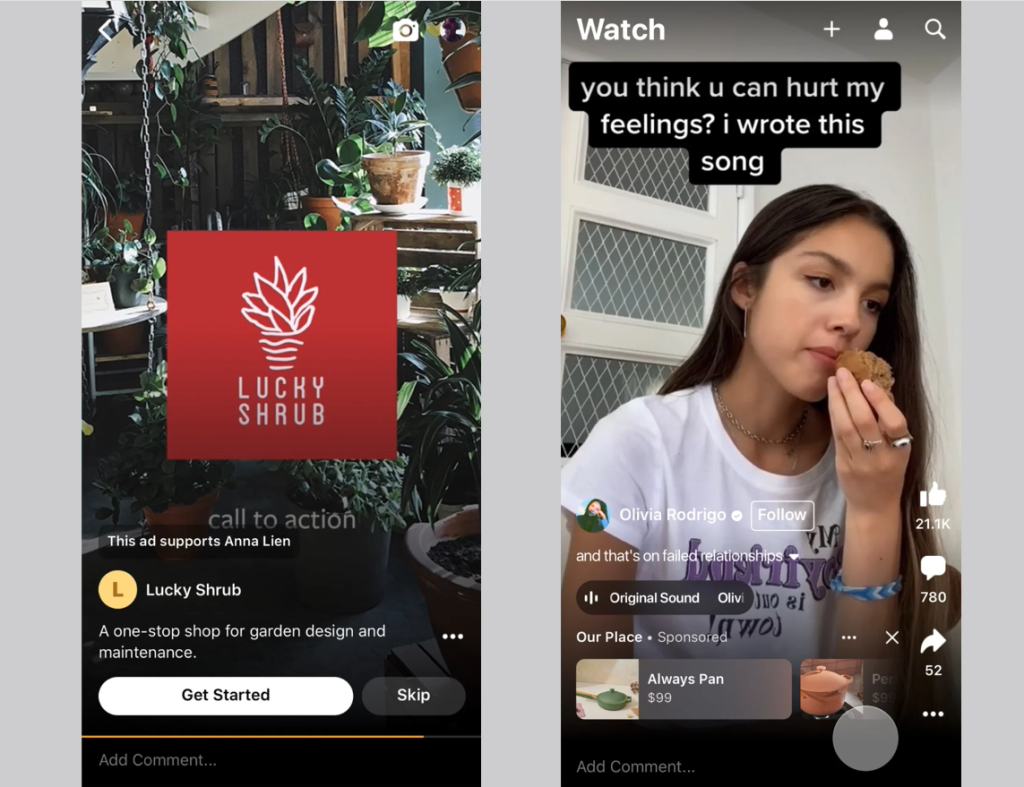
There are 2 advertisement formats that advertisers can set up on Facebook Reels: overlay banner and post-loop ads.
- Overlay banner ads appear as a banner displayed at the bottom of the Reels video content, providing a subtle yet effective way to promote products or services without disrupting the viewing experience. Within overlay banner on Reels, there are 2 distinct forms:
- Single-image ads appear as static banners at the bottom of Facebook Reels after the Reel has started.
- Image carousel ads are a carousel of images that can include anywhere between 2-10 images and render at the bottom of Facebook Reels content.
- Interstitial Reels Ads are full-screen ads shown between organic Reels as users scroll through the Reels feed. Because the ad takes over the full viewing area, brands have more space to deliver video creative, key messaging, and a clear call to action.
Each type of Reels Ad offers brands unique opportunities to engage with their audience and achieve their advertising goals on Facebook. By leveraging these various formats strategically, brands can effectively reach and connect with their target audience in a dynamic and engaging way.
Facebook Reels Ads Specs and Additional Requirements
Facebook Reels Ads should be built for a full-screen, vertical viewing experience. Use the following specifications to keep your creative clear and properly displayed across the Reels placement.
| Specification | Recommended setup |
|---|---|
| Aspect ratio | 9:16 |
| Recommended resolution | 1440 × 2560 px |
| File formats | MP4, MOV, GIF |
| Maximum file size | 4 GB |
| Video encoding | H.264, square pixels, fixed frame rate, progressive scan |
| Audio | Stereo AAC at 128 kbps or higher |
| Sound | Recommended |
| Safe zone | Keep important text, logos, and products away from interface overlays |
For the safe zone, keep roughly 14% of the top, 35% of the bottom, and 6% on each side free from important text, logos, or other key elements. This helps prevent Reels interface elements from covering your message.
Mega Digital recommends creating a dedicated 9:16 Reels version instead of simply cropping a Feed video. This gives you better control over framing, text placement, subtitles, and the main product or offer.
How to Set Up Ads on Facebook Reels?
Setting up ad campaigns on Facebook is simple. You just need to own an ad account, whether it’s a self-served or a Facebook ad agency account. Then, follow these steps below to start creating your own Facebook Reels Ads:
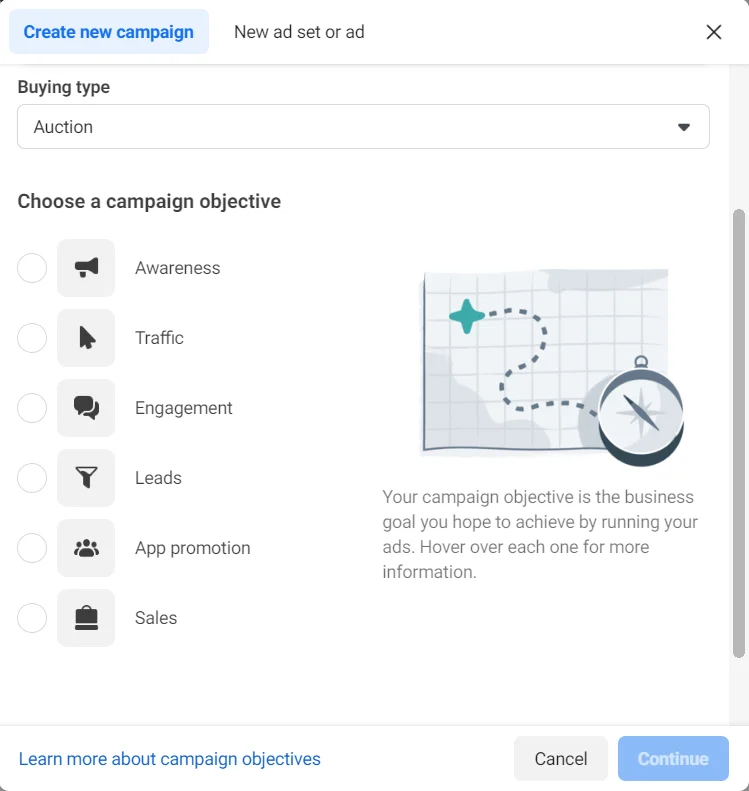
Step 1: Access Ads Manager and click on the “Create” button to start a new campaign.
Step 2: Customize campaign factors that align with your goals, such as:
- Campaign Objectives: Awareness, Traffic, Engagement, Leads, App Promotion, or Sales.
- Target Options: Demographics, Locations, Interests, Behaviors, and other relevant criteria.
- Budget and Schedule: Set your daily or lifetime budget and campaign duration at the Ad Set level.
Step 3: Under the Facebook Ad Placements section, use Advantage+ placements to let Meta automatically distribute your ads across eligible placements. If you prefer manual control, select Facebook Reels under Stories and Reels.
Step 4: Upload your ad creative, ensuring it meets the specifications outlined for Reels ads, such as vertical format, recommended resolution, safe zone, and audio requirements.
Step 5: Review your ad settings, targeting options, and creative content to ensure everything is set up correctly. Once satisfied, click “Publish” to launch your Reels ad campaign.
Best Practices for running Facebook Reels Ads
For those who want to test out Reel ads on Facebook and make it work, ACTUALLY work! I think these tips below gonna help you to achieve the advertising result you want. Let’s check it out!
- Capture Attention Quickly: Start your Reels ad with an attention-grabbing hook to captivate viewers within the first few seconds.
- Keep it Short and Sweet: Reels content is short-form by nature, so ensure your ad is concise and to the point, conveying your message effectively in a limited time frame.
- Optimize for Mobile Viewing: Since most Facebook users access the platform on mobile devices, ensure your Reels ad is optimized for mobile viewing with clear visuals and legible text.
- Create Engaging Content: Use dynamic visuals, compelling storytelling, and engaging calls-to-action to encourage viewer interaction and drive engagement.
- Leverage Trending Topics and Challenges: Incorporate popular trends, challenges, or hashtags into your Reels ad content to capitalize on current cultural moments and increase relevance and virality.
- Engage with User-Generated Content: Encourage user-generated content by inviting viewers to create and share their own Reels featuring your brand or products. Engage with user-generated content to foster a sense of community and authenticity around your brand.
By following these best practices, brands can effectively leverage Facebook Reels ads to reach and engage with their target audience, drive brand awareness, and achieve their marketing objectives on the platform.
Best Reels Ads Example – Navi
Navi is a strong example of how brands can combine Facebook Reels Ads with creator-led content to drive measurable results. Instead of using traditional ad-style videos, Navi worked with creators to produce content that felt more natural to the Reels viewing experience.

What makes it work:
- Creator-led content: Navi used creators to make the ads feel more native to Reels rather than overly promotional.
- Reels-first creative: The videos were designed around the short-form viewing experience instead of simply repurposing traditional video ads.
- Clear acquisition goal: The campaign stayed focused on driving first-time transactions, not just views or engagement.
- Measurable results: The campaign achieved an 8% reduction in cost per first-time transaction.
Read more: 18 Outstanding Facebook Ad Examples (and Why it Worked)
Facebook Feed Video Ads vs. Reels Ads: What’s the Difference?
Both Facebook video ads and Reels Ads use video to reach audiences, but they offer different viewing experiences and require different creative approaches.
| Feature | Facebook Feed Video Ads | Reels Ads |
|---|---|---|
| Viewing Experience | Appear within the Facebook Feed alongside other posts | Appear in the immersive, full-screen Reels experience |
| Creative Format | Support more flexible aspect ratios and video styles | Best optimized for vertical 9:16 creative |
| Content Style | Suitable for product explanations, storytelling, and detailed messaging | Better suited to fast-paced, short-form, creator-style content |
| Audio | Can be designed to work with or without sound | Quality audio is strongly recommended as part of Reels-first creative |
| Interaction Opportunities | Users can like, comment, share, and click the CTA | Users can like, comment, share, follow, and interact with the CTA |
| Targeting Options | Uses Meta’s audience targeting and optimization tools | Uses the same Meta targeting and optimization system |
Meta recommends building Reels creative specifically for the placement, using vertical video, quality audio, and key messages within the safe zone rather than simply repurposing a Feed video.
Neither format is automatically better. Consider your creative style, selected placements, ads costs, and campaign goals when deciding how to use Feed Video Ads and Reels Ads in your strategy.
Frequently Asked Questions About Facebook Reels Ads
Yes. Facebook Reels can support overlay image ads and image carousel ads, while interstitial Reels Ads are better suited to full-screen video creative. Pasted text
Only when you have the appropriate commercial rights. For safer ad usage, use original audio, licensed music, or tracks available through Meta’s Sound Collection.
Captions are not required, but they can make the message easier to understand when users watch without sound. Keep them short and inside the safe zone so interface elements do not cover important text.
Yes, but preview both placements before publishing. Even with the same 9:16 creative, interface elements and cropping can affect how text, products, and CTAs appear.
Read more: Facebook Image Ads Guide: Specs, Examples & Best Practices
Final Words
By leveraging the short-form, visually compelling format of Reels, businesses can capture users’ attention and inspire action in just a matter of seconds. As Reels continue to gain popularity and evolve on Facebook, embracing Facebook Reels Ads can be a valuable addition to any brand’s digital marketing strategy, helping to drive meaningful results and foster deeper connections with their audience.
Want to upscale your Facebook Advertising performance? Connect with Mega Digital for insightful strategies, expert guidance, and tailored solutions to elevate your Reels ads and maximize your brand’s impact on Facebook.