

Most advertisers on Facebook must be familiar with Image Ad types, or you can call Photo Ads. This ad format is the cheapest and most common advertising method on Facebook used by most brands and businesses; therefore, it’s even harder to compete and stand out. So, to make sure advertisers avoid technical issues when running Facebook, let’s get to know all the information about Facebook Image Ads now!
Quick summary:
- Facebook Image Ads use a single static visual to promote a product, offer, service, or brand message.
- Choose the right size and aspect ratio for each placement, especially Feed, Stories, and Reels.
- Keep each ad focused on one clear message and use distinct creative angles when testing.
- Review CTR, conversion rate, CPA, ROAS, and frequency together to understand performance.
- Refresh creatives when results start to weaken, not simply because an ad has been running for a set number of days.
What are Facebook Image Ads?
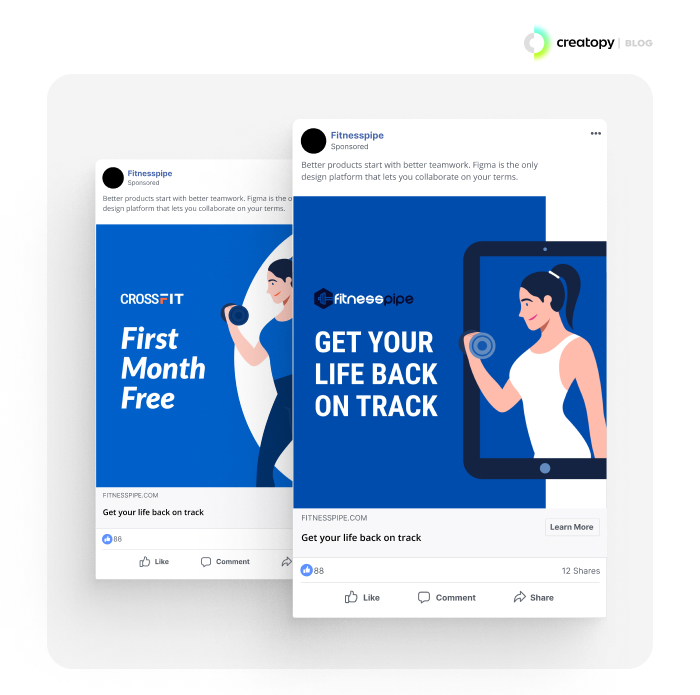
Facebook Image Ads (Photo Ads) are a type of advertisement format on the Facebook platform that consists of a single static image. These ads appear in users’ News Feeds alongside other organic content and are designed to capture attention and drive engagement.
Advertisers can create Image Ads using high-quality images that showcase their products, services, or brands in a visually appealing way. Image Ads may include accompanying text, headlines, descriptions, and call-to-action buttons to provide additional context and encourage users to take action, such as clicking through to a website or making a purchase. They are a versatile and effective advertising option for businesses looking to reach and engage their target audience on Facebook.
Why Should Brands Use Photo Ads on Facebook?
As one of the most common Facebook ad types, Image Ads give brands a simple way to communicate one clear message with minimal production effort.
- Strong visual impact: A clear image can quickly communicate a product, offer, or key benefit while users scroll.
- Easy to create: Static ads require fewer production resources than formats such as video ads, making them easier to produce and test.
- Flexible campaign use: Image Ads can support awareness, traffic, leads, sales, and other campaign goals.
- Easy to adapt: Creative can be resized for Feed, Stories, Reels, and other placements.
- Lower production requirements: Brands can launch and refresh creatives without the time and cost of producing video content.
How can Brands Use Facebook Image Ads?
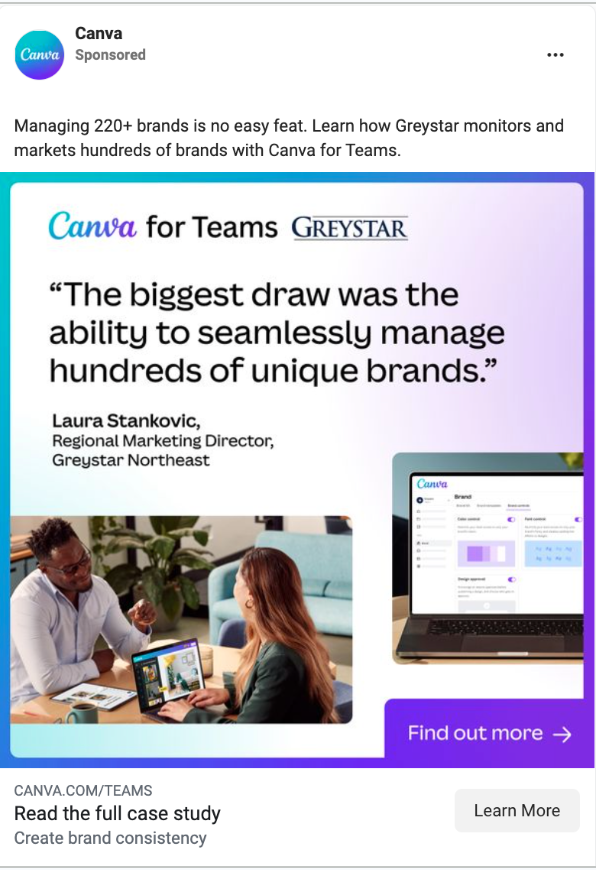
Facebook Image Ads work best when one visual can communicate the message clearly. Brands can use them in several practical ways:
- Product promotion: Highlight a product, feature, or new launch with a strong visual and clear CTA.
- Limited-time offers: Promote discounts, seasonal sales, or special deals with the offer clearly visible.
- Brand awareness: Use recognizable brand visuals, messaging, and design to improve recall.
- Social proof: Feature customer testimonials, reviews, or real customer experiences to build trust.
- Educational content: Explain a product benefit, use case, or simple tip through an easy-to-understand visual.
Facebook Photo Ads Specs and Additional Requirements
Facebook Image Ad specifications vary by placement, so prepare your creative based on where the ad will appear rather than relying on one size for every placement.
| Placement | Recommended size | Aspect ratio |
|---|---|---|
| Facebook Feed | 1440 × 1440 px or 1440 × 1800 px | 1:1 or 4:5 |
| Facebook Stories | 1440 × 2560 px | 9:16 |
| Facebook Marketplace | 1080 × 1080 px or larger | 1:1 |
| Facebook Search Results | 1080 × 1080 px or larger | 1.91:1 to 1:1 |
| Facebook Right Column | 1080 × 1080 px or larger | 1:1 |
For most Facebook Image Ads, use JPG or PNG files with a maximum size of 30 MB. If you only create one asset, a 1:1 square image is the most flexible option, while 4:5 gives you more screen space in the mobile Feed.
How to Set Up Image Ads on Facebook
After creating your own Facebook ad account or setting up your business with a Facebook Ads Agency account, follow these steps to create an Image Ad in Meta Ads Manager.
Step 1: Create a New Campaign
Go to Meta Ads Manager, click + Create, and select the objective that matches your campaign goal: Awareness, Traffic, Engagement, Leads, App Promotion, or Sales. Then complete the basic campaign settings before moving to the Ad Set level.
Step 2: Configure Your Ad Set
Choose your conversion location and performance goal, then define your ad targeting, budget, schedule, and placements. You can refine the audience using factors such as locations, interests, and other available audience controls.
Step 3: Set Up Your Ad Identity
At the Ad level, select the Facebook Page and Instagram account that will represent your business. Choose Create ad and use Manual upload if you want to add your own static image rather than pull creative from a catalog.
Step 4: Upload Your Image
Add your image under Ad creative and adjust the crop for relevant placements. In Meta’s newer creative workflow, Single Media is managed through Format display options / Creative setup; keep Single Media enabled if you want the ad to remain a standard Image Ad.
Depending on your account, the interface may still show Single image or video earlier in the setup because Meta is rolling out the updated workflow gradually.
Step 5: Add Your Copy, Destination, and CTA
Add your primary text, headline, destination URL, and call-to-action button, such as Shop Now, Learn More, or Sign Up. Preview the creative across Feed, Stories, and other selected placements, and customize the image crop where necessary.
Step 6: Review and Publish
Check the image quality, copy, destination URL, tracking, placements, and CTA before launching. Once everything displays correctly, click Publish to submit the Image Ad for review.
Best Practices for Running Facebook Image Ads
Mega Digital recommends using Image Ads to test clear creative ideas, then letting performance data tell you what to keep, improve, or replace.
Match the Creative to the Audience
Cold audiences usually need a clear reason to care, so test angles around the problem, product benefit, or use case. For retargeting, move closer to the purchase with customer reviews, offers, product proof, or messages that answer common objections.
For example, a skincare brand could introduce a dry-skin problem to new audiences, then retarget product viewers with reviews or a limited-time bundle.
Give People a Reason to Believe the Ad
A good-looking image may stop the scroll, but it still needs something that makes the message believable. Mega Digital recommends adding one clear proof point, such as a customer review, product result, comparison, key feature, or the product being used in a real situation.
Instead of testing five similar product shots with different backgrounds, try a product-led ad, a review-led ad, and a benefit-led ad to see which message actually drives action.
Test Different Ideas, Not Tiny Design Changes
Focus your tests on meaningful creative differences rather than changing only colors, fonts, or button styles. A useful testing set might include product-led, problem-led, testimonial-led, and offer-led images while keeping the audience and offer consistent.
This matters because winners tend to carry most of the budget. In one study of 368 Meta creatives, the top 10% of creatives accounted for 68% of total spend, showing why finding strong concepts matters more than producing many near-identical variations.
Read CTR and Conversions Together
Do not call an Image Ad successful just because it gets a high CTR. If clicks are strong but conversions are weak, the problem may be the offer, landing page, pricing, or message mismatch rather than the image itself.
Mega Digital diagnostic: If CTR falls but CPA is still within target, do not rush to replace the creative. If CPA keeps rising while the ad is getting enough delivery, that is a much stronger reason to test a fresh concept.
Refresh Ads When Performance Starts to Weaken
There is no fixed rule that an Image Ad must be replaced after 7, 14, or 30 days. Watch the economics of the campaign instead, especially CPA, ROAS, CTR, and conversion rate.
Recent Meta creative data found that 80% of creatives never reached 100,000 impressions, while CPA increased about 19.6% among creatives that reached 500,000 – 1 million impressions. This suggests advertisers should refresh based on performance decline rather than a fixed calendar.
Frequently Asked Questions about Facebook Image Ads
Yes, but avoid using exactly the same crop for every placement. Prepare square or 4:5 versions for Feed and vertical versions for Stories or Reels so important text and product details remain visible.
This usually happens when the image resolution is too low or its aspect ratio does not match the selected placement. Check the placement previews in Ads Manager and customize the crop before publishing.
There is no fixed number. Mega Digital recommends testing a small set of clearly different concepts, such as product-led, benefit-led, testimonial-led, or offer-led—rather than many near-identical designs.
Yes, depending on your campaign objective. Image Ads can support goals such as awareness, engagement, messaging, or lead generation without sending users to a website, while traffic and sales campaigns usually need a suitable destination.
Read more: Facebook Reels Ads: What Makes It Effective for Businesses?
Final Word
Facebook Image Ads are not boring, for sure! With just some accurate technical settings, attractive ad creatives, powerful content, and your knowledge of target customers, you can create compelling Photo ads that are not only effective but also budget-friendly for your brands. Want to make high-converting Facebook ad campaigns with high-profile accounts that don’t need time to warm up? Connect with Mega Digital now for full advertising service!