

In the ever-evolving world of digital marketing, crafting compelling Facebook Ads is just one piece of the puzzle. The true magic happens when you place those ads strategically and at the perfect moment. With various placement options across Facebook, Instagram, Audience Network, and Messenger, advertisers have so many opportunities to reach their target audience. In this article, I will cover everything about Facebook ad placements, from basic placement options to advanced optimization strategies.
Quick summary:
- Facebook ad placements determine where your ads appear across Facebook, Instagram, and Audience Network.
- Advertisers can use Advantage+ placements to let Meta optimize delivery automatically or choose Manual placements for greater control.
- The best placement depends on your campaign objective, audience behavior, creative format, and actual performance data.
- Ad creatives should be adapted to each placement, especially vertical formats such as Stories and Reels.
- Review placement-level results such as CPA, ROAS, CTR, and conversion quality before excluding placements from your campaign.
What are Facebook ad placements?
Facebook refers to the various locations where your ads can be displayed to the audience. You determine your placement at the ad set stage of your campaign, and based on your campaign’s goal, your ads could be shown on Facebook, Instagram, Audience Network, and/or Messenger. These are recognized as platforms, and each platform has a range of placements.
Placements are now categorized based on the user experience of your ad across different platforms. For instance, if you choose Stories placements, your Stories ads on Facebook, Instagram, and Messenger will provide a consistent user experience. The same principle applies to placements in Facebook and Instagram feeds.
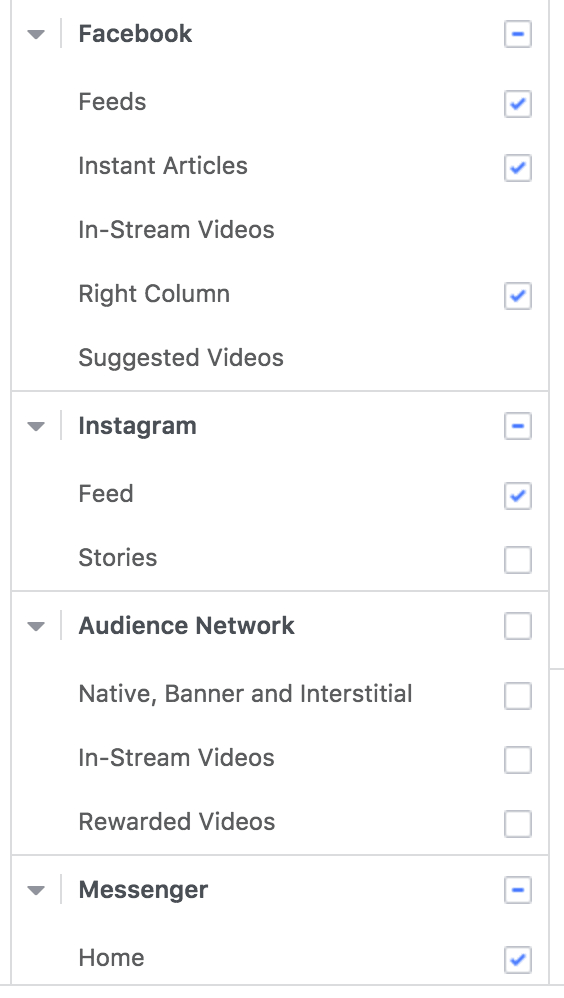
When creating a Facebook ad campaign in Ads Manager, you can choose where you want your ads to be displayed, allowing you to tailor your message to specific audiences and achieve your marketing objectives.
Why are Facebook ad placements so important?
Facebook offers a variety of ad types, each designed to help you achieve a specific business goal. Therefore, it’s crucial to choose the right placements for your ads. By doing so, you can ensure that your ads reach the right target customers at the right time. This strategic placement of ads can significantly enhance the effectiveness of your campaigns, driving better engagement and results.
Selecting the optimal placements is critical for several reasons:
- Reach the Right Audience: Different placements cater to diverse user habits and preferences. Understanding which placements your target audience frequents allows you to reach them where they are most engaged.
- Optimize Campaign Performance: Each placement possesses unique characteristics that can influence ad performance. Selecting placements aligned with your campaign goals, such as driving website traffic or generating leads, can significantly impact click-through rates (CTR) and conversion rates.
- Control Costs: By strategically choosing placements, you can potentially reach your target audience at a more cost-effective rate compared to relying on automatic placements.
Note: Not all ad types are compatible with all ad placements. Therefore, it’s important to be mindful of the ad size of each ad format. Always ensure that your chosen ad type is suitable for your selected ad placement to avoid some common issues like ads not delivering or not converting and maximize the effectiveness of your Facebook advertising campaigns.
2 Facebook Ad Placement Options: Which one to choose?
There are two available placement options in Ads Manager that will dictate how your ads are displayed: automatic placements and manual placements.
You might wonder which option is suitable for your campaign. Well, first let me clear that out for you what exactly do these Facebook ad placement options mean, and when to use them in this section.
1. Advantage+ placements
Advantage+ placements allow Meta’s delivery system to distribute your ads across eligible placements on Facebook, Instagram, Messenger, and Audience Network.
Instead of selecting individual placements yourself, Meta uses its delivery system to identify opportunities that can help you get more results from your budget.
Some benefits of Advantage+ placements include:
- Broader delivery opportunities: Your ads can compete across multiple eligible placements rather than being restricted to a small selection.
- Automated optimization: Meta can shift delivery toward placements where it predicts better results.
- Simpler campaign management: You do not need to manually manage placement combinations for every campaign.
2. Manual Placements
Manual Placements allow you to handpick where your ads will appear. This option gives you more control over your ad placements but requires a deeper understanding of each placement’s strengths and weaknesses.
Manual Placements have some following benefits:
- Control: You decide exactly where your ads are shown.
- Specificity: If you know your audience engages more with a certain type of placement (like Stories or In-Stream Videos), you can focus your efforts there.
- Testing: Manual placements allow for more precise A/B testing of different placement options.
Choosing the Right Facebook Ad Placement Option for Your Campaign
Meta generally recommends Advantage+ placements because giving the delivery system access to more eligible placements provides more opportunities to find efficient results.
However, this does not mean Manual placements should never be used. If you have enough campaign data or a clear business reason to restrict placements, Manual placements can provide the additional control you need.
For most campaigns, Mega Digital recommends starting with Advantage+ placements and reviewing placement-level performance before making exclusions. Avoid removing placements simply because you assume they will perform poorly; use actual campaign data such as CPA, ROAS, conversions, and lead quality to guide your decision.
Exploring Facebook Ads Placement Types
Meta offers multiple ad placements across Facebook, Instagram, Threads, and Audience Network. Each placement creates a different user experience, so advertisers should adapt their creative accordingly.
| Platform | Placement | How it works / Best use |
|---|---|---|
| Feed | Ads appear alongside organic Feed content. Suitable for most campaign objectives and supports both image and video creatives. | |
| Right Column | Desktop-only placement displayed beside Facebook content. Best suited to simple, highly recognizable creatives. | |
| In-Stream Video | Ads appear within eligible video content, helping brands reach users already engaged with video. | |
| Stories | Full-screen vertical ads displayed between Stories. Use 9:16 creative designed for mobile viewing. | |
| Reels | Ads appear within the immersive Reels experience. Meta recommends 9:16 video with audio and key messages inside the safe zone. | |
| Search Results | Ads can appear alongside relevant Facebook and Marketplace search results while users are discovering content. | |
| Marketplace | Ads appear while users browse products on Marketplace, making this placement particularly relevant for commerce-focused campaigns. | |
| Feed | Ads appear naturally between organic Instagram posts. Strong visuals are particularly important for this placement. | |
| Stories | Full-screen vertical ads shown between Stories. 9:16 creative is the best fit. | |
| Reels | Ads appear between organic Reels in the full-screen viewer. Native vertical video, audio, and safe-zone messaging are recommended. | |
| Search Results | Ads reach users while they search and discover content on Instagram. | |
| Explore Home | Ads can appear within the Explore experience where users discover content based on their interests. | |
| Threads | Threads Feed | Ads appear natively between Threads posts. Threads placements can be included in eligible Advantage+ and Manual placement campaigns. |
| Audience Network | Native & Banner | Ads appear within eligible third-party mobile apps and are designed to fit the surrounding app experience. |
| Interstitial | Full-screen ads typically displayed during natural transitions within an app. | |
| Rewarded Video & Rewarded Interstitial | Users receive an in-app benefit in exchange for interacting with the ad, making these formats common in mobile gaming apps. |
Mega Digital recommends: Instead of selecting placements based only on assumptions about where your audience spends time, start with Advantage+ placements when appropriate and use placement-level performance data to identify which environments actually contribute to your campaign goals.
How to choose or edit your ad placements on Facebook?
Here’s a step-by-step guide on how to choose or edit your ad placements on Facebook:
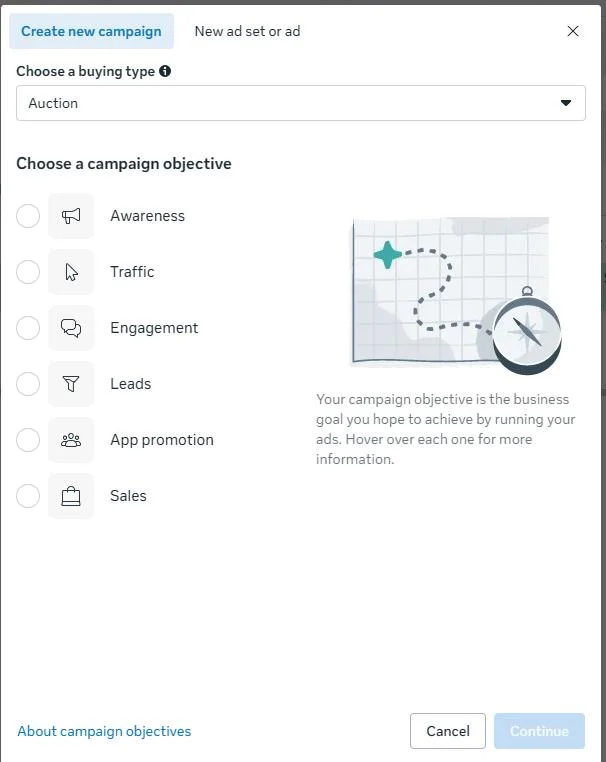
- Go to Meta Ads Manager. Create a new campaign or open an existing one, then choose your campaign objective. Your available placement options may differ depending on the objective and campaign setup.
- Go to the Ad Set level and scroll down to the Placements section. This is where Meta lets you control where your ads can appear.
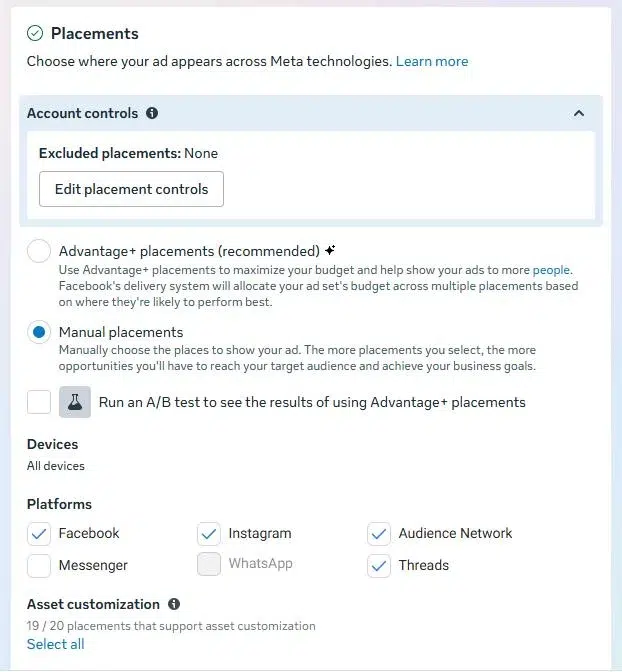
- Choose between Advantage+ placements and Manual placements. With Advantage+ placements, Meta automatically distributes your ads across eligible placements. If you want more control, select Manual placements and choose the platforms and individual placements you want to include or exclude.
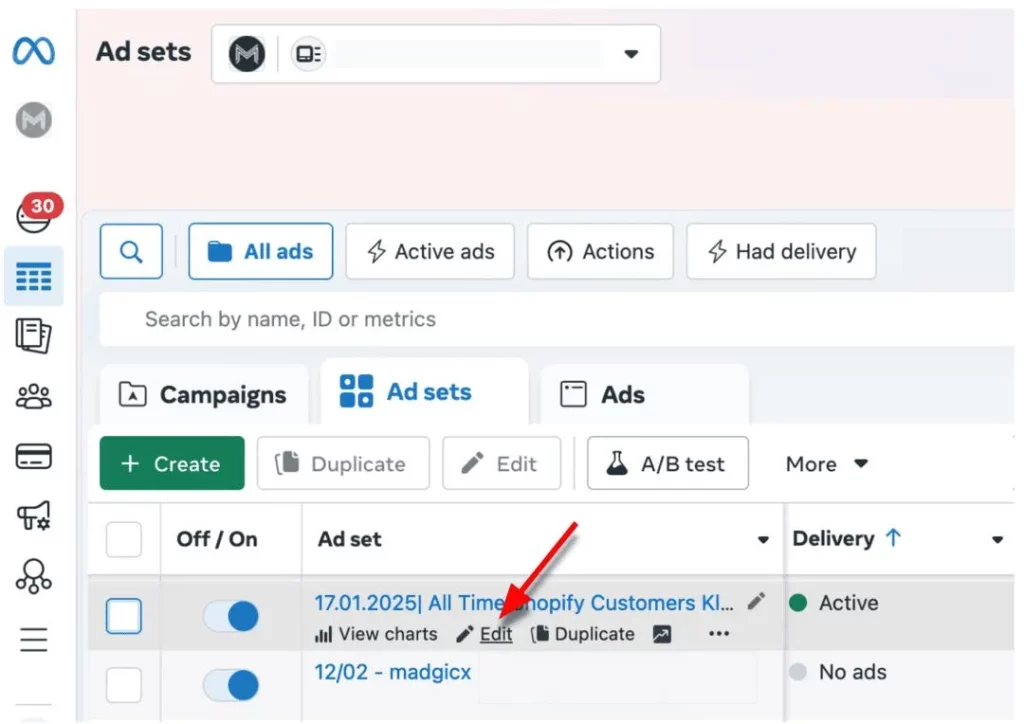
To edit the placements of an existing campaign, open the campaign in Ads Manager, select the relevant Ad Set, and click Edit. Return to the Placements section and adjust your placement settings as needed.
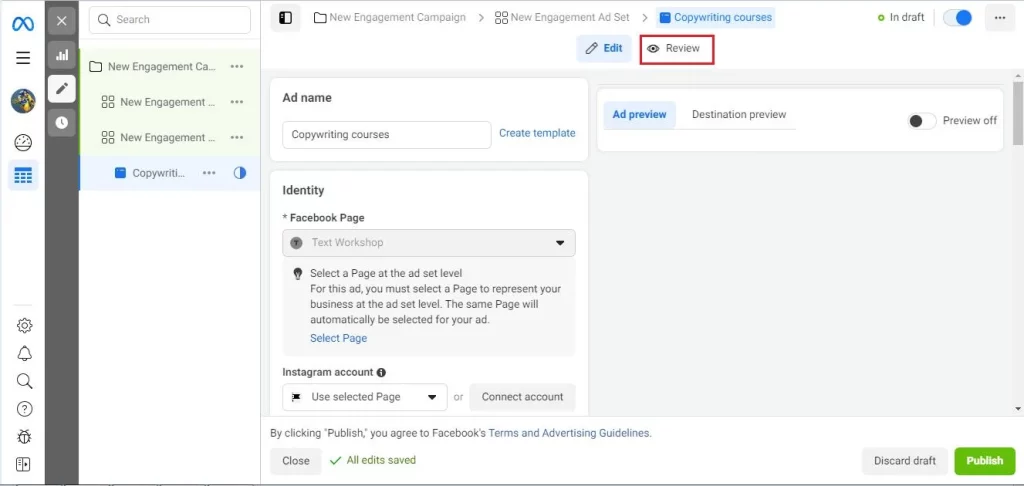
Once you have finished making changes, review your settings and click Publish. The updated placements will apply to future ad delivery.
Facebook Ads Placement Optimization Tips from Mega Digital
Optimizing your Facebook ad placement can significantly improve your campaign’s performance. Here are some tips:
- Use Audience Insights: Use Facebook’s Audience Insights tool to understand where your target audience spends most of their time on the platform, and prioritize placements accordingly.
- Consider your objective: The success of different placements can depend on your campaign objective. For example, if your goal is brand awareness, you might find more success with News Feed placements.
- Customize ad creative: Tailor your ad creative to suit the format and context of each placement. For example, create visually engaging vertical videos for Stories placements and eye-catching images for News Feed placements.
- Test different placements: Not all placements will work for all businesses or objectives. Test different placements and compare the results.
- Exclude irrelevant placements: Exclude placements that are not relevant to your campaign objectives or audience. For instance, if your campaign is focused on driving website traffic, exclude video-specific placements if they are not contributing to your goals.
- Optimize bidding strategy: Adjust your bidding strategy based on the performance of different placements. Allocate higher budgets to placements that drive better results and lower budgets to underperforming placements to maximize ROI. Additionally, utilizing a Facebook ad agency account can be beneficial in achieving lower CPM and CPA rates. Many businesses have reported significant cost savings and improved campaign performance when managing their Facebook ads through an agency account.
FAQs about Facebook Ad Placements
Advantage+ placements are a good starting point for most campaigns because they give Meta more flexibility to optimize delivery. Manual placements are better when you have reliable performance data or specific reasons to limit where your ads appear.
Yes. Different placements can generate different CPM, CPC, CPA, and ROAS depending on competition, audience behavior, and creative fit. The cheapest placement is not always the most valuable if it produces weaker conversions.
You can, but the creative may not perform equally well across every placement. Feed can support square or vertical formats, while Stories and Reels are usually better suited to vertical 9:16 creative.
Use the placement breakdown in Meta Ads Manager to compare performance. Focus on metrics such as conversions, CPA, ROAS, and lead quality rather than relying only on CTR or CPM.
Wrap-up
In conclusion, mastering Facebook ad placements is crucial for any business looking to make the most of their Facebook advertising efforts. By understanding the different placement options, optimizing your ad delivery, and staying up-to-date with the latest developments, you can ensure that your ads reach the right people at the right time.
At Mega Digital, we understand the importance of effective ad placement in Facebook advertising. With our Facebook Advertising services, you can leverage the power of Facebook ad placements to achieve your goals.