

Your Facebook ads are getting clicks, but sales aren’t coming in. You’re spending money without seeing the results you expected, and it’s hard to tell what’s going wrong. Is it your targeting, ad creatives, budget, or landing page? In this guide, Mega Digital breaks down why your Facebook ads aren’t converting and shares practical ways to fix the problem.
Quick summary:
- Poor audience targeting can waste your ad budget by reaching users who are unlikely to convert.
- Weak ad creatives and unclear messaging can fail to capture attention and motivate potential customers to take action.
- Insufficient ad budget can limit delivery and make it harder to gather enough data for optimization.
- Poorly optimized landing pages can drive potential customers away before they complete a purchase.
- Meta Pixel and conversion tracking help identify customer behavior and uncover opportunities to improve conversions.
- Effective ad scheduling and strong CTAs can encourage more potential customers to take action.
How long does it take for Facebook Ads to start converting?
There’s no definite duration for Facebook Ads to start generating sales. Some ads may generate conversions within a few days, while others take longer, depending on factors such as:
- Ad quality and audience targeting
- Product or service demand
- Ad spend and budget
- Landing page experience
According to Meta’s guidance, an ad set typically needs around 50 optimization events within 7 days to exit the Learning Phase and stabilize delivery. However, this doesn’t mean you need to wait until the learning phase ends to see conversions.
It’s important to be patient and continuously monitor your ads. Review key metrics such as CTR, CPC, and cost per acquisition (CPA) to identify performance issues. Avoid making frequent major changes during the Learning Phase, as these can disrupt optimization and delay consistent results.
Why are your Facebook Ads not converting?
Considering the aforementioned factors affecting Facebook ad conversions, they are likely to appear as causes of your Facebook Ads not converting. Let’s see 4 common reasons why your Facebook Ads get no sales:
Poor Audience Targeting
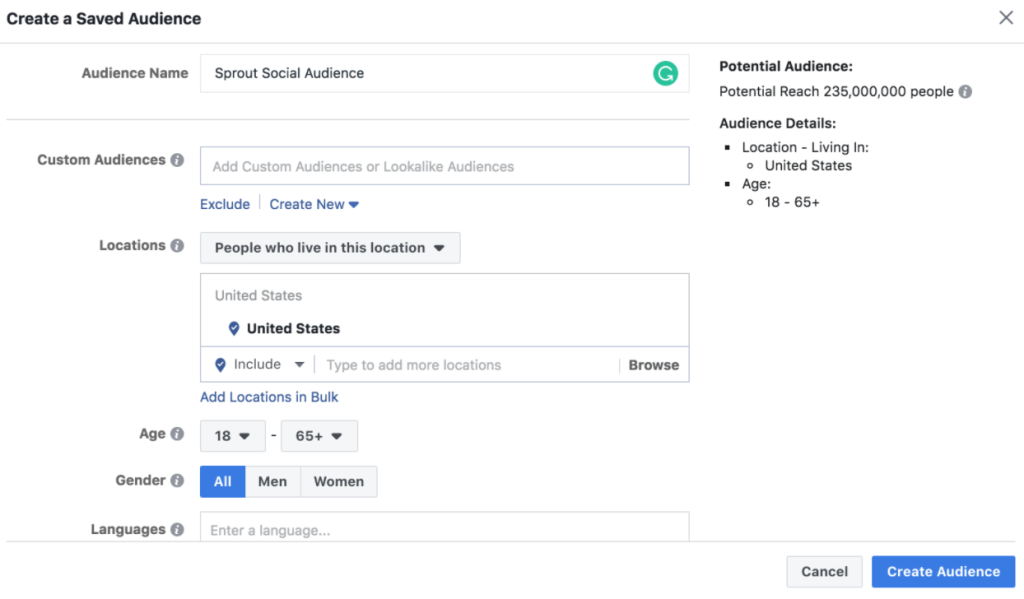
When the intended audience isn’t accurately defined or when targeting parameters are too broad or narrow, the ad fails to reach the right people at the right time. Consequently, despite the ad’s quality or persuasive content, its exposure to an uninterested or irrelevant audience diminishes its ability to drive conversions. Poor targeting dilutes the ad’s impact, resulting in wasted resources and a lack of meaningful engagement from the audience that truly matters for the conversion funnel to succeed.
What you should do:
- Analyze audience performance: Compare CTR, CPC, and conversion rates across different audience segments to identify which groups generate qualified traffic.
- Use Custom Audiences: Retarget website visitors, cart abandoners, or previous customers who have already shown interest in your products.
- Test Lookalike Audiences: Reach potential customers who share similar characteristics with your existing buyers.
- Consider Advantage+ Audience: Give Meta’s delivery system more flexibility to identify potential customers beyond your initial audience suggestions.
After creating a Custom Audience, advertisers can use it as a seed audience to generate Lookalike Audiences. These Lookalike Audiences consist of users who share similarities with the seed audience, expanding the reach to new potential customers who exhibit similar behaviors or characteristics.
Low Ad Quality
Standing out among competitors to capture user attention is challenging; thus, if your ads lack the allure to capture, prompting user action becomes difficult. So, here are some detailed points explaining how ineffective ads impact conversions:
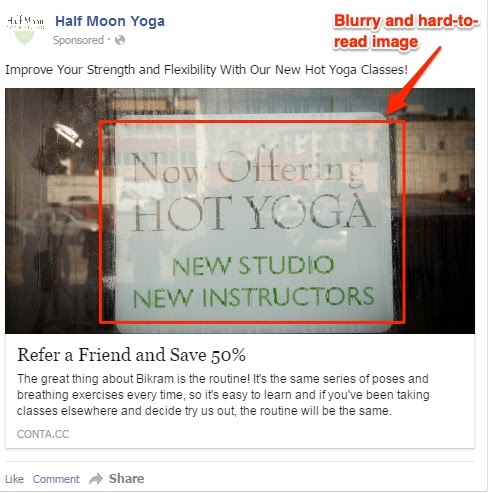
Poor Visuals and Design
Always remember to verify whether your ads have been in any given scenario:
- Low-quality visuals
- Unappealing graphics
- Unclear imagery
Users scrolling through their feeds might overlook or ignore such ads, reducing the chances of engagement or clicks.
Weak or Confusing Messaging
If the ad copy lacks clarity:
- Have spelling errors
- Have grammar mistakes
- Fail to communicate the value proposition clearly
Users might not understand the offer or the benefit of engaging with the ad. This confusion leads to a lack of interest and, subsequently, lower conversion rates.

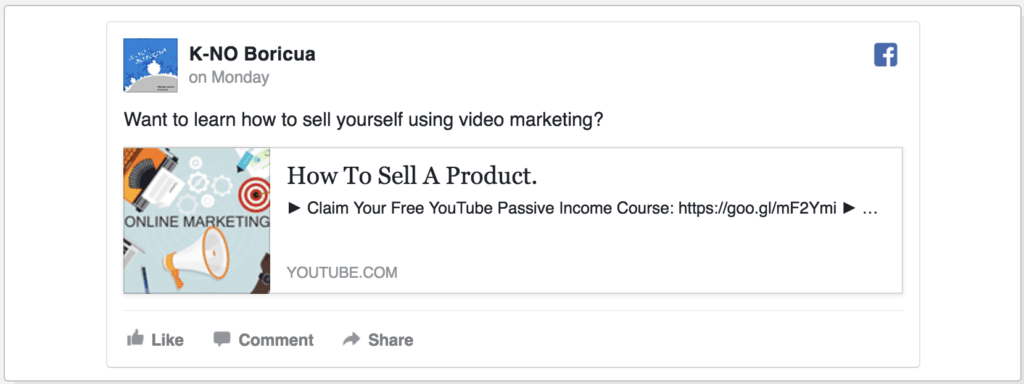
Lack of Call-to-Action (CTA)
Ads without a clear CTA or with a weak, non-compelling CTA might not prompt users to take action.
What you should do:
Improving ad creatives involves enhancing the visual and messaging elements of your ads to make them more engaging, compelling, and aligned with your audience’s interests. Here are some aspects you should consider to modify:
- Eye-Catching Visuals:
- Use high-quality images or videos that grab attention and stand out in the newsfeed.
- Ensure visuals are relevant to your brand and messaging.
- Avoid using stock photos that look vague.
- Compelling Copy:
- Craft clear, concise, and persuasive ad copy that communicates your message effectively.
- Focus on a strong headline, a concise yet impactful body text, and a clear call to action.
- Highlight Benefits:
- Emphasize the benefits or unique selling points of your product/service rather than just listing features.
- Explain how your offering solves a problem or fulfills a need for your audience.
- Mobile Optimization:
- Ensure your ad creatives are optimized for mobile devices, as a significant portion of users access Facebook through mobile.
- Use vertical or square formats for videos and images that fit well on mobile screens.
- Personalization:
- Tailor your ads to specific segments of your audience.
- Use dynamic content that changes based on user behavior or demographics, creating a more personalized experience.
- Comply with Guidelines:
- Adhere to Facebook’s advertising policies and guidelines to prevent ad rejection or disapproval.
- Ensure your ad complies with its rules on text-to-image ratio, prohibited content, and other restrictions.
According to Meta’s analysis of 15 split tests, Reels ads featuring 9:16 vertical videos with audio and key messages within safe zones achieved a 34.5% lower cost per result than image ads in the campaigns tested. This highlights the potential of mobile-first video creatives to improve ad efficiency, although results may vary by campaign.
Low Budget
When working with a limited budget on Facebook ads, the scope for reaching and engaging with a wider audience becomes restricted. This constraint often leads to reduced visibility and fewer impressions, limiting the number of users exposed to your ad. It becomes harder to test different audience segments, ad creatives, or optimization strategies, hindering the ability to find the most effective combination that resonates with your audience. As a result, the limited budget might not allow for sufficient ad exposure and might contribute to Facebook ads no sales.
What you should do:
The only option here is to raise your budget. Remember to evaluate your budget allocation concerning your ad campaign objectives and ROAS. You don’t want your ad to bring negative ROAS unless it’s for brand awareness.
There isn’t a fixed maximum budget set by Facebook for daily ad spend. However, Facebook might have spending limits based on your account history, payment methods, or adherence to their policies. If you want to run ads without spending limits, a Facebook agency ad account is the right answer!
Read more: Facebook Ad Budget: How to Calculate and Optimize Ad Budget?
Non-optimized Landing Pages
Landing pages that are not optimized can consequently result in Facebook ads with no conversion. Here are some common problems that you should take notice of:
- Slow loading speed: It causes users to lose interest and abandon the page before it fully loads.
- Mismatched Content: If the content on the landing page doesn’t align with the ad that users clicked on, it leads to confusion and disinterest.
- Complex Navigation or Design: Landing pages with complex layouts, confusing navigation menus, or unclear paths to complete the desired action (e.g., purchase, sign-up) can deter users from locating the information they need.
- Lack of Mobile Optimization: In today’s mobile-centric world, a landing page that isn’t mobile-friendly or responsive might result in a frustrating user experience, leading users to abandon the page without converting.
What you should do:
After addressing issues leading to Facebook Ads not converting, your next step should be to make efforts to alleviate them.
- Clear Objective: Whether it’s lead generation, product sales, sign-ups, or other desired actions, ensure the entire page is focused on driving users toward that specific goal.
- Consistent Messaging: Align the messaging on your landing page with the corresponding ad or promotion that directed users to it.
- Simplify Design and Navigation:
- Keep the layout clean, easy to navigate, and focused on the main goal.
- Use a clear visual hierarchy to guide users’ attention towards the important elements.
- Mobile Responsiveness:
- Optimize your landing page for mobile devices to improve user experience.
- Test and adjust the layout and content to fit various screen sizes.
- Fast Loading Speed: Improve the loading time of your landing page to reduce bounce rates by:
- Optimizing images
- Reducing unnecessary scripts
- Employing caching techniques
- A/B Testing: Conduct A/B tests on different elements of your landing page (CTA button color, headlines, images, etc.) to identify what resonates best with your audience.
- Conversion Tracking and Analytics: Implement tracking tools like Google Analytics or Facebook Pixel to monitor user behavior, track conversions, and gather insights for further optimization.
- Continual Optimization: Regularly analyze performance metrics, user feedback, and test new strategies to refine and improve your landing page continuously.
Incorrect conversion tracking
Sometimes, your Facebook ads generate sales, but Ads Manager reports zero conversions because tracking isn’t working correctly. Missing Purchase events, duplicate events, or attribution differences can make campaign performance appear worse than it actually is.
What you should do:
- Check Meta Events Manager: Verify that important conversion events, including AddToCart, InitiateCheckout, and Purchase, are being recorded correctly.
- Use Meta Pixel and Conversions API: Improve conversion measurement and configure event deduplication to avoid double-counting.
- Compare conversion data: Check Ads Manager reports against actual orders in your eCommerce platform to identify tracking or attribution discrepancies.
Wrong campaign objective
Choosing the wrong campaign objective can attract traffic without generating meaningful conversions. For example, a Traffic campaign optimized for link clicks focuses on getting people to click your ads rather than finding customers most likely to purchase.
What you should do:
- Choose the right campaign objective: Select the Sales objective when your primary goal is to generate purchases rather than website traffic.
- Set the appropriate conversion event: Optimize for Purchase, Lead, or another relevant event based on your business goals and available conversion data.
- Review your performance goal: Ensure Meta’s delivery system is optimizing for the actions that matter most to your business.
4 Best Ways to Optimize Non-Converting Facebook Ads
Facebook ads with no conversions could be a nightmare for many advertisers. Besides knowing what problems you should avoid and what solutions are approachable, Mega Digital suggests some hacks to optimize and keep your Facebook ads from generating no sales.
1. Applying for a Facebook Agency Ad Account
A Facebook agency ad account provides direct assistance in resolving problems causing no conversions in Facebook ads, such as low budget, ineffective ads, poor audience targeting, etc.
A Facebook agency ad account is like having a team of experts who are good at making sure your ads on Facebook work well:
- Know the best ways to create ads that people like and understand.
- Use smart strategies to make sure your ads reach the right people who might be interested in what you offer.
- Making it more likely that people will click, buy, or do what you want them to do when they see your ads.
With Mega Digital – a Meta Business Partner, your ads become better at getting more people interested in what you have to offer on Facebook, preventing your Facebook Ads not converting.
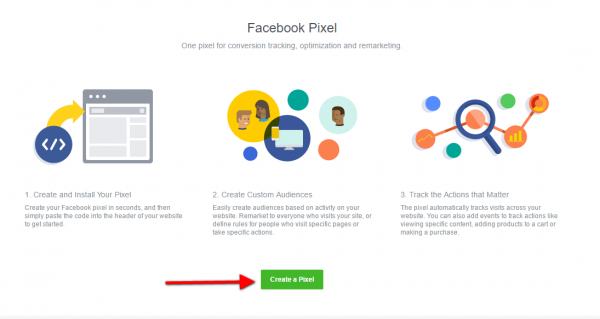
#2 Utilizing Facebook Pixel
By leveraging the data collected through Facebook Pixel, you can better understand user behavior, refine targeting, personalize ad content, and optimize ad delivery to boost conversions. Here are a few actions you should consider:
Conversion Tracking
- Implement the Facebook Pixel on your website to track specific actions taken by users after clicking your ads.
- Measure conversions such as purchases, sign-ups, or form submissions.
- Analyze this data to understand which ads or campaigns are driving the most conversions.
Optimize Ad Delivery
Pixel data can be used to optimize your ad delivery. Utilize Facebook’s optimization features like “Conversion Optimization” or “Value Optimization” to automatically show your ads to people more likely to take the desired action based on their past behavior tracked by the Pixel.
Learn More: Facebook Ad is Not Delivering: 5 Reasons Why & How to Fix
Create Custom and Lookalike Audiences
Facebook Pixel allows you to create Custom Audiences based on website visitors. Segment audiences based on their interactions, such as:
- Users who viewed specific pages and added items to a cart but didn’t complete a purchase.
- Users who spent a certain amount of time on your site.
Retarget these audiences with tailored ads to encourage them to complete the desired action.
These new audiences share similarities with your existing website visitors or customers. Facebook uses Pixel data to find users with similar behaviors, interests, and characteristics. In doing so, it helps expand your reach to potential customers interested in your offerings.
Testing and Optimization
- Leverage Pixel data to conduct A/B tests on various elements of your website, such as landing pages, CTAs, or product pages.
- Analyze the data to optimize your website for better user experience and improved conversion rates.
- Optimize for Mobile and Cross-Device Tracking: Facebook Pixel helps understand user behavior across devices. Ensure the Pixel is implemented correctly to track conversions on mobile devices, providing insights into multi-device user journeys.
#3 Scheduling ads effectively
Scheduling ads effectively on Facebook involves strategic planning to reach your target audience when they’re most active and receptive. You can optimize ad delivery by utilizing scheduling options for better engagement and conversions. To schedule ads effectively, start by:
- Analyzing your audience insights and past performance data to understand when your audience is most active.
- Set specific schedules based on these insights, considering factors such as:
- Time zones
- Peak engagement hours, and days when your audience will likely be online.
- Experiment with different schedules and monitor performance metrics to identify when your ads receive the most engagement and conversions.
- Utilize ad scheduling features provided by Facebook’s Ad Manager to control the start and end times of your campaigns precisely.
- Adjust and refine your ad schedules regularly based on ongoing performance analysis to continually optimize and improve the effectiveness of your campaigns.
#4 Using strong Call-to-Action (CTA)
A compelling CTA serves as a clear directive guiding users on what to do next, encouraging them to engage further with the ad content. Here are some tips to enhance the conversion rates of your Facebook ads:
- Craft a concise yet persuasive CTA that aligns with the ad’s objective.
- Utilize action-oriented language that prompts immediate action, such as “Shop Now”, “Learn More”, “Sign Up Today”, or “Get Started”.
- Place the CTA prominently within the ad, ensuring it stands out visually and is easy to notice.
- Ensure consistency between the ad’s messaging and the CTA to build trust and guide users seamlessly toward the intended action.
- Regularly test different variations of CTAs to determine which ones resonate best with your audience and drive higher conversion rates.
FAQs about Facebook Ads Not Converting
Likes and engagement don’t necessarily indicate purchase intent. Users may enjoy your content without being interested in buying. Focus on conversion-focused metrics rather than engagement alone to evaluate your campaign’s effectiveness.
A good conversion rate varies by industry, campaign objective, and product price. Rather than relying on a universal benchmark, compare your conversion rate with historical performance and your target cost per acquisition (CPA).
Yes. Ad fatigue, increased competition, seasonal demand changes, or shifts in customer behavior can reduce conversions over time. Compare recent results with previous performance to identify what has changed.
Not necessarily. If your ads are still gathering useful data, pausing them too early may prevent meaningful optimization. However, if spending significantly exceeds your target CPA without results, consider pausing and reviewing the campaign before spending more.
Final Words
Facebook Ads not converting can be troublesome if you do not understand why it happened and how to modify it. I hope this article is helpful to get you out of the situation. Consider amplifying your Facebook ad conversions by using a Facebook agency ad account and partnering with a seasoned expert like Mega Digital. Let’s unlock the true potential of your Facebook ad campaigns together!