

Every Google Ads keyword match types has a unique function that can help you optimize your ad’s relevance and visibility. This article focuses on the features of keyword match types for Google Ads. Mega Digital will help you gain a deeper understanding—whether you are a professional looking to improve your strategy or a newbie just wanting to learn the basics.
Quick summary:
- Google Ads has three main keyword match types: Broad, Phrase, and Exact.
- Broad match offers the widest reach and works especially well with Smart Bidding.
- Phrase match balances reach and control by matching searches around the meaning of your keyword.
- Exact match provides the most control but can still match close variants and searches with the same intent.
- Combining match types with negative keywords can help improve traffic quality and reduce wasted spend.
What are keyword match types in Google Ads?
Keywords are words or phrases that are used to match advertisements to the terms people search for. For example, you may use a broad match to target a broader range of user searches, or an exact match to target specific user queries.
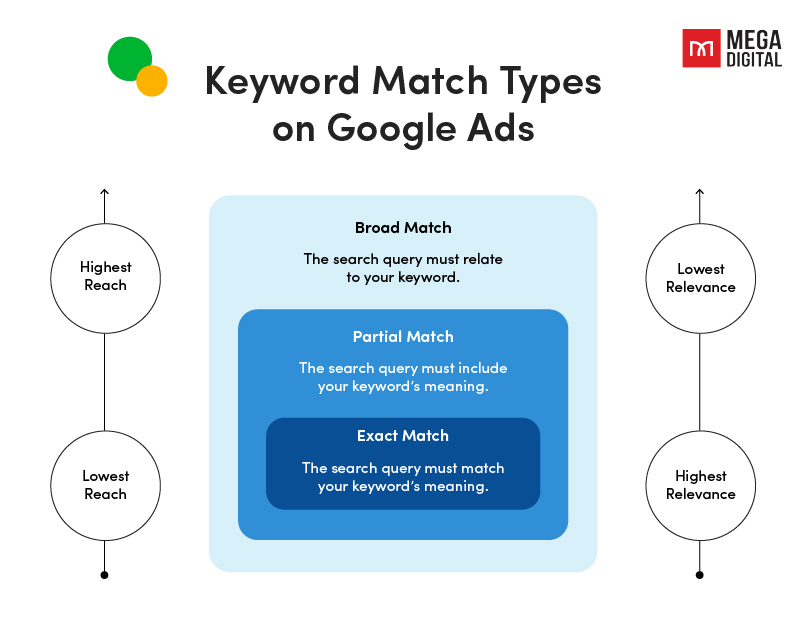
Google Ads keyword match types are crucial as they determine when your ads appear based on user search queries. There are 3 main types: Broad Match, Phrase Match, and Exact Match.
- Broad match: Targets searches related to your keyword, reaching many people but might be less relevant due to including various related terms.
- Phrase match: Shows ads for searches containing the essence of your keyword, balancing reach and relevance by focusing on specific phrases or variations.
- Exact match: Displays ads only for searches precisely matching your keyword, ensuring high relevance but potentially reaching a smaller audience.
How do keyword match types in Google Ads impact Search ads results?
Google keyword match types can have a significant impact on the performance of your ad account because they are the control you use to choose which search queries you are bidding on. The following is how they affect the results.
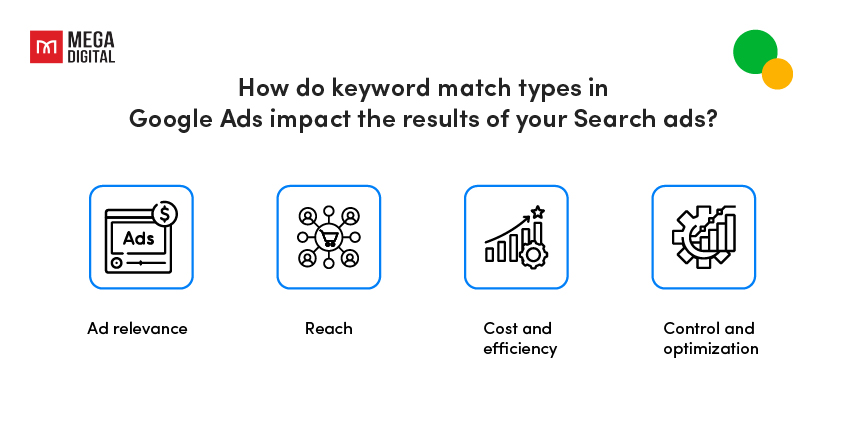
Ad relevance
Match types affect the degree to which a user’s search query must coincide with the terms you have selected. Your ads are more likely to be extremely relevant to the searcher’s query when you use more precise match types, such as Exact Match, which could lead to higher click-through rates and conversions.
Reach
The range of matches your ads can reach varies depending on the match type. Broad Match may increase visibility by displaying your ads for a wider range of similar searches, but it may also draw less relevant traffic. Phrase Match targets particular phrases or variations, which helps to somewhat reduce the reach. The most restricted reach is provided by Exact Match, which focuses on incredibly accurate keyword matches.
Cost and efficiency
The match type you select can have an impact on the efficiency and expense of your campaign. Broad Match may result in more clicks, but it may also result in more spending owing to less focused traffic. While Exact Match may result in fewer clicks, it often results in higher conversion rates, hence optimizing your money more effectively.
Control and optimization
Using a combination of match types gives you more control over your ads targeting. You can allocate funding and alter bids based on the performance of each match type to optimize for the best outcomes.
Overall, the Google Ads keyword match types you select have a direct impact on the quality of traffic, cost-effectiveness, and control over your Google Ads campaigns, influencing the overall success and outcomes of your advertising efforts.
3 Google Ads Keyword Match Types Explained
Google Ads provides three fundamental keyword match types. Let’s dive into how each one works, including the latest updates that affect how Google matches keywords with search queries today.
1. Broad Match type
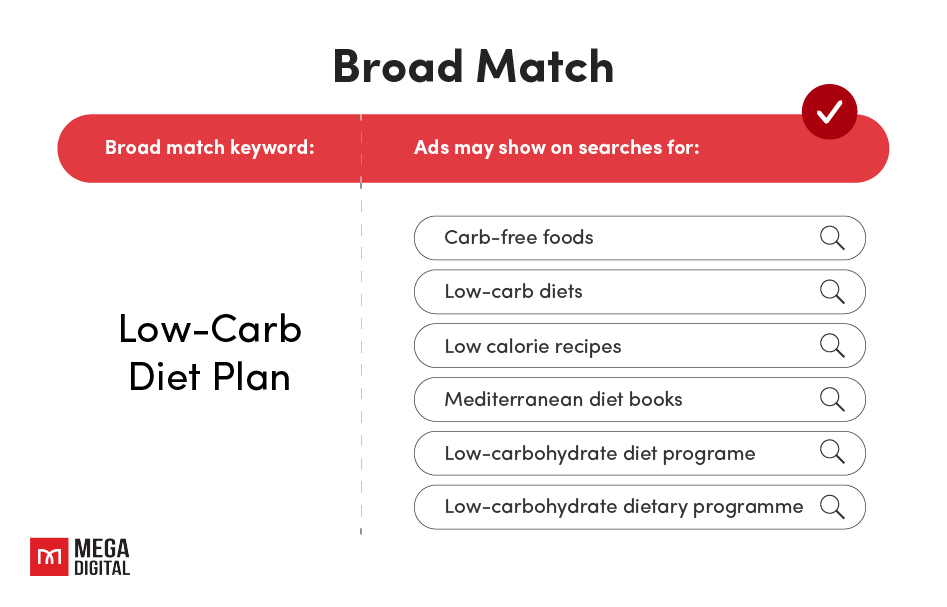
The broad match type is the default setting and offers the widest reach among Google Ads keyword match types. Your ads may show on searches related to your keyword, even when the query does not contain the exact keyword terms.
Google reports that around 15% of queries it sees each day are entirely new. Broad match can help advertisers discover relevant searches they may not have anticipated when building their keyword lists.
Here are some of the relevant signals Google may consider with broad match:
- Other keywords in your ad group
- The user’s recent search activity
- The user’s location
- Your landing page content and assets
Industry Trend Update: Google increasingly recommends pairing Broad Match with Smart Bidding, such as Target CPA or Target ROAS. Smart Bidding evaluates auction-time contextual signals to adjust bids for each query, while broad match gives the system access to a wider range of relevant searches.
However, broad matches still require regular monitoring. Review your Search Terms report and use negative keywords when necessary to prevent irrelevant searches from consuming your budget.
2. Phrase Match type
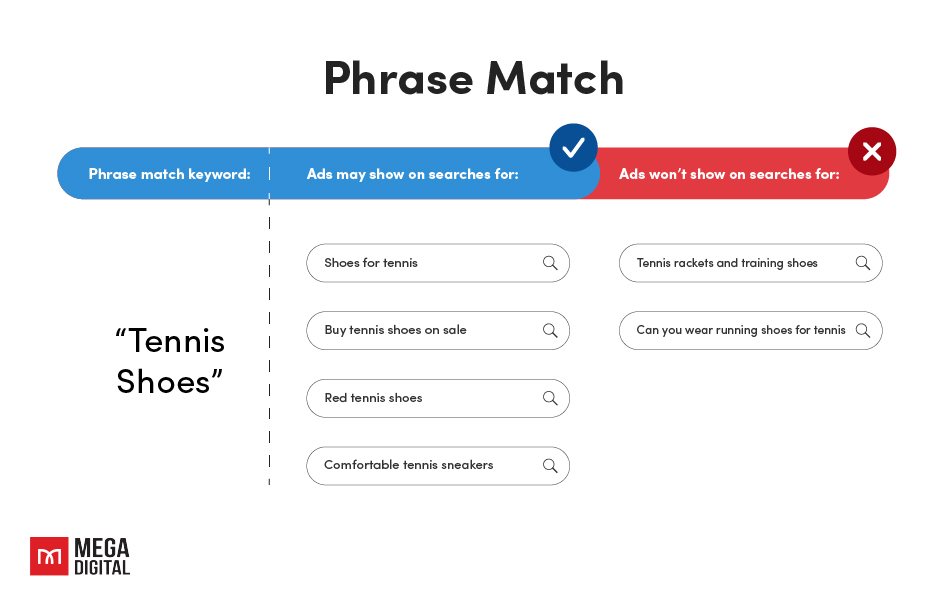
Phrase match type provides a balance between reach and relevance. In Google Ads, you use quotation marks to indicate phrase match keywords, such as “tennis shoes”. Ads may appear on searches that include the meaning of your keyword, even when that meaning is implied or the search is a more specific version of it.
With phrase match, you can reach more searches than exact matches and fewer searches than broad matches, giving you more flexibility while maintaining greater control over search relevance.
For example, with the phrase match keyword “tennis shoes”, your ad may show searches such as shoes for tennis or buy tennis shoes on sale, while unrelated searches outside the keyword’s intended meaning are less likely to match.
3. Exact match type
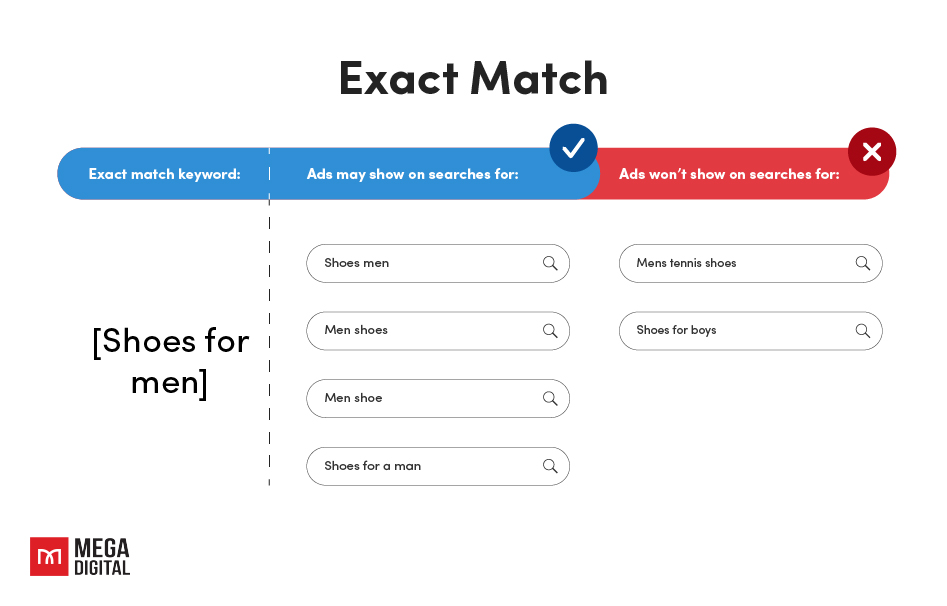
The exact match type allows your ads to show on searches that have the same meaning or intent as your keyword, giving you the greatest level of control among the three match types. You format exact match keywords using brackets, such as [black cocktail dress].
Previously, exact match was much closer to literal word-for-word matching. Today, Google also allows Exact Match keywords to trigger for close variants, including variations that preserve the same meaning or search intent.
Key takeaway: Exact match no longer means word-for-word matching. Google can also match close variants that preserve the same meaning or search intent.
For example, the Exact Match keyword [bathing suits] may also match a search for swimming suits because Google recognizes the terms as having the same intent.
While Exact Match now covers a broader range of relevant searches than it did in the past, it remains the most restrictive of the three Google Ads keyword match types and provides advertisers with the highest level of query control.
How to target keywords in Google Ads
Here is the fundamental instruction for you to set up Google Ads keyword match types.
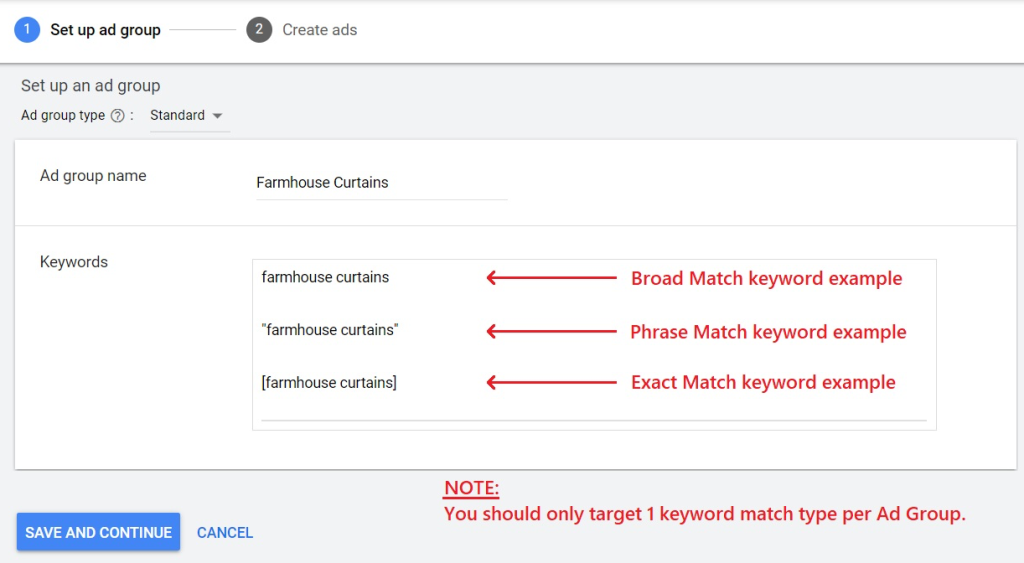
Step 1: Log in
Log in to your Google Ads account. Then, establish either a fresh Search campaign or generate a new Ad Group within a current campaign.
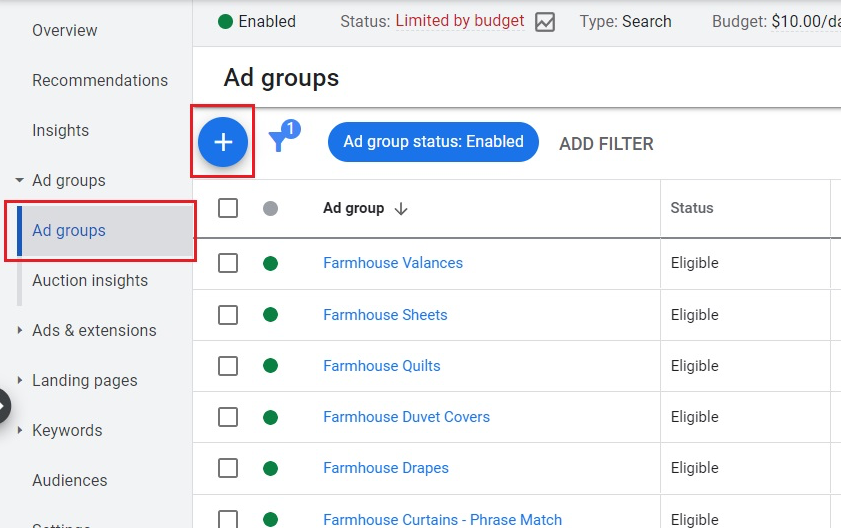
Step 2: Employ match type
Decide on the keywords that you wish to target. However, it’s recommended to employ just one keyword match type per Ad Group and refrain from targeting the same keyword using different match types.
Step 3: Preview and save
Press the ‘Save And Continue’ button to set the targeting for the chosen keywords.
How do Google Ads 3 types of keyword matches differ?
Understanding the different Google Ads keyword match types is essential for any successful Google Ads campaign, whether you’re starting from scratch or looking to improve the effectiveness of an existing campaign. You can choose how broad or exacting your keywords are when matching search queries and showing adverts, with each match type providing varying flexibility.
3 Types of keyword matches comparison
Absolutely, here’s a detailed table comparing Google Ads keyword match types:
| Feature | Broad Match | Phrase Match | Exact Match |
|---|---|---|---|
| Function | Casts a wide net, showing ads for related searches including synonyms, misspellings, variations, and relevant searches | Targets specific phrases, displaying ads when a user’s search includes the exact phrase or close variations, allowing additional words before or after | Displays ads exclusively when a user’s search query precisely matches or closely resembles your specified keyword, without additional words |
| Example | Keyword: “shoes” Triggered by: “buy sneakers”, “footwear deals” | Keyword: “blue shoes” Triggered by: “buy blue sports shoes”, “affordable blue shoes” | Keyword: [blue shoes] Triggered by: “blue shoes”, “shoes in blue” |
| Scope | Broad, inclusive of synonyms and related terms | Moderately specific, focus on the specified phrase and variations | Highly specific, requires exact or very close matches |
| Reach | High reach, covers diverse search queries | Moderate reach, captures more specific queries | Low reach, targets a very specific audience |
| Precision | Low precision, may include irrelevant searches | Moderate precision, balances reach and relevance | High precision, ensures relevance but limits reach |
The ultimate question is: Which Google Ads keyword match type is better? Choosing between these categories might be a tough decision. They all have both advantages and disadvantages.
- Broad match offers the greatest possible reach while being the least restrictive in terms of matching your target keyword.
- Exact match has the lowest possible reach, it also provides the closest, most relevant matching to your target keyword.
- Phrase match is in the middle, broadens your target’s reach, resulting in more clicks and conversions.
So, instead of limiting your account to one match type, why not combine them for your ads? This may require a few changes to your account structure, but it will provide you with the best balance and performance. You’ll strike a balance between having optimal reach and a narrow target, into which you can put more money to drive conversions.
Google Ads keyword match types example
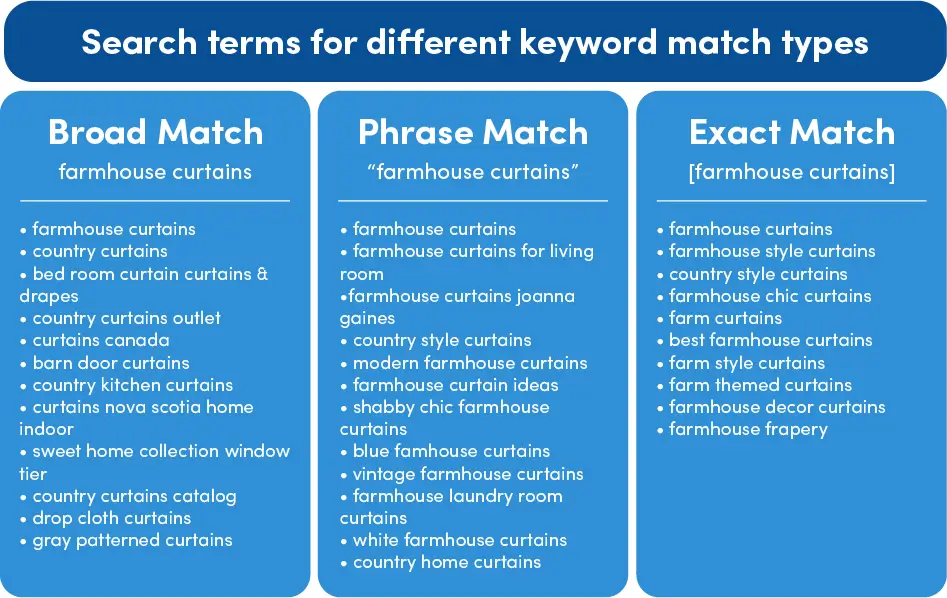
Here are examples demonstrating how various search terms align with different keyword match types. These examples are derived from an active Google Ads campaign to illustrate the distinctions between broad, phrase, and exact keywords.
FAQs about Google Ads Keyword Match Types
No. All keyword match types can automatically match close variants, and Google does not provide an option to disable them.
No. Changing a keyword’s match type does not directly change its Quality Score. Quality Score is evaluated based on historical performance for searches closely related to that keyword.
No. Negative keywords also use broad, phrase, and exact match, but they work differently from positive keywords and do not expand to close variants.
They do not compete against each other in the auction. Google selects the eligible keyword based on factors such as relevance, identical matching, and Ad Rank.
Wrap up
We trust that our guide has provided a clear explanation of exact phrase keyword match types for you. Understanding Google Ads keyword match types is crucial for targeting the right audience. When it comes to match kinds, remember that there is no right or wrong answer. Every business purpose and budget is unique and must be considered while deciding on the appropriate method.
If you need more information about other keyword match types and Google Advertising in general, visit our blog website to satisfy your demands.