

Your Facebook ads just got rejected, putting your campaigns on hold and delaying your chances of reaching potential customers. But what went wrong, and how can you get your ads approved? In this guide, Mega Digital breaks down 6 common reasons for Facebook ad rejection and shares practical ways to fix them.
Quick summary:
- Violating Meta’s Advertising Standards can cause your Facebook ads to be rejected or removed.
- Misleading claims and deceptive content can trigger ad rejection, especially when promoting unrealistic results.
- Discriminatory targeting and Special Ad Category violations can prevent ads from receiving approval.
- Landing page issues, including broken links, misleading information, and intrusive pop-ups, can lead to rejection.
- Editing rejected ads or requesting a review can help resolve disapprovals, depending on the violation.
- Following Meta’s advertising policies before launching campaigns can reduce the risk of future rejections.
How to know if your Facebook Ads get rejected?
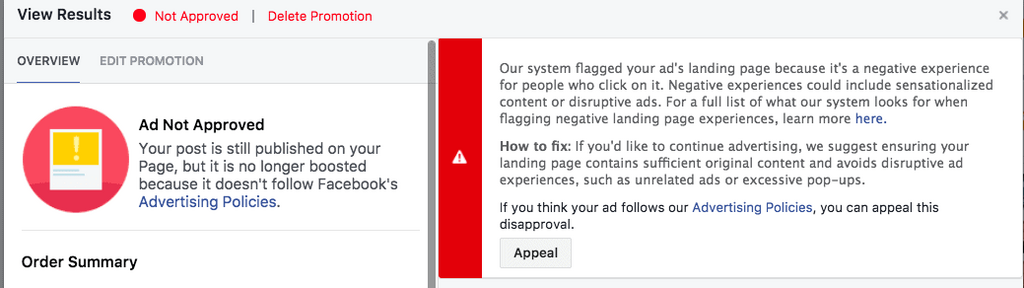
Upon rejection of your ad, Facebook typically sends an email notification to your registered account. This notification includes a link to Meta Business Support Home, enabling you to access detailed information regarding the cause of your Facebook Ads rejection.
Clicking on this link directs you to where you can uncover the specific reasons behind the rejection, helping you understand and address the issues effectively.
Previously approved Facebook ads might undergo additional review due to several reasons, such as:
- Unexpected high engagement: Particularly when users block or hide ads
- Missed issues during the initial review: Using user reports to pinpoint any discrepancies
You won’t receive a notification unless your ad violates Facebook’s Advertising Standards. In case of policy violations, the ad will be rejected, halting its delivery.
What are common reasons for rejected Facebook Ads?
Facebook may reject ads that violate its Advertising Standards, including restrictions on content, targeting, and landing pages. Here are six common reasons why your Facebook ads get rejected and how to address them.
1. Violating Facebook’s Advertising Policies
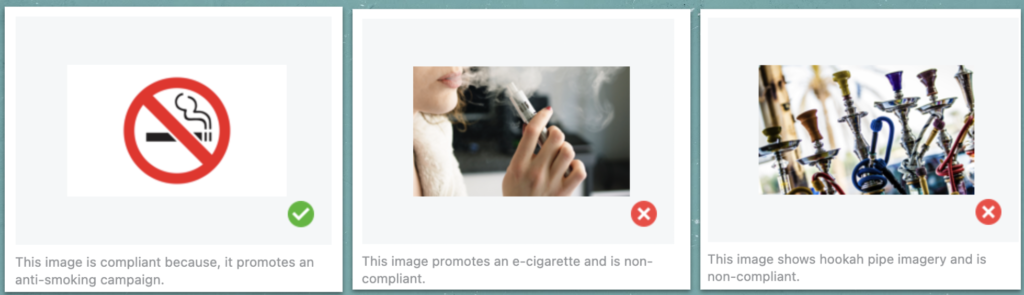
Ads that violate Meta’s Advertising Standards may be rejected. These policies cover prohibited content, restricted products and services, misleading business practices, and intellectual property rights.
Some common violations include:
- Prohibited Content: Illegal products or services, hate speech, discriminatory practices, and content promoting violence or exploitation.
- Deceptive Content: Misleading claims, unrealistic outcomes, scams, or attempts to circumvent Meta’s advertising systems.
- Restricted Products and Services: Certain products, including alcohol, gambling, financial services, and health-related products, are subject to additional requirements.
- Intellectual Property Infringement: Unauthorized use of copyrighted materials, trademarks, or third-party content.
What to do:
Review Meta’s Advertising Standards before launching your campaign. If your product belongs to a restricted category, check the applicable requirements and adjust your ad content accordingly.
2. Low-Quality or Misleading Content
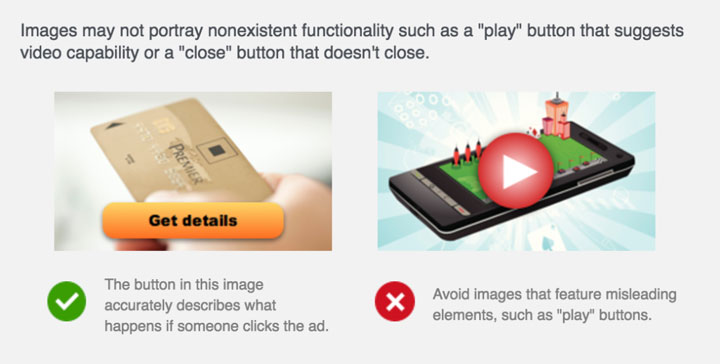
Facebook ads containing misleading claims, clickbait, exaggerated promises, or deceptive offers may be rejected. Low-quality ad experiences can also negatively affect delivery, although poor visual quality alone doesn’t automatically lead to rejection.
For example, consider a weight-loss ad claiming: “Lose 20 pounds in 5 days – Guaranteed!”
This ad could violate Meta’s policies because it promises unrealistic results and makes potentially misleading health-related claims.
What to do:
Keep your ad content accurate and transparent. Avoid exaggerated promises, misleading before-and-after claims, and false urgency. Ensure your product benefits and promotional offers can be substantiated.
3. Unacceptable Targeting or Audience Selection
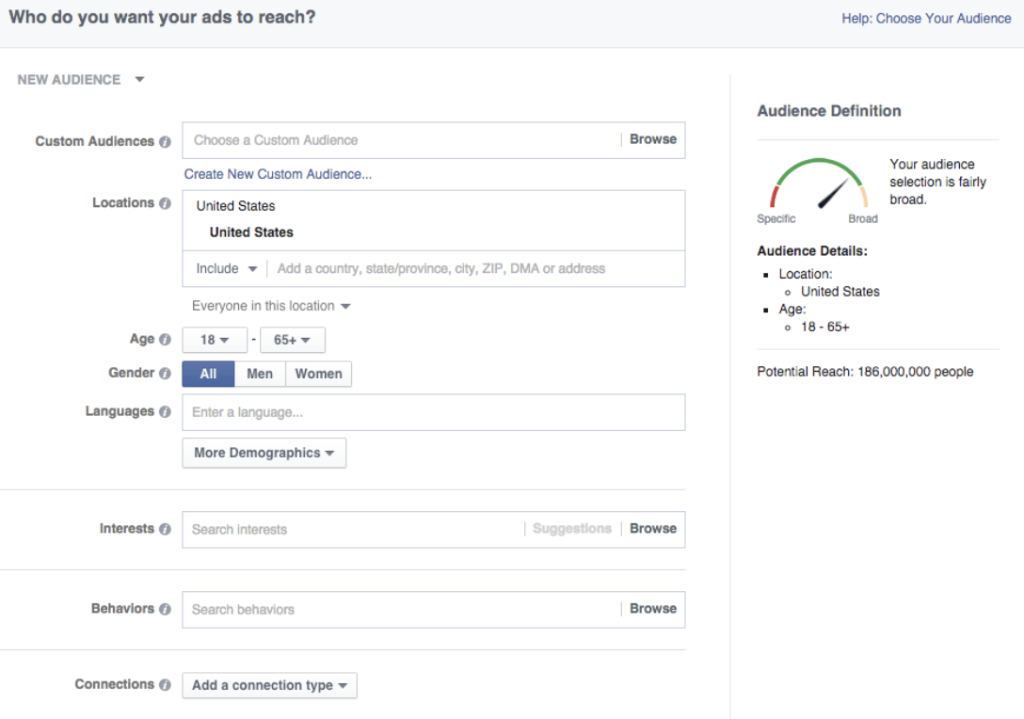
Meta prohibits discriminatory advertising practices, particularly in sensitive industries such as employment, housing, and financial services.
Some targeting issues include:
- Discriminatory Targeting: Using targeting or exclusion settings in ways that unlawfully discriminate against protected groups.
- Sensitive Personal Attributes: Using ad targeting or messaging that improperly exploits sensitive characteristics, such as health conditions or religious beliefs.
- Age and Location Restrictions: Failing to follow applicable legal or policy requirements for age-restricted products.
- Special Ad Categories: Using restricted targeting options for ads related to housing, employment, or financial products and services.
What to do:
Review your audience settings to ensure they comply with Meta’s advertising policies and applicable laws. For regulated industries, check whether your campaign requires a Special Ad Category and follow its targeting restrictions.
4. Non-Compliance with Community Standards
Facebook ads must also comply with applicable Community Standards. Content promoting violence, hate speech, exploitation, or other harmful activities may be rejected, even when it appears in ad creatives rather than organic posts.
What to do:
Review Meta’s Community Standards and remove content involving:
- Violence, criminal activities, or dangerous organizations.
- Hate speech, bullying, or harassment.
- Sexual exploitation, graphic violence, or other prohibited content.
5. Issues with the Landing Page
Facebook reviews not only your ad content but also the destination users visit after clicking. Landing pages containing misleading information, broken links, malware, or disruptive elements may cause ad rejection.
Common landing page problems include:
- Mismatched Content: The landing page doesn’t match the product, service, or offer advertised.
- Broken Links: The destination URL leads to a 404 error, an inaccessible page, or an unexpected redirect.
- Intrusive Pop-Ups: Excessive pop-ups or interstitials prevent users from accessing the main content.
What to do:
- Ensure landing page relevance: Match your landing page content with the advertised offer.
- Fix technical errors: Check URLs, redirects, and page accessibility before submitting your ads.
- Improve user experience: Remove intrusive elements that interfere with navigation.
- Follow Meta’s policies: Ensure your landing page content complies with applicable advertising requirements.
6. Non-compliance with Special Ad Categories
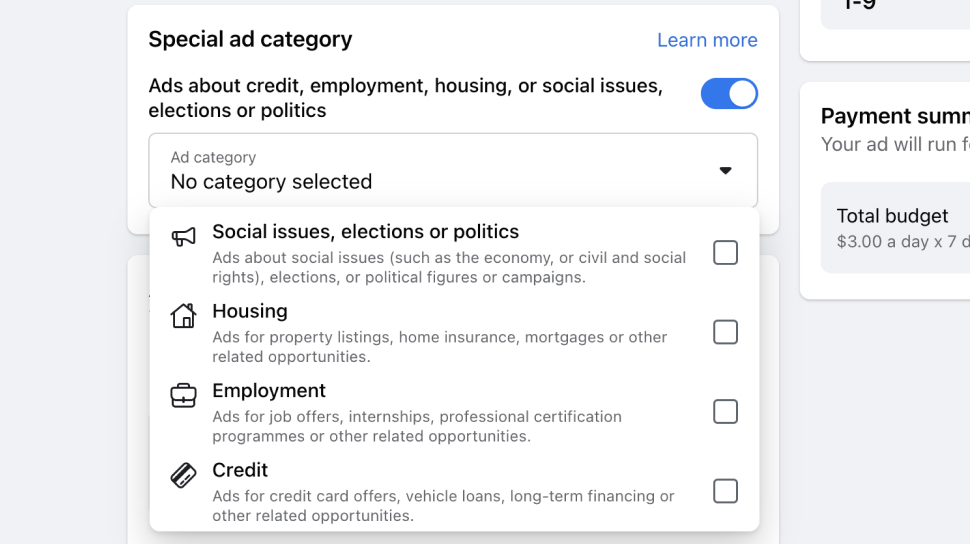
Meta requires advertisers in certain industries, including housing, employment, and financial products and services, to comply with additional advertising requirements. These rules help prevent discrimination and promote fair access to opportunities.
Failing to declare an applicable Special Ad Category or using restricted targeting options may result in ad rejection or delivery restrictions.
What to do:
- Select the correct category: Check whether your campaign falls under a Special Ad Category when setting up your ads.
- Review targeting restrictions: Ensure your audience settings comply with the category’s requirements.
- Check regional policies: Verify applicable requirements based on your advertising location and industry.
3 Ways to resolve rejected Facebook Ads
If your Facebook Ads have yet to receive approval, here are some resolutions you can take to address them.
Use Facebook Agency Ad Account
A Facebook Agency Ad account is a specialized type of account provided by Facebook to marketing agencies, businesses, or individuals. It can manage multiple client accounts or advertising campaigns. Moreover, Facebook Agency Ad account offers various tools and features within the platform, specifically tailored to facilitate the management, organization, and optimization of advertising efforts on behalf of clients.
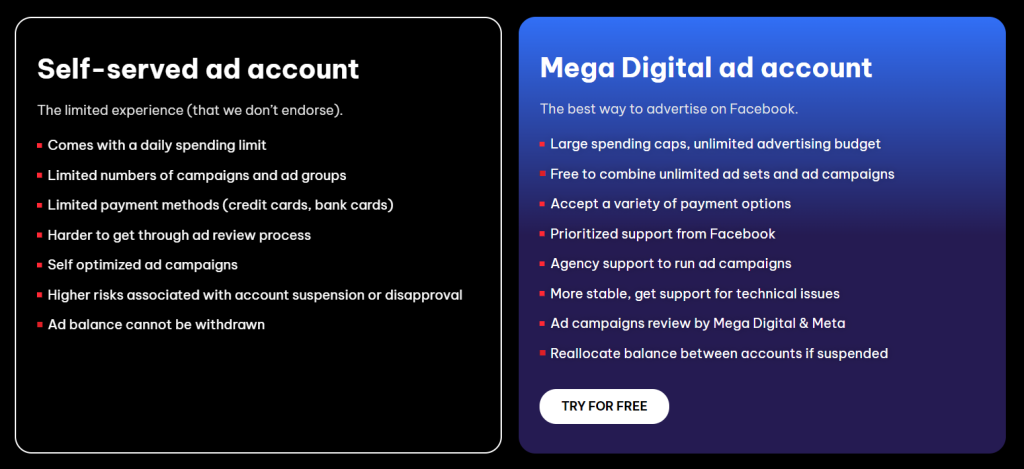
A Facebook Agency Ad account is a pre-vetted account with certain privileges and a faster ad approval process. You can start your ad campaign immediately without “warming up” your account. In addition, assistance from a team of experts can help prevent mistakes leading to ad rejection or account suspension, such as policy violations.
With the possession of a professional Facebook Agency Ad Account, Mega Digital is a great partner helping to provide insightful consultancy as well as assistance to optimize your Facebook ad campaign to yield the most success.
Request Facebook to review your ad
If you doubt your Facebook Ads’ disapproval is false, you can submit a review request in Business Support Home. Here are steps to send a request review to Facebook:
- Step 1: Visit Business Support Home
- Step 2: Click to choose Ad Account with ad rejected
- Step 3: Pick an ad or a group of ads or a campaign that is assumed to be unreasonably disapproved
- Step 4: Click “Request review” button to submit
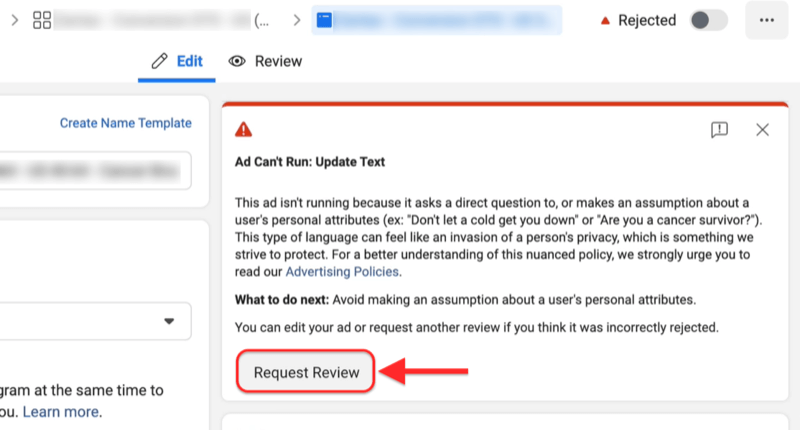
Facebook’s human reviewers will process your request, and you will receive the result within at least 48 hours. If the review result appears to be reversed, your ad campaign is automatically active. Or else it will remain rejected, and you can not re-submit a request review for the same ad. You can track your request’s status in the Business Support Home.
Adjust or Create a new Facebook Ad
If your ad violates Facebook’s Advertising Policies, you can fix it by changing it. It is recommended that you examine some components that easily disobey the platform’s policies, such as images, landing pages, target audiences, and texts,… Once you edit your Facebook Ad, it will be reviewed by Facebook’s ad review system.
When do you have to create a new ad? Unfortunately, not all types of ads can be edited, and it’s simply due to your inability or your choice not to do so. In these two cases, a new ad is the better way.
Rejected ads can be deleted, but please note that you cannot request an ad review appeal if you do so. Furthermore, editing or deleting Facebook ads disapproved does not remove the mark of violation from your account.
Tips to avoid Facebook Ads Rejection
Before publishing your Facebook ads, take a few minutes to review your campaign settings, creatives, and landing pages. Mega Digital recommends using this pre-launch checklist to reduce the risk of ad rejection.
- Review ad copy and creatives: Check for misleading claims, unsupported promises, prohibited content, and unauthorized use of copyrighted materials.
- Verify your landing page: Make sure the destination URL works, matches your advertised offer, and displays essential business information clearly.
- Check targeting and ad categories: Confirm that your audience settings and Special Ad Category selections comply with Meta’s requirements.
- Review product-specific restrictions: Check whether your industry requires additional permissions, age restrictions, or regional compliance.
- Inspect all ad elements: Review images, videos, headlines, primary text, CTA buttons, and destination links before submitting your campaign.
- Check account and Page status: Review Meta Business Support Home for unresolved advertising restrictions that could affect your campaign.
FAQs about Facebook Ads Rejected
There is no guaranteed timeframe for reviewing an appeal. While initial ad reviews are typically completed within 24 hours, reconsideration requests may take longer depending on the case. You can track the status in Meta Business Support Home.
Yes. Meta may review ads again after they’ve started running. If an ad is found to violate its Advertising Standards, it can be rejected even after receiving initial approval.
Not every rejected ad leads to an account restriction. However, repeated or severe policy violations may result in advertising restrictions or account suspension. Review your account status in Meta Business Support Home.
Yes, as long as your advertising account remains eligible. However, repeated policy violations can lead to restrictions. Make sure your new ads comply with Meta’s Advertising Standards before submitting them.
Read more: Facebook Ads Not Spending? 5 Causes & How to Fix Fast
Final words
Facebook Ads rejected for no reason is a painful experience for advertisers. Many have been struggling to identify the causes of the problem and solutions to it. We hope this blog will enlighten you with helpful insights and some applicable ways to resolve. To avoid unexpected mistakes, Facebook Agency Ad Account is a top-tier solution with unlimited features for your advertising campaigns. And Mega Digital is ready to help!