

Are you spending money on clicks that never become customers? The real challenge isn’t driving traffic, it’s attracting high-intent prospects who are ready to convert. If your Google Ads campaigns generate traffic but not qualified leads, it’s time to refine your strategy. In this guide, you’ll learn why businesses use Google Ads for lead generation and how to optimize your campaigns for better results.
Quick summay:
- Google Ads lead generation is about using targeted ads to drive clicks, capture contact info, and turn high-intent searches into qualified leads.
- It works because you can reach the right people at the right time, simplify sign-ups with lead form extensions, and only pay for results.
- Success depends on setting clear goals, choosing the right ad types (Search, Display, YouTube), writing compelling copy, and mapping the lead-to-sale journey.
- Smart Bidding, broad match, and continuous optimization help scale conversions while keeping CPA under control.
- In this guide, you’ll learn proven strategies, optimization tips, and see a real case study (GreenThumb) that doubled leads and boosted sales by 50%.
What can be understood about Google Ads for Lead Generation?
Google Ads lead generation is a strategy used by businesses to drive sales and generate leads through advertising on Google. This often involves running direct-response campaigns that encourage potential customers to take a specific action, such as buying a product or signing up for a newsletter. These campaigns are also known as traffic-generating or lead-generating campaigns.
The goals of these campaigns typically include encouraging customers to complete a purchase, generating leads by gathering contact details through a sign-up page, and increasing traffic to a website to distribute information.
Why Use Google Ads for Lead Generation?
Google Ads is a potent platform for lead generation because it captures user intent exactly when they are actively searching for your products or services.
Before diving in, let’s solidify why Google Ads is an excellent choice for your lead generation efforts:
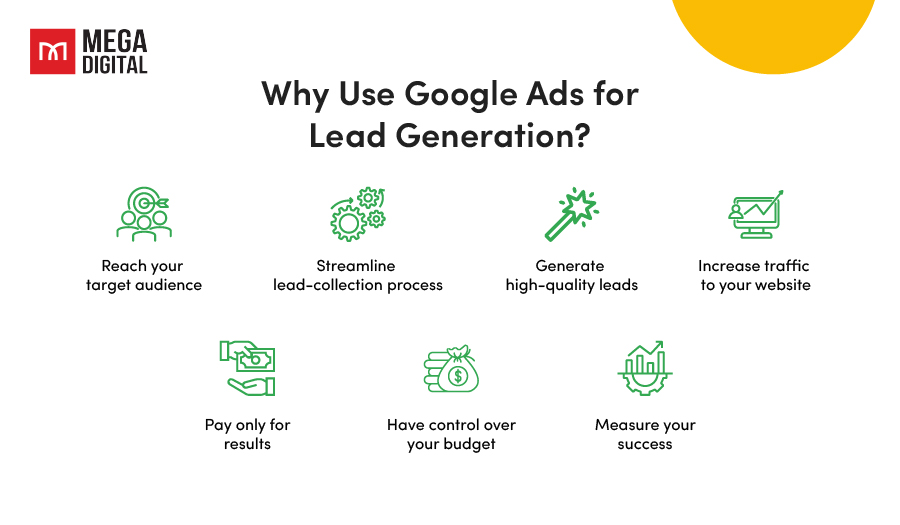
Reach your target audience
Google Ads allows businesses to reach and connect with a broad audience. With over 3.5 billion searches daily, the opportunity for businesses to reach potential customers is endless.
You can target based on keywords, location, demographics, and more. This means your ads are shown to people who are most likely to be interested in your products or services.
Streamline lead-collection process
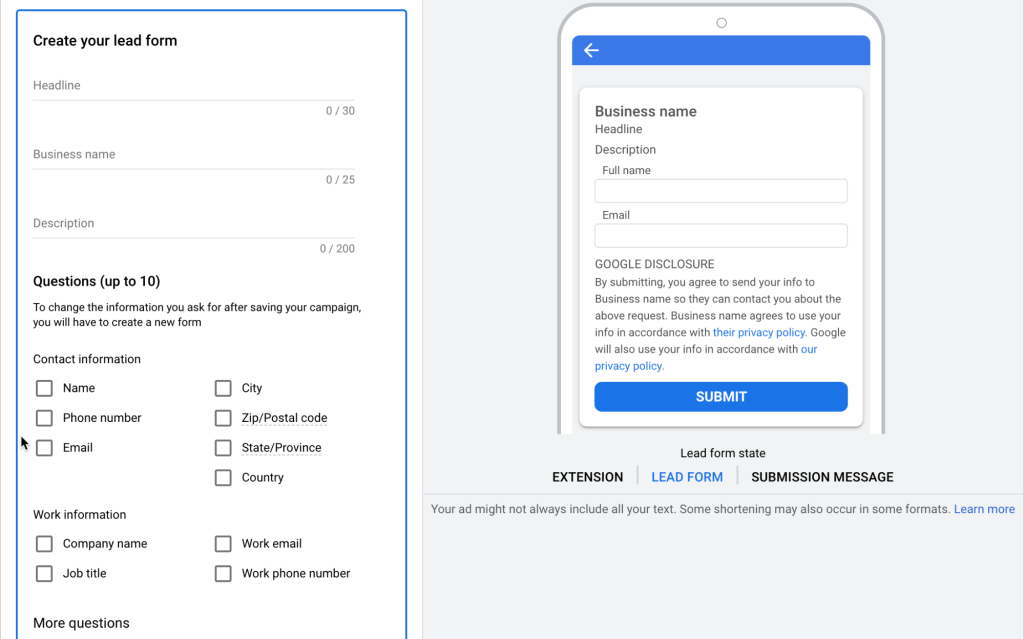
Google Ads has an extension called lead forms, allowing users to submit their information directly within the ad. When a potential customer clicks on a Google Ad, they can be directed to a landing page with a form. This form can be pre-populated with their Google account information, making it easier for them to submit their details. This not only simplifies the process for the customer but also ensures that the business receives accurate information.
Generate high-quality leads
Because you’re able to target your ads so precisely, the leads you generate from Google Ads are often high quality. These are people who are actively searching for your products or services, which means they’re more likely to convert.
Google Ads can direct potential customers to a sign-up page where they can provide their contact details in exchange for something valuable, such as a free trial, a discount, or a piece of content like a white paper or ebook. This allows businesses to build a database of potential customers who have expressed interest in their products or services.
Increase traffic to your website
Google Ads can significantly increase the visibility of your website in search engine results, driving more traffic to your site. This increased traffic provides more opportunities for businesses to distribute information about their products or services, educate potential customers, and build brand awareness. Additionally, the more visitors a website has, the more data a business can collect about customer behavior, which can be used to optimize marketing strategies and improve the user experience.
Pay only for results
Unlike conventional advertising, Google Ads operates on a pay-per-click (PPC) model. This means you only incur costs when someone clicks on your ad, ensuring your budget is directly tied to driving valuable website traffic. This cost-effective approach makes Google Ads accessible and beneficial for businesses of all sizes, allowing them to target the right audience and maximize their advertising budget.
Have control over your budget
Google Ads provides you with full control over your advertising expenditure. It allows you to establish a daily budget for your campaigns and modify it whenever necessary. This flexibility means you can start with a small budget in the beginning and gradually increase it as you observe positive results.
Measure your success
Google Ads offers detailed analytics so you can see exactly how your ads are performing. You can track all the metrics like the number of clicks, impressions, and conversions your ads are generating. This data can help you refine your campaigns and enhance your return on investment.
Industry Insight: According to LocaliQ’s Search Advertising Benchmarks, the average conversion rate for search advertising across all industries is 7.52%. Businesses that continuously optimize targeting, landing pages, and bidding strategies often achieve significantly higher conversion rates than industry averages.
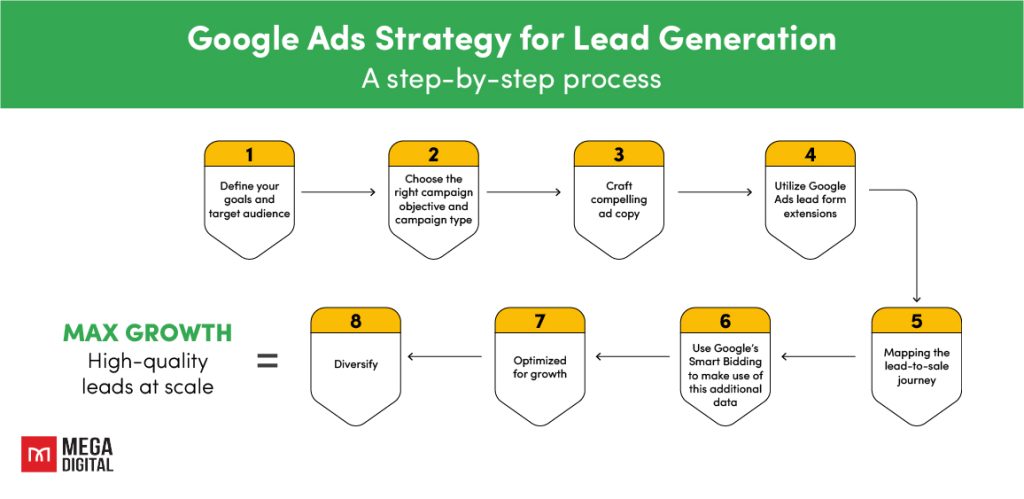
Google Ads Strategy for Lead Generation
Now, let’s delve into the key steps for building a lead-generating Google Ads campaign:
1. Define your business goals and target audience
Set clear goals
Before you start creating your ads, it’s important to define what you want to achieve. Are you looking to increase brand awareness, drive traffic to your website, or encourage customers to make a purchase?
Having clear goals will guide your strategy and help you measure the success of your campaign.
As I am focusing in Google ads lead gen in this post, lead generation should be your goal.
Understand your audience
What type of leads are you looking for? B2B decision-makers or consumers ready to purchase? Research their demographics, interests, online behavior, and pain points to craft targeted ad copy and messaging.
Pro Tip: Don’t just target demographics, target intent. Use Google’s “In-Market Audiences” to find users who are actively researching and comparing products or services in your industry.
2. Choose the right campaign objective and campaign type
Select the “Leads” objective when creating your campaign. This signals Google’s algorithm to optimize your ad delivery for form submissions, phone calls, or sign-ups.
- Search Ads: Best used when you want to reach customers actively searching for your services. Ideal for driving immediate conversions.
- Performance Max (PMax): PMax is the newest and most powerful trend for lead gen. It uses Google’s AI to serve ads across all Google channels (Search, Display, YouTube, Discover, Gmail) from a single campaign, finding leads wherever they are on the web.
- YouTube Ads: Great for storytelling, demonstrating complex B2B software, or building trust before asking for an email address.
Common Mistake: Running only Display Ads for Lead Gen. Display network traffic often has much lower intent than Search. Always prioritize Search or Performance Max for immediate lead generation.
3. Craft compelling ad copy

Your ad copy connects what users are searching for with the solution your business offers. For lead generation campaigns, strong copy should be clear, relevant, and action-driven.
- Conduct keyword research: Identify the terms your potential customers use when searching for your products or services. Focus on high-intent keywords and include them in at least one headline to improve ad relevance.
- Highlight specific benefits: Avoid generic claims. Show how your product or service solves a real problem for your target audience.
- Use direct calls to action: Tell users what to do next with clear CTAs like “Get Your Free Quote”, “Download the Guide”, or “Book a Demo.”
- Provide diverse ad variations: With Responsive Search Ads, Google can combine different headlines and descriptions. Test multiple angles, such as benefits, urgency, and social proof, to help the system find the best-performing combinations.
4. Utilize Google Ads lead form extensions
Google Ads form extensions are essentially interactive forms that appear with your ad, allowing potential customers to provide their contact information directly through the ad. This form can be customized to capture the specific information you need, such as name, email address, phone number, etc. The user’s basic contact details are often pre-filled, making it easier for them to submit the form. This not only enhances the user experience but also increases the likelihood of lead conversion. high-quality leads at scale.
5. Map the lead-to-sale journey
This process involves tracking a potential customer’s interactions with your business from the initial point of contact (the lead) to the final point of sale. It provides valuable insights into customer behavior and preferences, enabling businesses to tailor their marketing strategies accordingly. Moreover, it helps businesses measure the return on investment (ROI) of their marketing efforts, as they can directly link sales to specific ads or campaigns.
Act as if you were a potential customer and map both the online and offline touchpoints leading up to the revenue stage.
Remember to consider the following:
- Set up tracking mechanisms (Google Ads’ conversion tracking and Google Analytics) at each stage of the customer journey and constantly check if it is working or not.
- Calculate the average duration between each step to determine if it’s viable to optimize this as a conversion action.
- Track metrics like click-through rates (CTR), conversion rates, and sales to understand how customers are moving through the journey.
6. Use Google’s Smart Bidding to leverage this additional data
Smart Bidding is of great importance for every business in optimizing bids for conversions in each auction.
Business can choose from different strategies based on their goals, such as target CPA (cost per acquisition), target ROAS (return on ad spend), maximize conversions, or maximize conversion value.
Understanding how to effectively utilize bid strategies is crucial for maximizing their benefits. Here are some key considerations:
- Conversion volume: The Target ROAS currently has a threshold of 15 conversions at the account level. Based on experience, this might be insufficient. It’s advisable to use the Maximize Conversion Value strategy until you reach 50 conversions.
- Testing: If your campaign has sufficient volume, consider testing how value bidding compares to conversion-based bidding using Campaign Experiments.
- Initial volatility: Transitioning to a new bid strategy or conversion action can cause some initial volatility. The goal is to minimize this to the lowest level possible. Understanding how Smart Bidding utilizes data is crucial in this phase. You’ll likely need to make some adjustments in the short term.
- Learning period: Be prepared for a learning period where performance may initially appear somewhat weaker then you expected. This is a normal part of the process when adopting new bidding strategies.
Industry Insight: According to Google’s guide on Value-Based Bidding for Lead Generation, advertisers should assign different values to different lead types whenever possible. This allows Google’s bidding system to prioritize conversions that are more likely to drive business value rather than treating all leads equally.
7. Optimize for growth
Once you start getting more qualified leads, the next step in your Google Ads lead gen strategy is to optimize your campaigns to acquire more leads. This involves scaling your successful campaigns and refining your strategies to maximize results.
Here, I recommend you switch the keyword match type of your campaign to Broad match. Combined with Smart Bidding, you become eligible for a larger number of queries, while only participating in auctions that have a high likelihood of conversion.
On average, you can expect to see a 25% increase in conversion volume for the same Cost Per Acquisition/Return On Ad Spend.
Here are some key considerations:
- Do not use for brand campaigns: While technically, Broad Match could be used for brand campaigns, it’s not recommended. You’re likely to receive non-brand clicks through your brand campaign.
- Transparency: Despite Google limiting the queries visible in the Search Terms report, don’t let this deter you from testing Broad Match. Negative keywords remain important, but it’s crucial to ensure we ask Google to optimize towards the correct conversion actions.
- Creative relevance is crucial: With eligibility for a much broader range of queries, regular optimization of your Responsive search ads (RSAs) will ensure the Quality Score for each query is as high as possible.
- Leave no stone unturned: Pair broad match with Performance Max and dynamic search ad groups for maximum coverage.
Pro Tip: When switching to Broad Match, your Negative Keyword list becomes your best friend. Review your Search Terms report weekly and block irrelevant queries to avoid wasting money.
8. Diversify
Finally, it’s important to diversify your Google Ads lead gen strategy, as it allows you to reach different segments of your target audience, test different strategies, and reduce the risk associated with relying on a single platform or strategy.
Businesses should consider the following actions:
- Experiment with different ad types: Google Ads offers a variety of ad types. Experimenting with different ad types can help you reach your audience in different ways and identify which types are most effective for your business.
- Test different strategies: Don’t be afraid to try new strategies or techniques, from bidding strategies to targeting options. Regular testing and optimization are key to improving your campaigns and discovering what works best for your business.
Case Study – Renault’s Success with AI-Driven Lead Gen
In this case study, we will explore how Etisalat UAE leveraged automation and dynamic creatives to significantly boost their lead generation efforts.
Company Background
Etisalat UAE, a major telecommunications company based in Abu Dhabi, offers well-known products ranging from mobile packages to eLife TV and internet services. As a widely recognized telecom provider in the UAE, the company serves a broad customer base with diverse digital and connectivity needs.
The Challenge
While their products were widely recognized across the UAE, Etisalat UAE needed to move beyond simply generating brand awareness. They faced the challenge of connecting consumers with their ideal products and encouraging meaningful engagement, rather than simply driving views.
The Solution
Instead of relying solely on traditional static formats, Etisalat UAE collaborated with Google and their creative partner to implement a laser-focused dynamic creative optimisation (DCO) strategy. They used Google Signals to segment audiences based on interests, such as sports fans and movie lovers, as well as location data.
Then, an automated creative management platform dynamically adjusted ad elements, including images, calls to action, and URLs, in real time to deliver the most relevant message to each viewer.
The Results
By pivoting from product-focused to people-focused ads using automation, Etisalat UAE achieved:
- 3.5X increase in lead generation
- 54% increase in click-through rate (CTR) in just two months
- 20% drop in cost per lead
FAQs about Google Ads Lead Gen
While you can get clicks immediately, it typically takes 2 to 4 weeks for Google’s Smart Bidding algorithm to gather enough data to optimize your cost per lead. Consistent optimization is required during the first month.
This usually comes down to three things: a disconnect between your ad copy and landing page, high-friction lead forms (too many questions), or targeting broad keywords with low buying intent.
A “good” CPL varies drastically by industry. For a B2C local service, $15 – $30 might be standard, whereas a B2B SaaS company might happily pay $150 – $300 for a qualified demo request. The real metric to track is your Return on Investment (ROI) after the lead closes.
Use more specific keywords, add qualifying questions to your forms, and track offline conversions. This helps Google optimize toward leads that are more likely to become customers.
Wrap-up
Google Ads is a powerful tool for businesses to generate lead. By understanding how to use Google Ads lead gen and implementing a solid strategy, businesses can accumulate high-quality leads and ultimately increase their bottom line. Remember, the key to success with Google Ads lies in understanding your audience, creating compelling ads, and continually optimizing your campaigns.