

Struggling with “Low” Ad Strength or wasted budget from unoptimized Performance Max assets? Even small formatting mistakes can hurt campaign performance or lead to disapproved creatives. In this article, I’ll explain everything you need to know about Performance Max asset specs and the best practices to boost your return on ad spend.
Quick summary:
- We will explore the precise dimensions and character limits for all text, image, and video assets to ensure your ads are approved immediately.
- You will discover the most common reasons Google disapproves assets and learn exactly how to fix them to keep your campaigns running smoothly.
- We provide nine actionable best practices to optimize your creatives and maximize your overall conversion rates.
- You will learn how to leverage the latest Generative AI features and market trends to stay ahead of the competition.
What is a Performance Max asset?
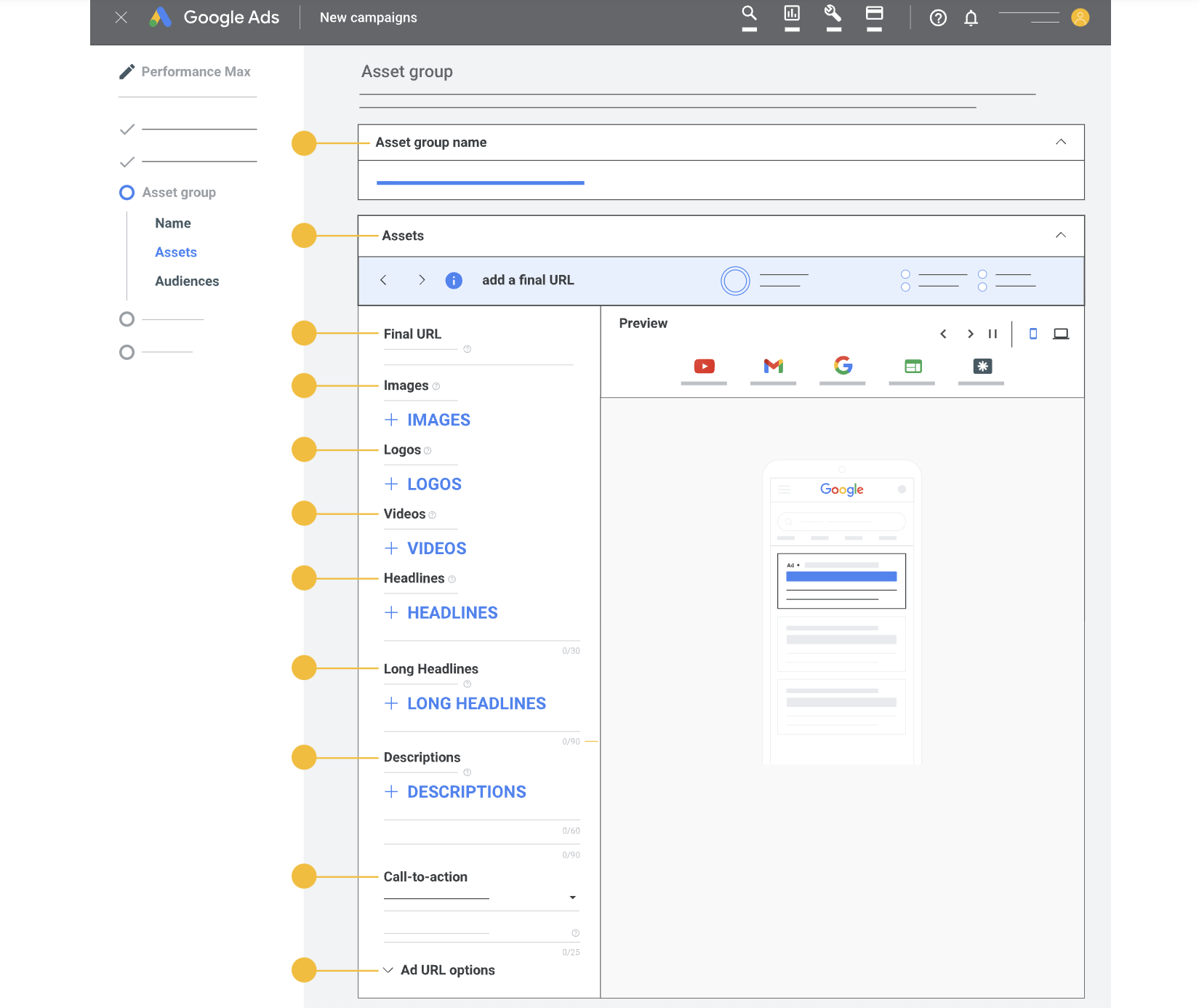
Performance Max assets are creative elements like text, images, or videos used in your campaign. Combined into asset groups linked to product groups based on themes (brand, category, audience), Google Ads effectively displays and matches these creatives across diverse channels.
Google Performance Max campaign assets can be divided into 4 types:
- Texts
- Images
- Videos
- Extensions
You can also create a Performance Max campaign without assets. In such cases, the ads will only be displayed on Google Shopping, Google Search, and the Google Display Network.
However, when you add assets to your campaign, your ads will have the opportunity to appear on Google Maps, YouTube, Gmail, Discover, and Google partner websites. This expands the number of placements where your ads can be shown.
Requirements and Specs of Performance Max Assets
Below are the key Performance Max asset requirements you should follow when preparing text, image, and video assets for your campaigns.
Text assets
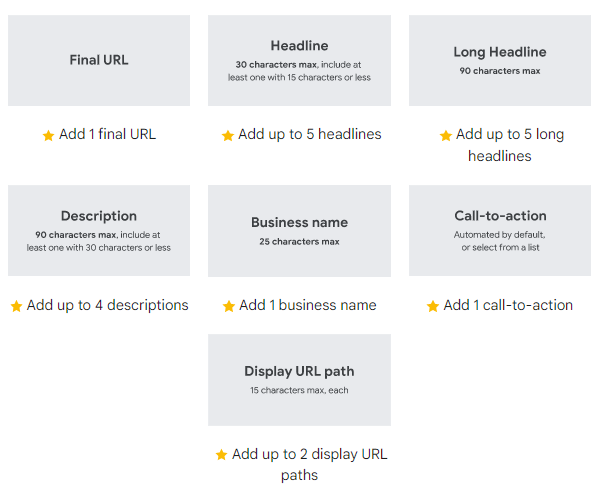
Text assets in Performance Max usually include the following components:
- Headline
- Long headline
- Description
- Business name
- Final URL
- Display URL path
- CTA (call-to-action)
Here is an overview of the specifications and requirements for text assets used in Performance Max:
| Text asset type | Requirements |
|---|---|
| Headline | Length: 30 characters max. Additional requirement: Include at least one headline that is 15 characters or shorter. Suggested quantity: 11+ headlines, with a minimum of 3 and maximum of 15. |
| Long headline | Length: 90 characters max. Suggested quantity: 2+ long headlines, with a minimum of 1 and maximum of 5. |
| Description | Length: 90 characters max. Suggested quantity: 4+ descriptions, with a minimum of 2 and maximum of 5. |
| Business name | Length: 25 characters max. Requirement: It should match your domain name or legally verified business name and should not include extra symbols or promotional text. |
| Final URL | Requirement: 1 final URL is required. |
| Call-to-action | Default: Automated. Optional: You can select from Google’s available CTA options. Suggested quantity: 1 call-to-action. |
| Display URL path | Length: 15 characters max for each path. Suggested quantity: 2 paths, with a minimum of 1 and maximum of 2. |
Image assets
In Performance Max campaigns, image assets include horizontal images, square images, vertical images, square logos, and horizontal logos. For detailed image rules, you can refer to Google’s official guide on image assets for Performance Max campaigns.
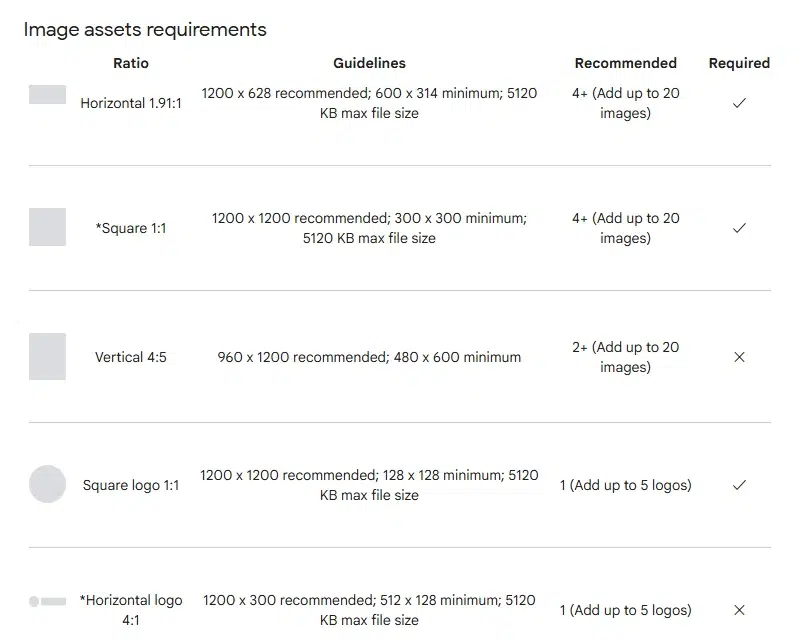
Note: Upload images as JPG or PNG files. Keep the main content within the center 80% of the image, as this safe area is less likely to be cropped across different placements.
Video assets
In Performance Max campaigns, video assets can appear across YouTube and other eligible Google placements. Google supports horizontal, square, and vertical videos, so you should prepare multiple orientations instead of relying on one format only.
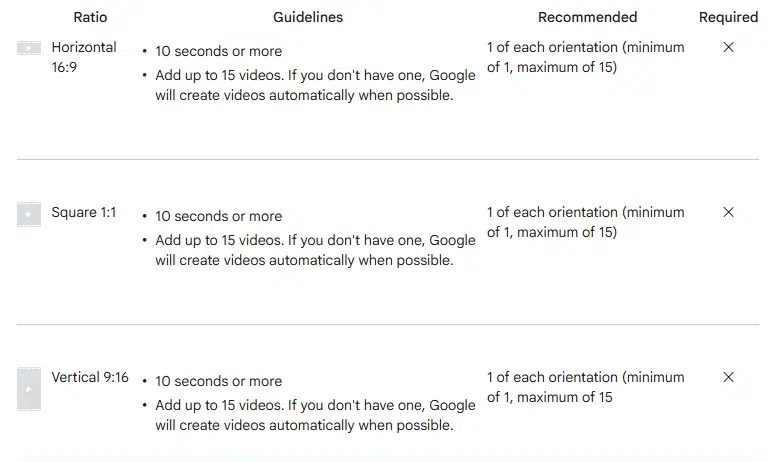
Tip: Add at least one 9:16 vertical video between 10 and 60 seconds to make your ads eligible for YouTube Shorts inventory. This helps your campaign cover more mobile-first placements instead of relying only on horizontal or auto-resized videos.
Note: If you do not upload video assets, Google may automatically create videos from your existing assets when possible. Google can also resize horizontal videos into square or vertical formats to improve performance across different placements, but you should still upload your own custom videos whenever possible for better creative control.
You can check out the list of call-to-action (and in other languages) here.
To make the most of these assets and achieve exceptional results, consider partnering with Mega Digital’s Google Advertising service. Our expert team will help you strategically manage and leverage Performance Max campaigns to drive meaningful engagement and maximize your advertising efforts. Contact us today for elevated Google advertising solutions.
9 Best practices for Performance Max assets
While it is possible to create effective campaigns using standard assets, going the extra mile can help your campaign truly stand out. Here are our top 9 best practices for successful Performance Max assets that we collected while running advertising for our valued customers:
#1 Use as many assets as possible
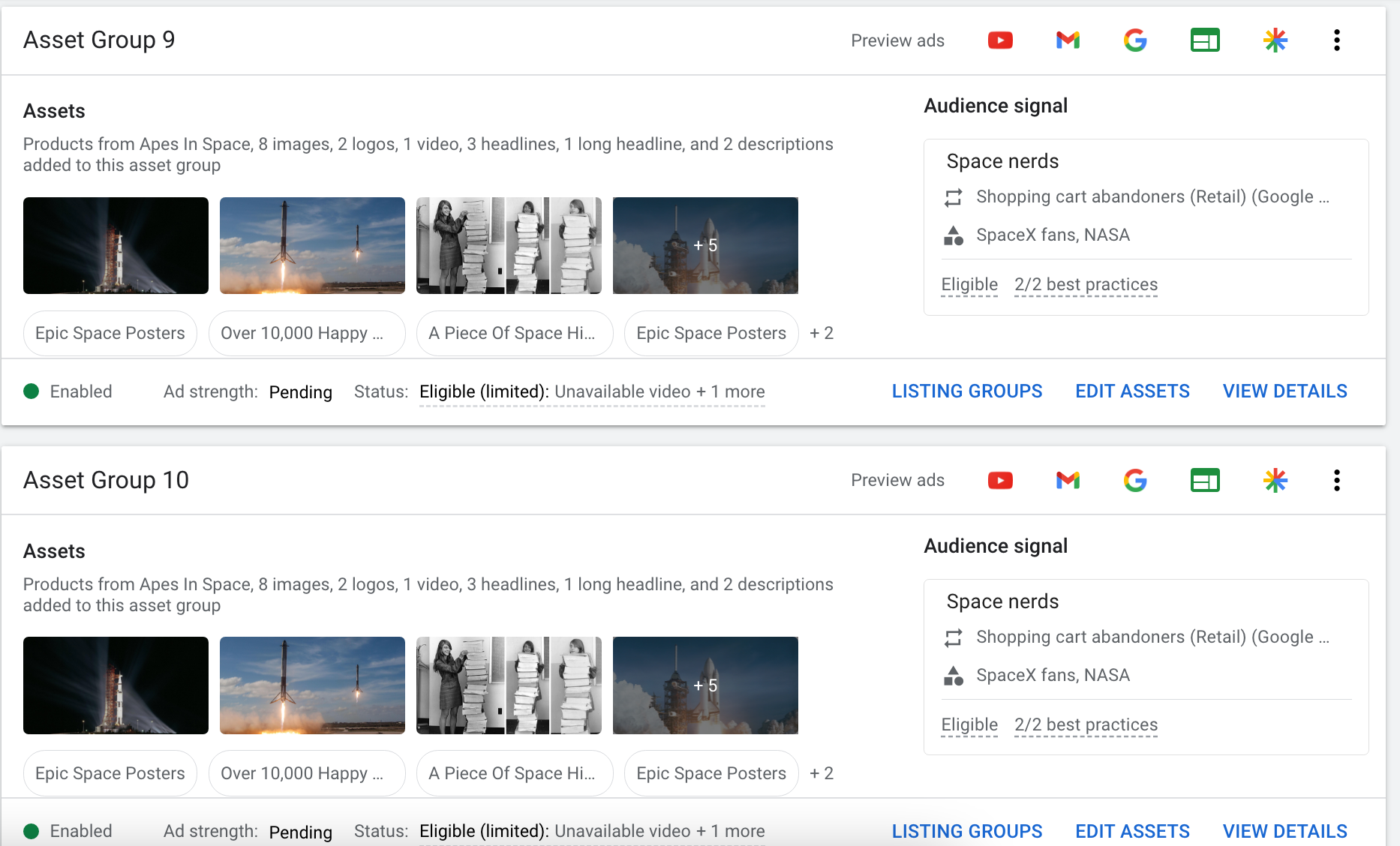
While it is possible to run a Performance Max campaign without assets, it is highly recommended to include as many assets as possible when utilizing them. Having a larger pool of creatives allows the algorithm to have more options for placements and enables Google to effectively test for effectiveness. It is important to ensure that the assets you add are relevant to your campaign.
In essence, aim for more than just the minimum number of assets within your asset group. Select a variety of assets with a consistent theme to better align with the desires and objectives of your target audience. By following this approach, you will likely see positive outcomes and better campaign performance.
#2 Add your own videos
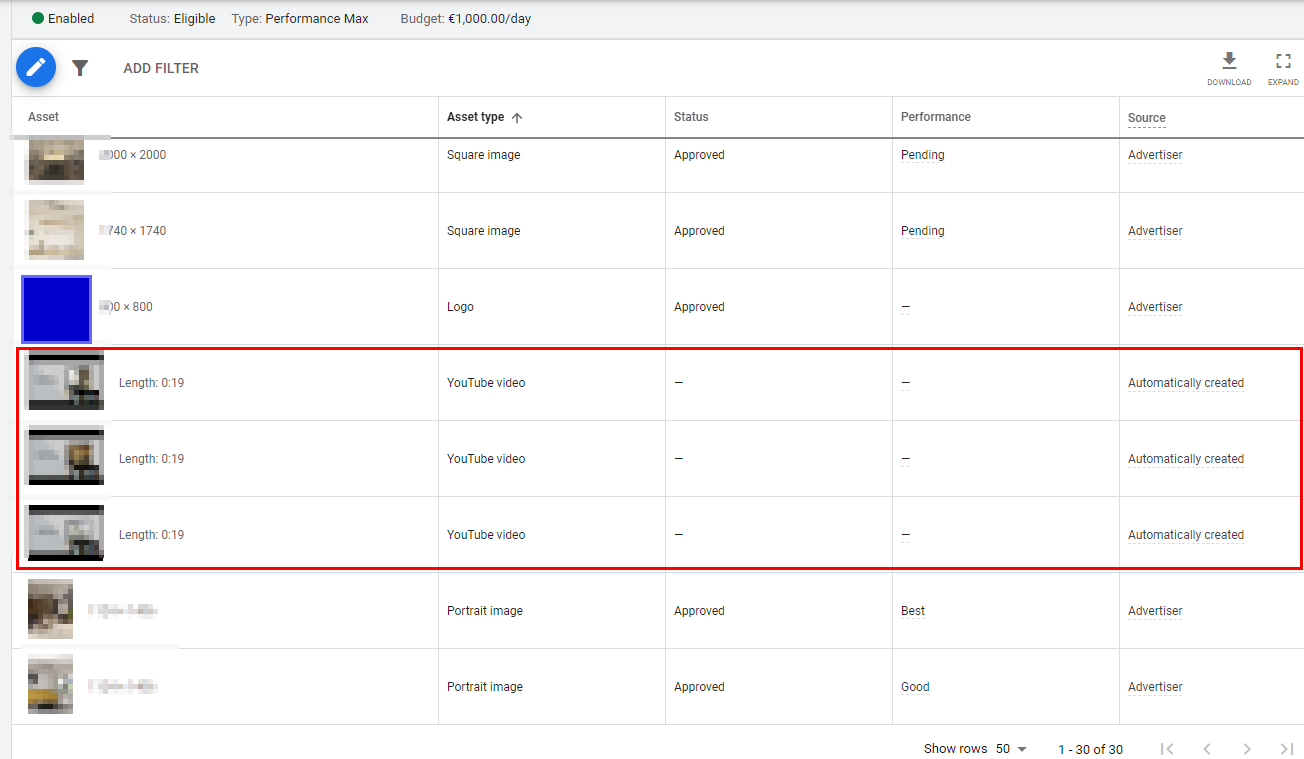
When creating your own video asset for a Performance Max campaign, you have more control over branding, structure, and appearance. If you don’t provide a video, Google will generate one using your information as a slideshow with system-selected music. Follow these principles for an effective video:
- Grab attention in the first 3-5 seconds: Use this opportunity to introduce your brand and engage viewers before the ‘Skip ad’ button appears.
- Appeal to your target audience: Include information that resonates with your intended audience, keeping them engaged while filtering out less interested viewers.
- Showcase your product or service: Clearly demonstrate key features and benefits to show how your offering meets their needs or solves their problems.
- End with a clear call-to-action: Conclude your video with a strong and concise call-to-action, guiding viewers to take the desired next steps.
#3 Enhance text assets with dynamic values
Adding dynamic values to your text ads is a recommended practice. It allows you to anticipate your target audience’s search queries and provide specific information, increasing relevance. The benefits of using dynamic values in ads include:
- Time savings: Instead of creating separate headlines for each group, you can fill in a template once and let the dynamic values automatically match with the relevant asset group, saving time.
- Relevance: Displaying specific information in your ads makes them more relevant, setting you apart from competitors.
- Improved results: By incorporating dynamic values, customers immediately grasp the context of your ad, leading to higher-quality clicks and increased conversion probability.
Try these tips to improve the quality of your Performance Max assets.
#4 Add audio to your videos
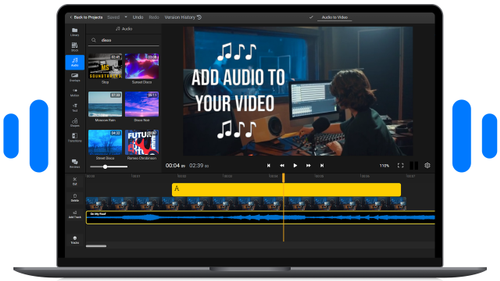
In YouTube, it is common for users to play videos as background sound while focusing on other activities. Therefore, if your video only contains background music, you miss the opportunity to capture the attention of the viewer/listener.
To make the most of this situation, consider incorporating a compelling voiceover in your video. By doing so, you engage both the active and passive viewers. This approach increases the likelihood of viewers taking action based on your video, rather than just providing a pleasant musical interlude.
By including a clear voiceover alongside the visuals, you effectively grab the attention of viewers and enhance the effectiveness of your video in driving desired outcomes.
#5 Leverage Google AI and anticipate seasonal trends
To keep your Performance Max assets relevant, combine Google’s AI-powered asset creation with timely promotional planning.
Google AI can now help eligible advertisers generate or suggest text, image, logo, and video assets when building a Performance Max asset group. Use these suggestions to refresh creatives faster, but always review them before publishing to ensure they match your brand, offer, and landing page.
Alongside AI, plan your asset groups around seasonal demand, product trends, and major promotions such as after-season sales, Black Friday, Christmas, or new product launches. The more relevant your assets are to current buyer intent, the stronger your Performance Max campaign inputs become.
#6 Constantly keep testing
What may be effective today doesn’t guarantee the same results tomorrow. That’s why ongoing testing of your assets is crucial.
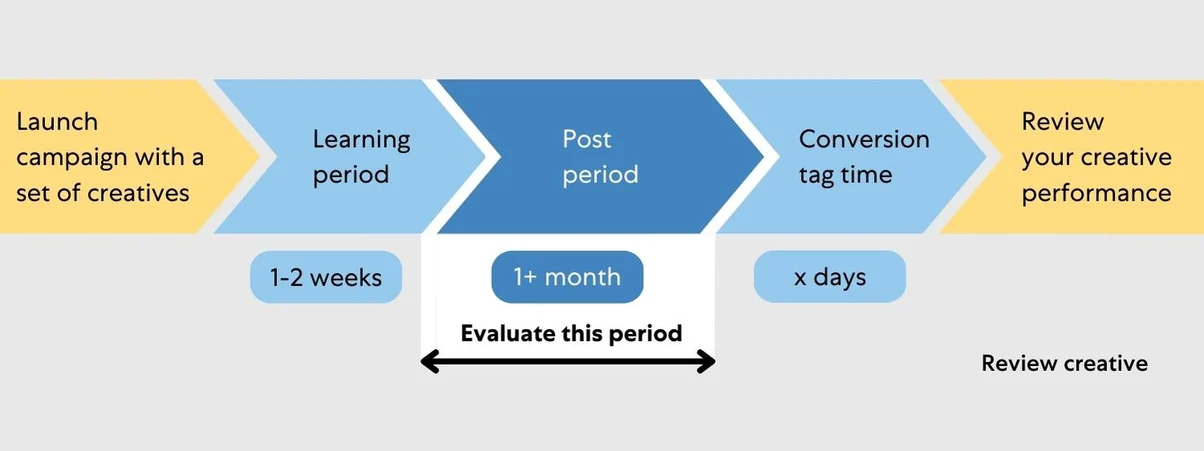
For instance, try adding different call-to-action to your assets and run them simultaneously to identify the most effective approach. Instead of testing everything at once, focus on A/B testing to compare specific variations. Once you determine a winner, move on to the next test to refine your design or asset further. Follow this recommended timeframe for conducting tests:
#7 Let the branding surface everywhere
The higher the recognition, the greater the chance of making a purchase. Ensure your logo, colors, and typography are recognizable across texts, banners, and videos. Maintain a cohesive brand identity for optimal results.
#8 Give careful thought to asset group structure
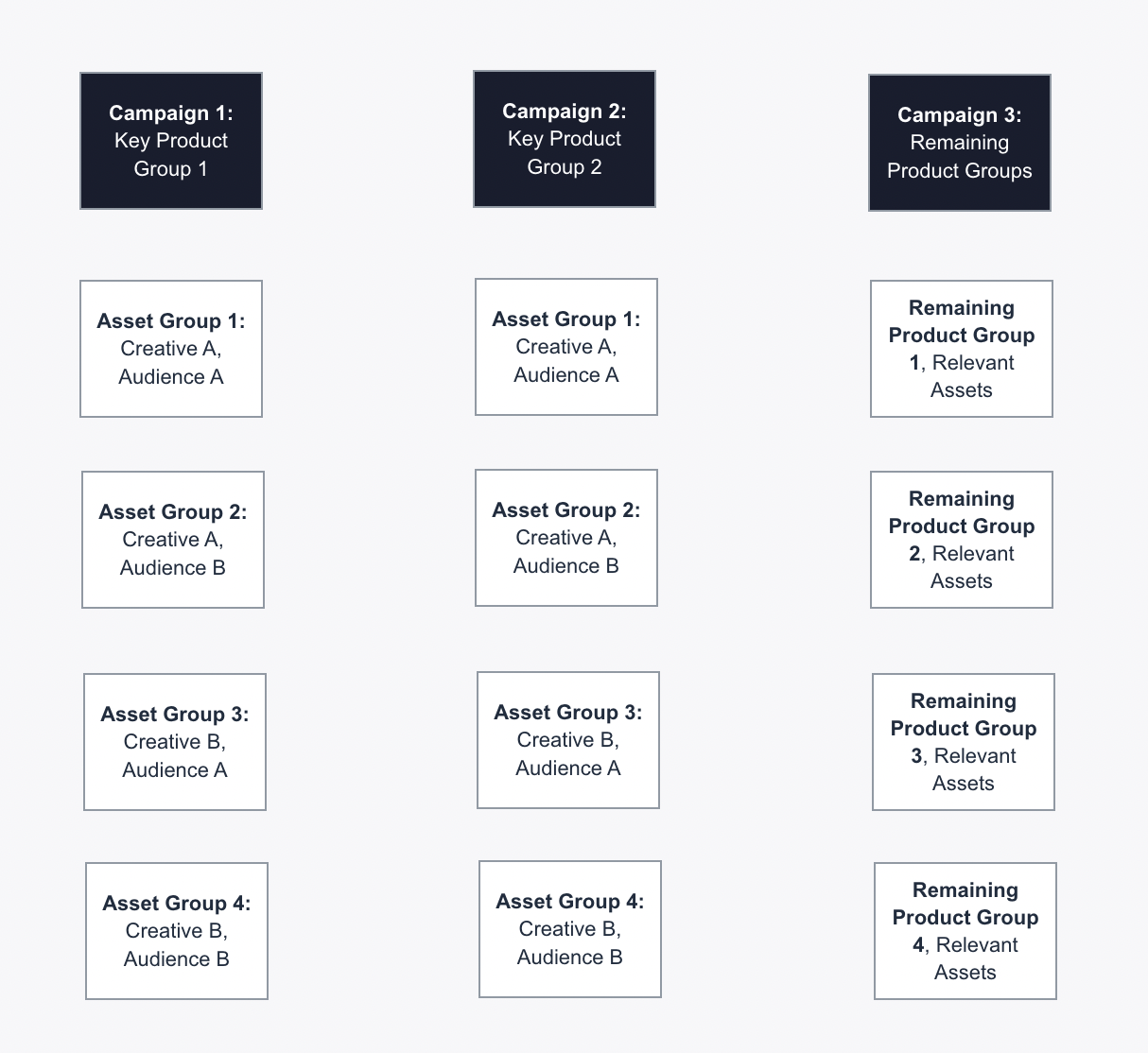
The structure of your Performance Max assets determines their type and effectiveness. You can base it on the target audience, performance, categories, or brands. A deeper structure aligns better with search queries and customer preferences, reaching customers at different stages of the sales funnel. However, it requires time and effort. Learn how to set up the best PMax campaign structure for your organization in our article.
#9 Select the right call-to-action
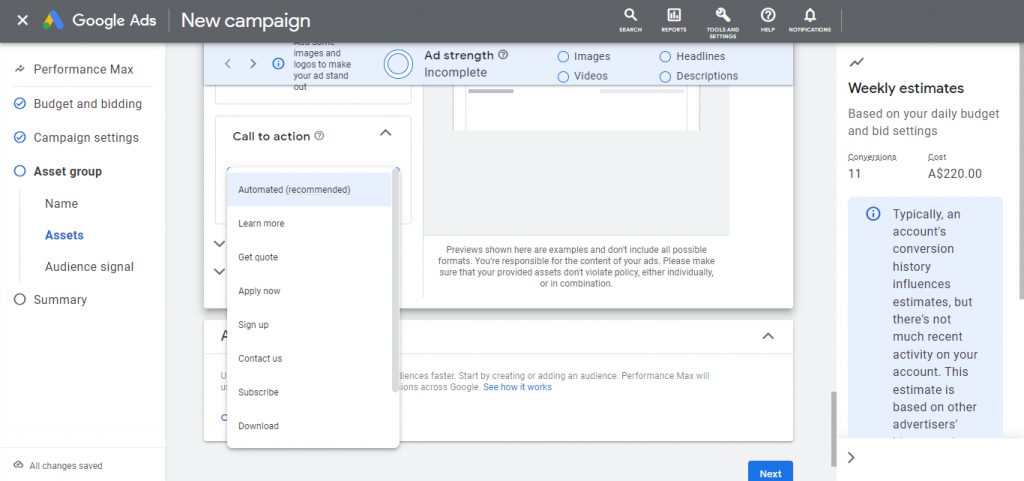
The primary goal of ads is to prompt action. To effectively guide your audience, carefully consider your call-to-action. Clearly identify whether you want them to make a purchase, read more, or get inspired. This prevents leading them astray and ensures a focused and desired response.
Common Performance Max Asset Disapprovals
Even correctly sized assets can be rejected if they fail Google’s policy, quality, or format requirements.
Excessive text or graphic overlay
Google prefers clean visuals that clearly show your product, service, or brand. If your image has too much promotional text, large watermarks, or oversized logo overlays, it may be limited or disapproved.
How to fix: Keep image overlays minimal and prepare at least one clean version without text or graphic overlays for each key aspect ratio. Avoid placing important details near the edges, as they may be cropped on different placements.
Wrong image specs or unsafe cropping
Performance Max image assets may be rejected or displayed poorly if they use the wrong file format, file size, aspect ratio, or layout. This often happens when the main product or message is too close to the edge of the image.
How to fix: Use JPG or PNG files, keep each image under Google’s file size limit, and place the main content within the center safe area. Prepare multiple image ratios, such as square, landscape, and vertical, so Google has enough assets to serve across different placements.
Poor video quality or copyright issues
Videos can be rejected if they are blurry, low-resolution, difficult to understand, or contain copyrighted music, footage, or brand elements without permission.
How to fix: Upload clear videos with original footage and properly licensed audio. Avoid copyrighted songs, third-party clips, or brand assets unless you have permission to use them in advertising.
Misleading claims or unclear business value
Text assets can be disapproved if they exaggerate results, make unrealistic promises, or fail to clearly explain what product or service is being advertised. Claims like “guaranteed results” or “instant results” can easily trigger policy issues.
How to fix: Rewrite your headlines and descriptions with clear, factual benefits. Make sure your landing page supports the same product details, pricing, offers, and claims used in your ad copy.
FAQs about Google Performance Max Specs
Yes. If you do not upload videos, Google may automatically create video assets from your existing text, image, and feed assets. However, uploading your own videos gives you better control over branding, messaging, and creative quality.
There is no one-size-fits-all number. Create separate asset groups only when your products, audiences, languages, themes, or promotions need different messaging and creative assets. Avoid splitting too much, as Performance Max works better when it has enough data to learn from.
Most ads are reviewed within one business day. Some assets may take longer if they require a more complex review, especially in sensitive categories. Upload your assets early before major launches, promotions, or holiday campaigns.
Your campaign can still run if it meets the minimum asset requirements, but limited assets may reduce creative variety and available placements. Aim for “Excellent” Ad Strength by adding enough relevant text, image, and video assets for Google to test across different formats.
Final words
Mastering Performance Max asset specs helps reduce disapprovals, improve creative quality, and give Google more assets to optimize your campaigns. By using the right dimensions, testing variations, and leveraging Google AI carefully, you can build stronger PMax campaigns with better results. Mega Digital can help businesses set up, manage, and optimize Google Ads campaigns more effectively.