

Black Friday brings more shoppers, but also higher ad costs and tougher competition. Without the right strategy, your Google Ads budget can quickly drain without delivering the sales you expect. Here are practical Black Friday Google Ads strategies to help you optimize your campaigns, control costs, and drive better results in 2026.
Quick summary:
- Prepare your Google Ads campaigns early for Black Friday on November 27 and Cyber Monday on November 30, 2026.
- Apply 7 practical strategies to improve targeting, promotions, bidding, remarketing, and conversions.
- Track ROAS, CPC, and conversion rates to optimize spending and protect profitability.
- Follow the Black Friday Google Ads checklist to manage campaigns before, during, and after the sale.
How to prepare your Google Ads campaigns for Black Friday

Black Friday falls on Friday, November 27, 2026, followed closely by Cyber Monday on Monday, November 30. With two major shopping events just days apart, advertisers need a coordinated plan to capture demand throughout the peak shopping period without making rushed decisions.
Here’s what to prepare before launching your campaigns:
- Review past performance: Analyze last year’s Black Friday and Cyber Monday data to identify top-performing campaigns, products, and peak conversion periods.
- Verify conversion tracking: Ensure purchases and conversion values are recorded accurately to support reliable performance measurement.
- Check campaign readiness: Review ad approvals, product feeds, pricing, and inventory availability in Google Merchant Center.
- Set clear goals and budgets: Define your target ROAS, revenue goals, and spending limits based on historical performance and profit margins.
- Finalize your campaign timeline: Schedule promotions, prepare landing pages, and complete essential checks before peak week.
7 Black Friday Google Ads strategies to boost performance
Running successful Google Ads during Black Friday requires more than increasing your budget. Here are seven practical strategies to attract high-intent shoppers, improve conversions, and make your ad spend more effective.
#1 Optimize landing pages for Black Friday conversions
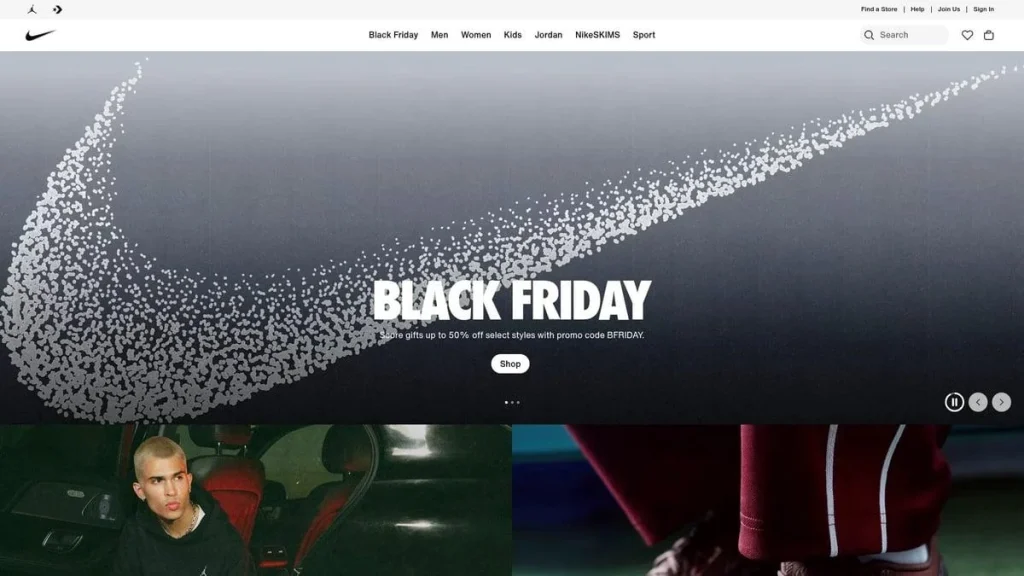
Even a well-optimized Google Ads campaign can lose potential sales if shoppers encounter slow pages, unclear discounts, or complicated checkout processes.
Your landing pages should make it easy for visitors to find the advertised products, understand the offer, and complete their purchases.
Focus on four essentials:
- Clear offers: Display promotional prices, discounts, and deadlines prominently.
- Consistent messaging: Ensure product details and offers match what visitors saw in your ads.
- Mobile experience: Improve page speed, navigation, and product selection on mobile devices.
- Smooth checkout: Minimize unnecessary steps and clearly display shipping costs, payment options, and coupon requirements.
For larger promotions, coordinate your Google Ads landing pages with your overall Black Friday campaign to maintain consistent messaging across marketing channels.
#2 Target high-intent Black Friday keywords
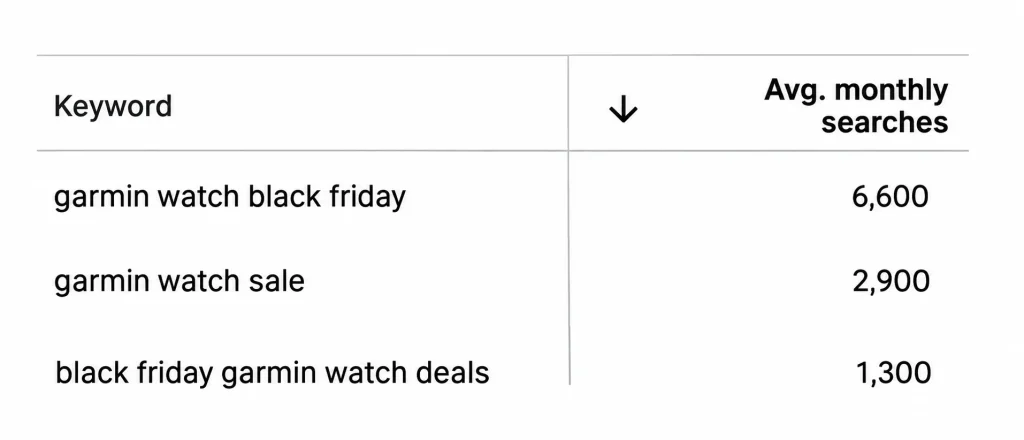
Not all Black Friday searches indicate the same purchase intent. Someone searching for “Black Friday deals” may still be exploring options, while a search for “Nike running shoes Black Friday sale” suggests interest in a specific product.
To attract more qualified traffic, organize your Search campaign keywords into three groups:
| Keyword type | Example |
|---|---|
| Branded | Nike Black Friday deals |
| Product-specific | Black Friday running shoes sale |
| General deals | Best Black Friday shoe deals |
Use Google Keyword Planner and historical search terms to identify keywords relevant to your products and promotions. Prioritize specific queries with strong commercial intent, especially when working with limited budgets.
Don’t overlook negative keywords. Regularly review your search terms report to exclude irrelevant searches that consume your budget without contributing to sales.
#3 Create compelling Black Friday ads and promotion assets
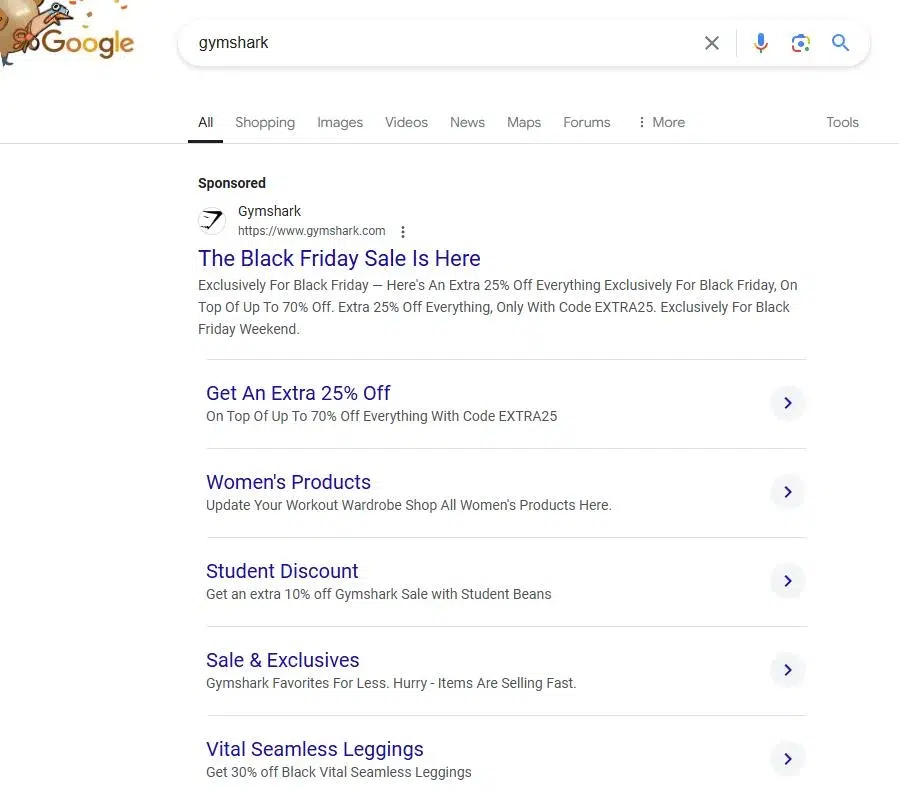
Your Google Ads need to give shoppers a clear reason to choose your offer over competitors. Instead of generic messages like “Shop Now”, highlight specific discounts, popular products, or promotion deadlines.
Here’s an example of a Black Friday responsive search ad:
| Ad element | Example |
|---|---|
| Headline 1 | Black Friday Shoe Deals |
| Headline 2 | Save 25% on Running Shoes |
| Headline 3 | Deals End November 30 |
| Description | Shop selected running shoes at 25% off through Cyber Monday. Terms apply. |
You can also strengthen your ads with promotion assets to showcase discounts, sitelinks to direct shoppers to sale categories, and countdown customizers to highlight approaching deadlines.
Google allows advertisers to select Black Friday and Cyber Monday as occasions for promotion assets, making it easier to highlight seasonal offers in eligible ads.
For more creative approaches beyond Google Search, explore Mega Digital’s Black Friday advertising ideas and examples.
#4 Optimize your Google Shopping feed and promotions
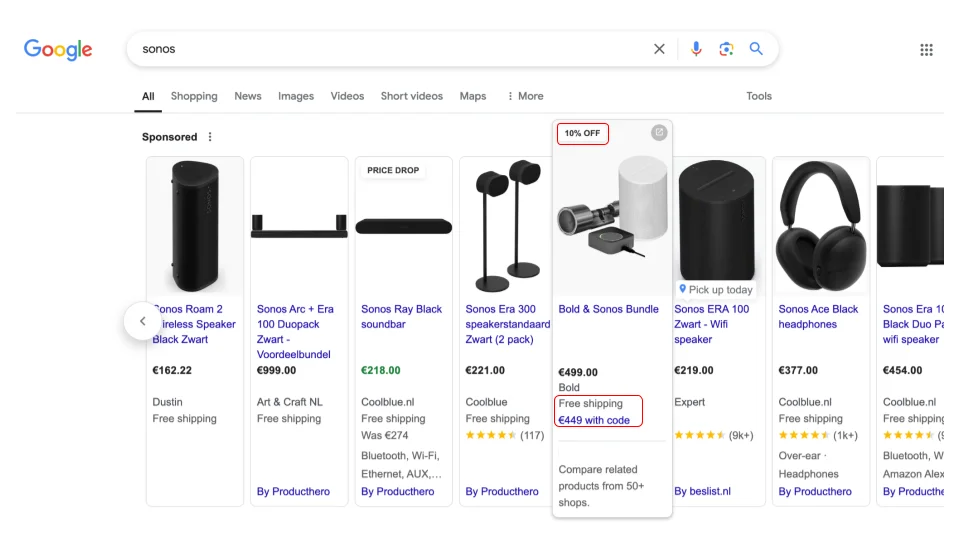
During Black Friday, shoppers actively compare products and prices before making a purchase. A well-optimized Google Shopping feed helps your products appear for relevant searches while highlighting competitive offers.
Focus on these improvements:
- Update sale prices: Use the sale_price and sale_price_effective_date attributes in Google Merchant Center to schedule discounted prices and make eligible sale price annotations possible.
- Improve product titles: Include relevant details such as brand, model, size, and color to help Google match your products with relevant searches.
- Set up Merchant Center promotions: Submit eligible discount offers, coupon codes, or free shipping promotions early enough for Google’s review.
- Prioritize profitable products: Focus on bestsellers with sufficient stock and healthy margins rather than promoting every product equally.
For example, if you’re offering 25% off running shoes, ensure the discounted prices match your website and that eligible promotions are configured correctly.
According to Google Merchant Center, promotion approval typically takes 24 – 72 hours from the promotion’s effective start time. Submitting offers early helps reduce the risk of missing peak shopping traffic.
#5 Fine-tune Performance Max and Shopping campaigns
Performance Max and Standard Shopping campaigns can both support Black Friday sales, but they require different optimization approaches.
For Performance Max campaigns, refresh seasonal creative assets and review asset groups to ensure your messaging reflects current promotions. You can also add relevant search themes, such as “Black Friday electronics deals”, to provide Google’s AI with additional context about seasonal demand.

For Standard Shopping campaigns, analyze product group performance and use custom labels to organize products by profitability, bestseller status, or promotional priority. This makes it easier to manage product-level performance and allocate resources where appropriate.
Mega Digital recommends optimizing existing campaigns ahead of peak week rather than rebuilding them at the last minute. Significant changes to campaign structure or bidding strategies may require additional time for Google’s automated systems to adjust.
#6 Adjust budgets and Smart Bidding strategically
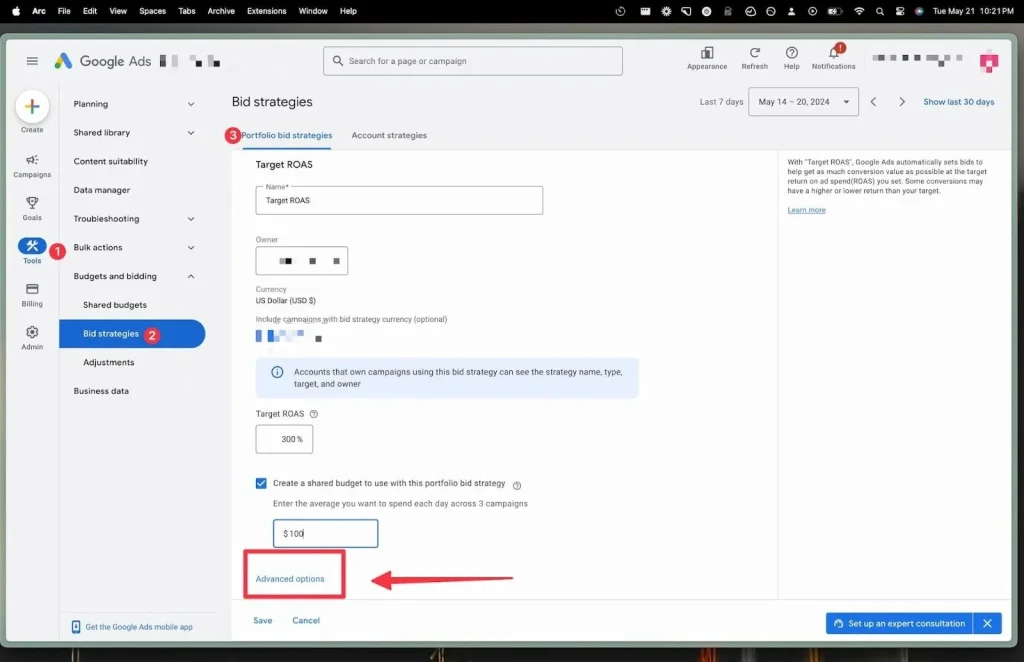
Black Friday often creates opportunities to increase sales, but raising your daily budget doesn’t always translate into better returns. The key is knowing which campaigns deserve additional investment.
An analysis of 113 eCommerce accounts showed an average ROAS of 8.41x during Cyber Five 2025, compared with 7.18x across the full year. While these results aren’t a universal benchmark, they illustrate how peak shopping periods can affect advertising returns.
To manage your spending effectively:
- Prioritize profitable campaigns: Allocate more budget to campaigns with strong conversion value and sufficient room to scale.
- Review Target ROAS: Adjust targets when justified by your sales goals, historical performance, and expected demand.
- Calculate break-even ROAS: Ensure your advertising costs don’t exceed the contribution margin available from each sale.
For example, if an $80 order leaves $20 in contribution margin before advertising, your break-even ROAS is 4.0x.
Google Smart Bidding already accounts for many seasonal patterns. According to Google’s guidelines, seasonality adjustments should generally be reserved for short events with significant expected conversion rate changes, rather than applied automatically to every Black Friday campaign.
#7 Re-engage shoppers with remarketing
Many shoppers research products before Black Friday but wait for discounts before purchasing. Remarketing allows you to reconnect with these potential customers when your offers become available.
Consider three valuable audience groups:
- Product viewers: Promote discounts on products or categories they’ve previously explored.
- Cart abandoners: Remind shoppers about relevant deals on items they considered purchasing.
- Past customers: Introduce complementary products, new collections, or exclusive seasonal offers.
You can also use Customer Match to reconnect with eligible customers using first-party data.
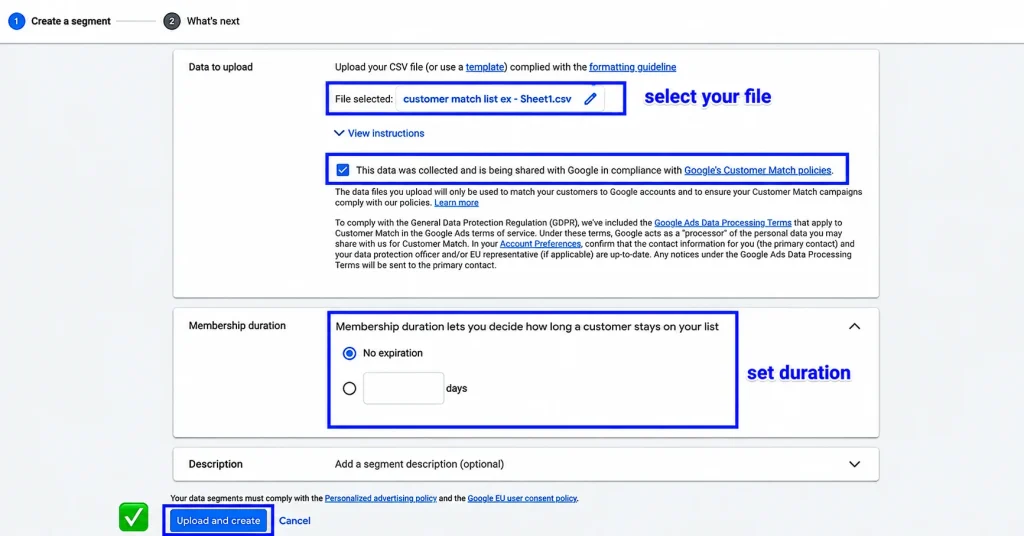
For Performance Max campaigns, add relevant customer lists or website visitor segments as audience signals. These help guide Google’s AI toward potential customers but don’t restrict delivery exclusively to those audiences.
The goal is to tailor your Black Friday messaging to each audience’s interests rather than showing everyone the same promotion.
Finally, test the entire purchase journey before the sale begins. Small issues during checkout can cost you conversions when traffic is at its peak.
How to manage Google Ads during and after Black Friday
Black Friday and Cyber Monday can bring rapid changes in ad costs and conversion rates. Monitoring performance closely helps you identify profitable opportunities, address issues early, and avoid unnecessary spending.
Track the right metrics to evaluate campaign performance
Focus on ROAS, conversion rate, CPC, and budget pacing rather than traffic or revenue alone. Compare these metrics against your historical data and profitability targets to determine whether your campaigns need adjustments.
For example, if your break-even ROAS is 4.0x and your target is 4.5x:
| Campaign ROAS | Performance assessment |
|---|---|
| 5.0x | Above target. Consider scaling if demand remains strong. |
| 4.2x | Above break-even but below target. Monitor before adjusting. |
| 2.5x | Below break-even. Investigate and limit unprofitable spending. |
A higher CPC isn’t necessarily bad if conversion rates or order values also increase. Additionally, account for conversion lag before judging same-day results.
Adjust campaigns based on performance signals
Instead of reacting to every fluctuation, match your optimization decisions to the issue:
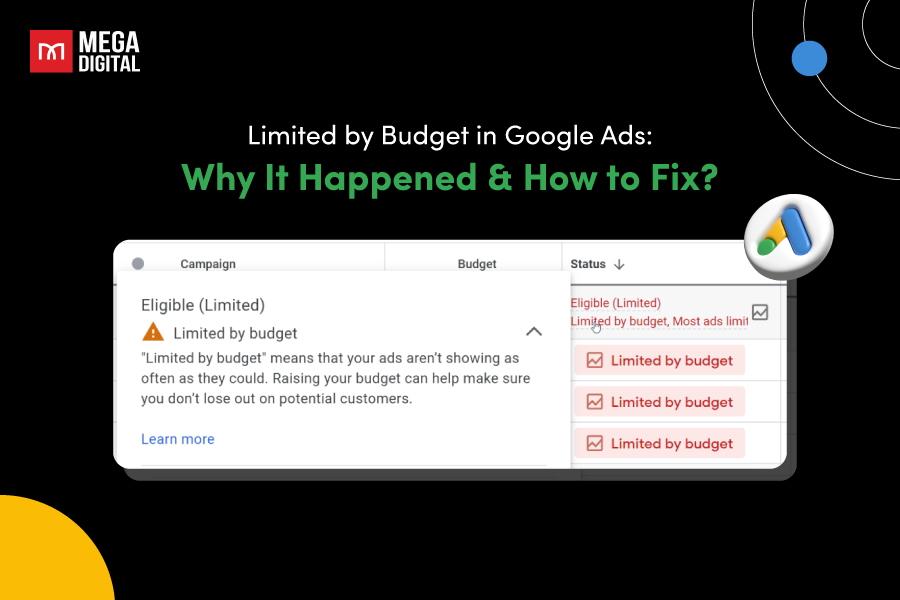
- High ROAS but limited traffic: If a profitable campaign is marked “Limited by budget”, consider gradually increasing its budget to capture additional demand.
- Rising CPC and declining ROAS: Check conversion rates and order values. If returns remain below break-even, consider reducing budgets or tightening your Target ROAS.
- High clicks but few conversions: Review search terms, landing pages, stock availability, and checkout errors before changing your bidding strategy.
For Smart Bidding campaigns, avoid frequent changes based on short-term data. Evaluate performance over sufficient conversion cycles to understand the impact of your adjustments.
Review results and control spending after Cyber Monday
Once Cyber Monday ends on November 30, review your campaigns to ensure your spending reflects post-sale demand rather than peak-week expectations.
Focus on three actions:
- Reset temporary settings: Remove expired promotions, review seasonal budgets and bidding targets, and update ad copy for December campaigns.
- Reallocate your budget: Reduce spending on campaigns falling below your profitability targets and prioritize products that continue generating profitable conversions.
- Evaluate final performance: Compare ad spend, revenue, ROAS, and contribution profit after accounting for conversion delays. Identify which campaigns and offers performed best across Black Friday and Cyber Monday.
Use these findings to refine your budget allocation and campaign strategy for the remaining holiday season.
Black Friday Google Ads checklist for 2026
With Black Friday falling on November 27 and Cyber Monday on November 30, 2026, use this checklist to keep your Google Ads campaigns on track throughout the shopping season.
| Phase | Google Ads checklist |
|---|---|
| Before Black Friday (Nov 5 – 26) | Review historical campaign performance and set ROAS targets. |
| Verify conversion tracking, product feeds, and inventory. | |
| Finalize promotions, ad creatives, and landing pages. | |
| Check ad approvals and prepare additional budget for peak demand. | |
| During Black Friday & Cyber Monday (Nov 27 – 30) | Monitor daily spending, ROAS, CPC, and conversion rates. |
| Check for disapproved ads, expired offers, and out-of-stock products. | |
| Adjust budgets based on profitability and campaign performance. | |
| Account for conversion delays before making major changes. | |
| After Cyber Monday (Dec 1 – 7) | Remove expired promotions and update seasonal ad copy. |
| Review budgets and bidding targets based on post-sale demand. | |
| Evaluate campaign profitability after conversion data stabilizes. | |
| Apply performance insights to upcoming December campaigns. |
FAQs about Black Friday Google Ads
Start preparing 4 – 6 weeks before Black Friday to review campaign performance, finalize promotions, and test your ads. For Black Friday 2026 on November 27, aim to complete major optimizations before peak week.
Base your budget on historical performance, expected demand, and profit margins. Prioritize profitable campaigns and reserve extra budget for peak shopping days rather than increasing spending across all campaigns.
Not always. If you’re using Smart Bidding, Google automatically adjusts bids based on auction signals. Only change your bidding targets when performance data and profitability goals justify it.
Search Ads capture high-intent shoppers, Shopping Ads showcase products and discounts, while Performance Max reaches customers across Google’s channels. The best choice depends on your products, budget, and campaign goals.
Read more: 11 Tips to catch up with Black Friday on TikTok Mega Sales 2026
Conclusion
Hope these Black Friday Google Ads strategies help you prepare your campaigns, manage your budget effectively, and turn more clicks into sales. Remember, success during peak shopping season isn’t just about increasing ad spend, but making the right adjustments at the right time.
If you’re looking to improve your campaign performance, Mega Digital’s Google Ads management services can help you plan, optimize, and manage your advertising efforts more effectively.