

For a mobile game UA manager, the real challenge isn’t getting installed. It’s getting players who stay, engage, and make in-app purchases. That’s where TikTok app install ads can become a strong growth channel. In this guide, we’ll walk through how to set up, optimize, and scale TikTok campaigns to drive higher-quality installs for mobile games.
Quick summary:
- TikTok app install ads help mobile game teams turn short gameplay moments into install intent.
- Strong tracking should include app attribution, MMP/SDK setup, and key in-game events.
- AEO helps optimize beyond installs toward tutorial completion, level achievement, IAP, and other quality signals.
- Gameplay-first, UGC-style creatives often fit TikTok better than polished cinematic trailers.
- Separating Pangle, iOS, and Android campaigns helps measure CPI, retention, ROAS, and player quality more accurately.
What Are TikTok App Install Ads?

TikTok app install ads are video ads designed to send users from TikTok directly to your mobile game’s download page on the App Store or Google Play.
These ads appear naturally in the For You feed, just like regular TikTok videos, but include a clear call-to-action button such as “Download Now” or “Play Game.” Instead of interrupting users with static banners, TikTok app promotion ads use short-form entertainment to build curiosity, show gameplay, and encourage players to install when their interest is already high.
Why TikTok App Install Campaigns Work for Mobile Games
For mobile game UA teams, TikTok is more than a traffic source. It is a discovery channel where players can see gameplay, understand the game loop, and decide whether a title feels worth downloading.
- Large player-ready audience: Around two-thirds of TikTok’s global ad audience is between 18 and 34, making the platform a strong fit for many mobile game genres.
- Native gameplay discovery: TikTok’s vertical, short-form format makes it easy to show battles, puzzles, upgrades, rewards, or level progression in just a few seconds.
- Lower CPI potential: TikTok can help mobile game advertisers reduce acquisition costs when campaigns combine strong creatives with proper event optimization.
- Value beyond last-click installs: TikTok often influences users before the final install, so its impact may be underestimated if UA teams only look at last-click CPI.
- Better fit for quality installs: Instead of optimizing only for downloads, TikTok app install campaigns can be built around meaningful in-game actions, such as tutorial completion, level achievement, registration, or in-app purchase.
In TikTok’s HOMA case study for Clean It!, the campaign generated 2.5M installs in six months, with 55% lower CPI, 60% higher CVR, and 50% lower cost per purchase. Singular’s Afterverse analysis also found a 70% assisted install rate and 2x higher ROI for TikTok than last-click attribution showed.
How to Set Up a TikTok App Promotion Campaign
Before launching, make sure your tracking is ready. TikTok needs clean install and in-game event data to find players who are likely to stay, progress, and purchase.
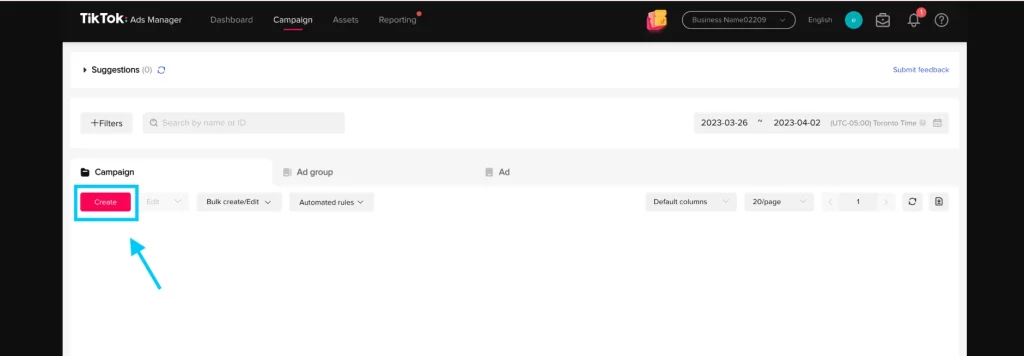
Step 1: Open TikTok Ads Manager and click Create.
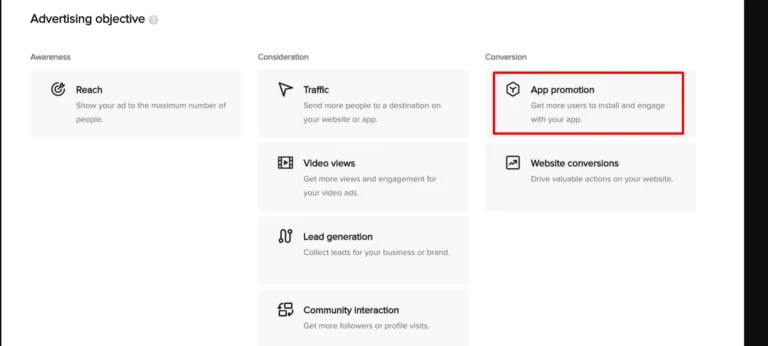
Step 2: Select App Promotion as your campaign objective.
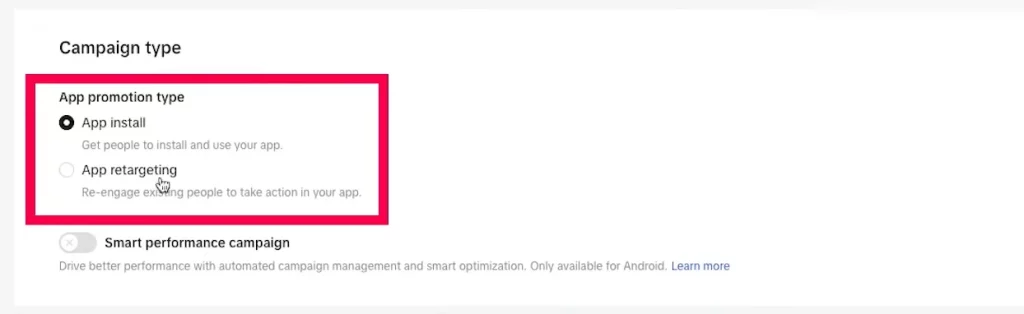
Step 3: Choose App Install to drive new players to your App Store or Google Play listing.
Step 4: Connect your mobile game using its App Store or Google Play URL.
Step 5: Set up app attribution through TikTok Events Manager, your MMP, or TikTok App Events SDK.
Step 6: Map key in-game events, such as tutorial completion, registration, level achievement, first session, or in-app purchase.
Step 7: Define your audience targeting. Start broad so TikTok has room to find relevant player segments.
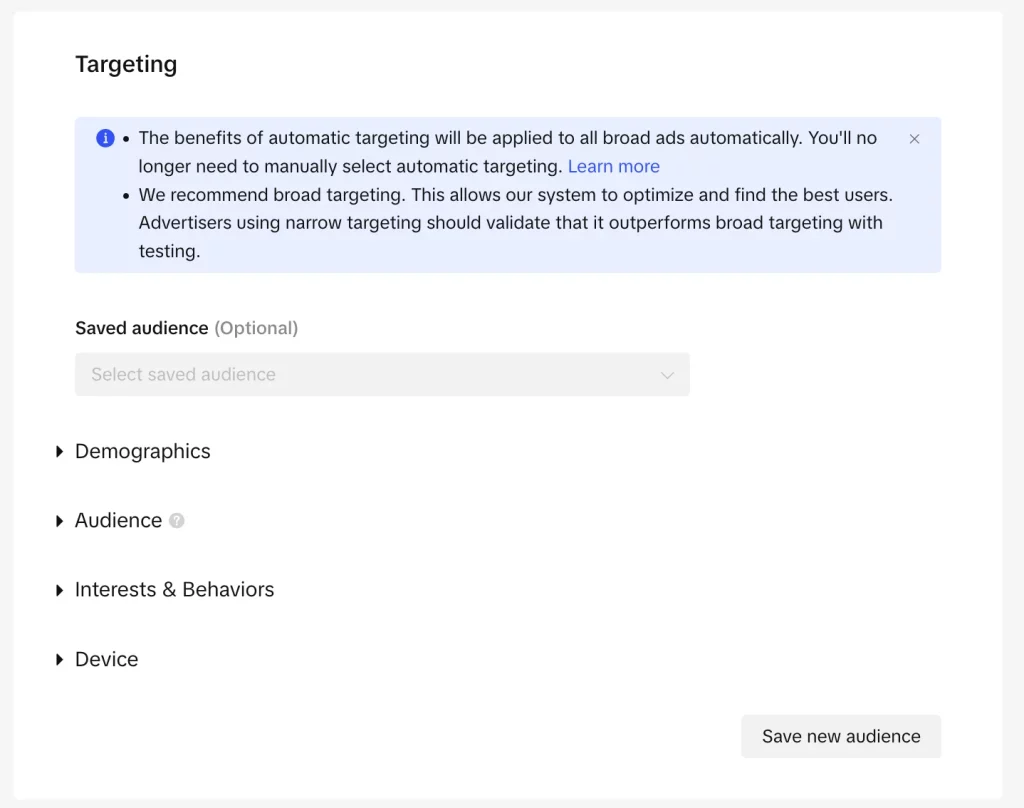
Step 8: Set your daily budget and optimization goal. For a new campaign, start with Install, then move to deeper events once enough data is collected.
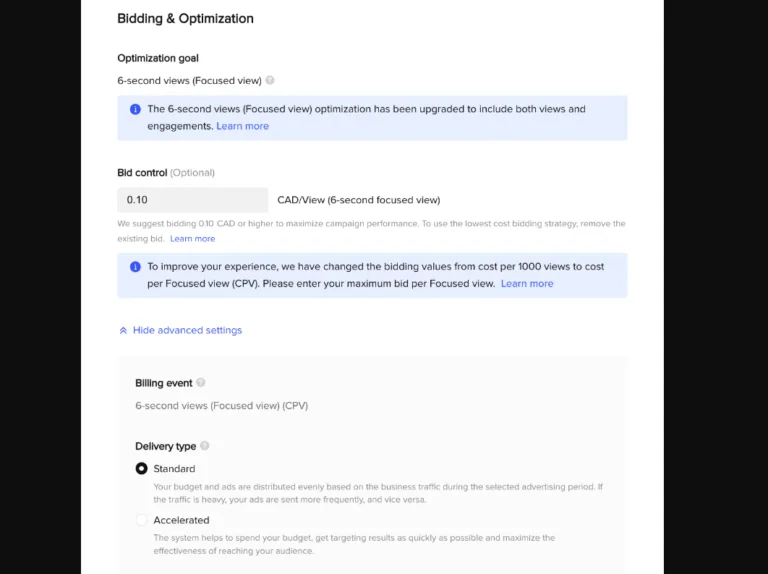
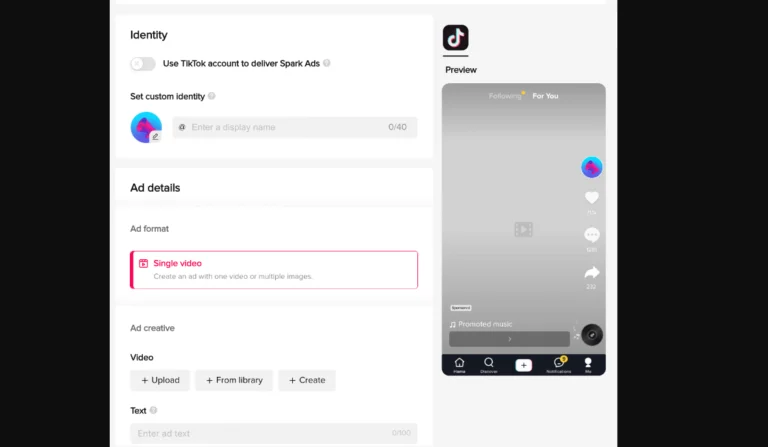
Step 9: Upload gameplay-first creatives, add short ad copy, choose a CTA such as Play Now, Download, or Install Now, then publish the campaign.
iOS vs Android: How your campaign setup changes
iOS and Android campaigns should be set up separately because attribution, reporting speed, and optimization signals work differently on each system.
| Factor | Android | iOS |
|---|---|---|
| Attribution | More flexible through MMP, TikTok Events Manager, or TikTok App Events SDK. | More restricted due to SKAN measurement. |
| Testing speed | Better for early creative, audience, and event testing. | Slower because conversion data can be delayed. |
| Optimization signals | Easier to optimize toward in-game events earlier. | Requires more patience before judging performance. |
| Best use case | Validate gameplay hooks, CTAs, and quality events faster. | Scale carefully after enough postback data is available. |
| Campaign setup | Standard app install campaign setup. | Turn on iOS 14.5+ Dedicated Campaign and configure SKAN properly. |
Expert tip from Mega Digital: Use Android to validate early UA signals faster, but treat iOS separately. SKAN postbacks can be delayed by up to 72 hours on SKAN 3.0 and up to 4 days on SKAN 4.0, so avoid judging iOS campaigns too early.
5 Proven strategies to drive quality installs for mobile games
Getting installed is only the first step. For mobile game UA, the real goal is to acquire players who stay, complete key actions, and generate long-term value.
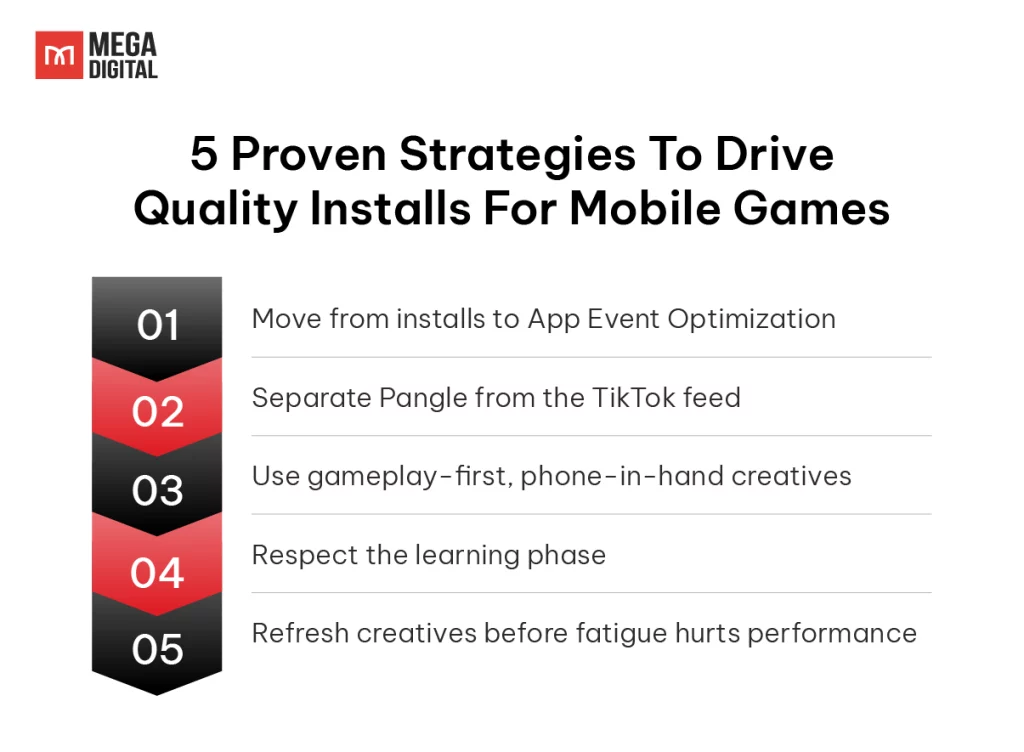
1. Move from installs to App Event Optimization
Start with Install optimization to collect early data. Once your campaign has enough post-install signals, shift to App Event Optimization (AEO) for events such as tutorial completion, level achievement, registration, or in-app purchase. This helps TikTok optimize toward players who are more likely to engage after downloading.
Case highlight: In TikTok’s EK Games case study, creator-made TikTok Creative Challenge assets helped reduce CPI by 35% for App Event Optimization purchase campaigns and 53% for Mobile App Install campaigns.
2. Separate Pangle from the TikTok feed
Pangle can expand reach across TikTok’s external app network, but its traffic behavior may differ from the native TikTok feed. For mobile games, separate Pangle into its own ad group or campaign so you can compare CPI, retention, tutorial completion, and purchase quality more accurately.
3. Use gameplay-first, phone-in-hand creatives
Avoid relying only on polished trailers. TikTok creatives usually work better when they feel native to the feed, so show real gameplay quickly: a battle, puzzle, upgrade, reward, fail moment, or satisfying win. For many mobile games, a phone-in-hand demo can make the gameplay feel easier to understand and more believable.
4. Respect the learning phase
Avoid changing targeting, budget, bid strategy, or creative assets too early. TikTok’s delivery system needs enough conversion data to understand which users are likely to install and complete valuable in-game actions. If you need to scale, increase the budget gradually instead of making sudden jumps.
Pro tip from Mega Digital: Don’t rush major edits during the learning phase. We recommend giving TikTok app campaigns at least 7 days to collect signals, with 50 conversions as a key benchmark before scaling or making big changes.
5. Refresh creatives before fatigue hurts performance
Creative fatigue can appear before CPI rises sharply. Watch for signs such as falling CTR, weaker retention, rising CPM, or lower event completion rate. Refresh video assets every few weeks, test new gameplay moments, and use multiple creative angles to keep delivery stable.
Mega Digital recommends using Creative Fusion to speed up creative testing. The tool helps game advertisers combine different hooks, gameplay angles, captions, CTAs, and visual styles, making it easier to refresh TikTok creatives without losing focus on the game’s core loop.
Common TikTok app install campaign mistakes to avoid
A strong setup still wastes the budget if you optimize for installs instead of player quality. Avoid these common mistakes:
- Hyper-targeting too early: Stacking too many interests can limit TikTok’s learning. Start broad, then refine once you have enough install and in-game event data.
- Editing campaigns too soon: Changing budget, targeting, bid strategy, or creatives too early can disrupt learning. Let the campaign collect enough signals before making major edits.
- Staying on install optimization too long: Install optimization is useful at the start, but it should not be your long-term strategy. Move to AEO once you have enough data on events like tutorial completion, level achievement, or IAP.
- Mixing iOS and Android data: iOS and Android use different attribution and reporting conditions. Keep them separate to evaluate CPI, retention, and IAP performance more accurately.
- Skipping iOS 14.5+ setup: For iOS campaigns, enable iOS 14.5+ Dedicated Campaign and configure SKAN properly. Otherwise, your iOS reporting may be incomplete.
Key metrics to track in your TikTok app promotion ads
A low CPI does not always mean your campaign is working. For mobile games, the real question is whether TikTok users continue playing after the install.
Start by tracking the events that show player quality:
- First open: Confirms that the install becomes an actual app open.
- Early engagement: Tracks actions like registration, tutorial completion, or level achievement.
- Monetization: Measures IAP, subscriptions, or other paid actions.
After that, evaluate performance through Day 1 retention, Day 7 retention, CPA, ROAS, and LTV. These metrics show whether your campaign is attracting valuable players, not just cheap downloads.
For example, a campaign with a $3.00 CPI and strong Day 7 retention can be more profitable than a $1.50 CPI campaign where most players leave after the first session.
FAQs about TikTok App Install Ads
A good CPI depends on player quality, not just install cost. Instead of chasing the lowest CPI, compare it with Day 1 retention, Day 7 retention, ROAS, and LTV to see whether TikTok is bringing valuable players.
For a serious mobile game UA, yes. An MMP such as AppsFlyer, Adjust, Branch, Singular, or Tenjin helps track post-install events, measure ROAS, compare channels, and evaluate player quality beyond the install.
TikTok uses 50 conversions as a key benchmark for passing the learning phase. For app campaigns, give the system enough time to collect signals before making major edits; in many cases, this means allowing at least 7 days for learning.
Android is often easier for early testing because attribution and event reporting are usually faster and more flexible. Use it to validate creatives, audiences, and in-game events, but treat iOS separately because SKAN reporting can delay conversion data.
Conclusion
Running TikTok app install ads for mobile games is not just about driving downloads. To acquire quality players, you need clean tracking, the right campaign setup, strong gameplay creatives, and optimization signals that go beyond installs, such as retention, level achievement, and in-app purchase.
As an Official TikTok Marketing Partner and TikTok Performance Agency of the Year 2025, Mega Digital can help mobile game teams plan, launch, and optimize TikTok Ads campaigns built around quality installs, not just download volume.