

Are your mobile game ads getting lost in a sea of endless scrolling, wasting your budget on low engagement? Traditional formats fail to showcase real gameplay, but TikTok Playable Ads solve this pain point by letting users instantly try your game before they download, turning passive scrollers into high-quality installs.
In this guide, you’ll learn exactly what they are, how they work, step-by-step setup, real examples, and pro optimization tips from Mega Digital.
QUICK SUMMARY
- Learn what TikTok Playable Ads are and how they let users try your game before downloading, boosting engagement and installs.
- Discover their key benefits: higher CTR and CVR, lower CPI, and more satisfied players through hands-on demos.
- Follow a simple setup guide using TikTok’s built-in tools (Interactive Video, Template, and Adaptation) to create interactive ads easily.
- Apply Mega Digital’s pro tips, pick the right game genre, target precisely, test multiple creatives, and track performance for best results.
What is TikTok Playable Ads?
Imagine being able to test out a mobile app before deciding to download it. Well, that’s precisely what Playable Ads offer. Playable Ads are like your app’s sneak peek – they’re interactive videos that give users a taste of what your app has to offer before they hit that download button
“Playable Ads are interactive videos that allow you to showcase a preview of your app before someone downloads it. Users can tap and swipe in a full-screen experience.” – TikTok Ads Manager
In a nutshell, Playable Ads lets users try before they buy – a great way to ensure they know what they’re getting.
How do TikTok Playable Ads work?
When you watch a Playable Ad, it’s not just a passive viewing experience. You get to dive into a full-screen interactive demo. Try out the app’s features by tapping and swiping, and if you like what you see, there’s a button to download it instantly. Here are 2 most significant benefits of TikTok Playable ads:
- Outperforming Traditional Ad Formats: According to Pangle’s data, Playable Ads offer a remarkable boost in both click through rates (CTR) and conversion rates (CVR) on TikTok when compared to non-Playable Ads.
- Efficient Cost Optimization: When it comes to cost efficiency, Playable Ads are the way to go. Pangle’s data reveals that Playable Ads consistently deliver a lower cost per result compared to non-Playable Ads.
For app developers and marketers, Playable Ads are a game-changer. It provides an immersive way to showcase your app’s capabilities and turn potential users into actual users. These ads work best as video content, making them a dynamic addition to your advertising arsenal.
TikTok Playable Ads for Game Ads: Benefits and Features
Why should mobile game developers prioritize Playable Ads over standard video creatives? Beyond just being a fun mini-game, they offer strategic advantages that directly impact your user acquisition ROI.
Benefits
Getting users to download your mobile game is no walk in the park. With traditional ads falling flat, how can you truly engage your audience and boost conversion rates? The answer lies in Playable Ads.
Enhanced Engagement
Playable ads turn passive scrollers into active players. Users interact directly with your game mechanics before downloading. According to official TikTok Pangle data, Playable Ads deliver significantly higher CTR and CVR compared to standard video ads. In practice, this means lower bounce rates and more qualified installs for casual and mid-core games.
Improved Conversion Rates (CVR)
By letting users experience core gameplay (tapping, swiping, building bases, etc.), Playable Ads reduce post-install frustration. Recent industry benchmarks show playable formats can improve Day 1 retention and boost conversion rates by 20 – 40% in gaming verticals.
Reduced Cost per Install (CPI)
Playable Ads help you pay less for higher-quality users. Data from MMPs like Adjust indicates TikTok-driven app installs often come with lower CPI and better long-term ROAS compared to other networks..
Higher Player Retention & Lifetime Value (LTV)
Because users have already “test-driven” the core loop of your game, those who proceed to install are genuinely interested. This pre-qualification filters out low-intent users, leading to significantly higher Day 1 and Day 7 retention rates, ultimately boosting the player’s Lifetime Value (LTV) and In-App Purchase (IAP) potential.
Valuable In-Ad Data Insights
Unlike standard videos where you only track views and clicks, Playable Ads let you see exactly how users interact with the demo. You can track which buttons they tap, how long they play, and where they drop off. This provides a gold-mine of behavioral data to help you optimize both your ad creatives and the game’s actual onboarding process.
Features
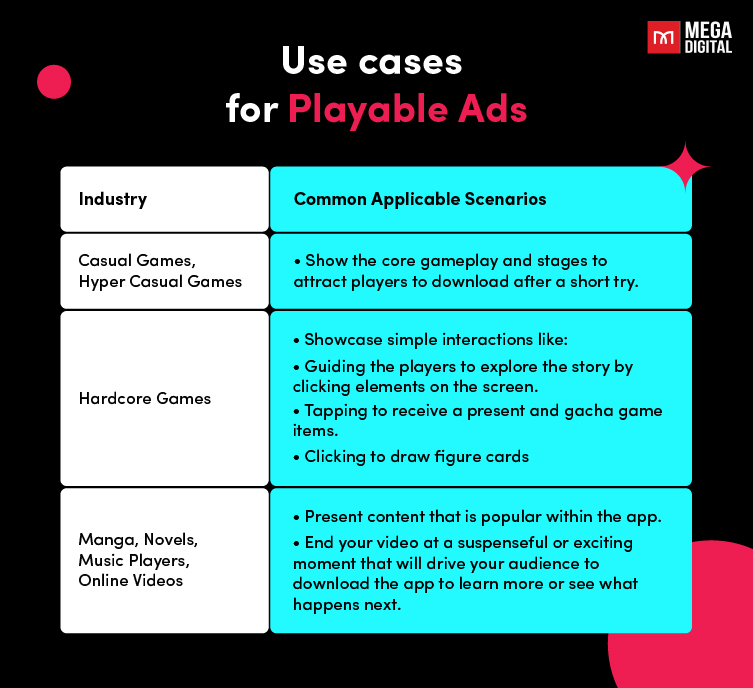
Traditional ads often struggle to captivate users, leaving them uninterested and unengaged. With so many distractions and quick scrolls on various platforms, making an impact is a real challenge. But when Playable Ads come into play, they offer key interactive features that solve this problem:
- Full-Screen Immersive Experience: Unlike standard in-feed videos, Playable Ads expand to provide a distraction-free, full-screen interactive demo of your game.
- Intuitive Gestures: Users actively engage with the ad by tapping, swiping, or dragging to complete mini-challenges, mimicking actual gameplay.
- Visual Hints & Prompts: To ensure users know how to play and don’t drop off, these ads cleverly use animated hand icons or glowing visual cues to guide the user’s interaction.
- Interactive End Card & Persistent CTA: Instead of a basic download link, Playable Ads conclude with an engaging “End Card”, paired with a highly visible and persistent “Download” or “Play Now” Call-to-Action to drive immediate installs.
How to make TikTok Playable Ads?
Creating interactive ads for your app doesn’t have to be complex. TikTok has designed 3 user-friendly tools for you:
Interactive Video Tool
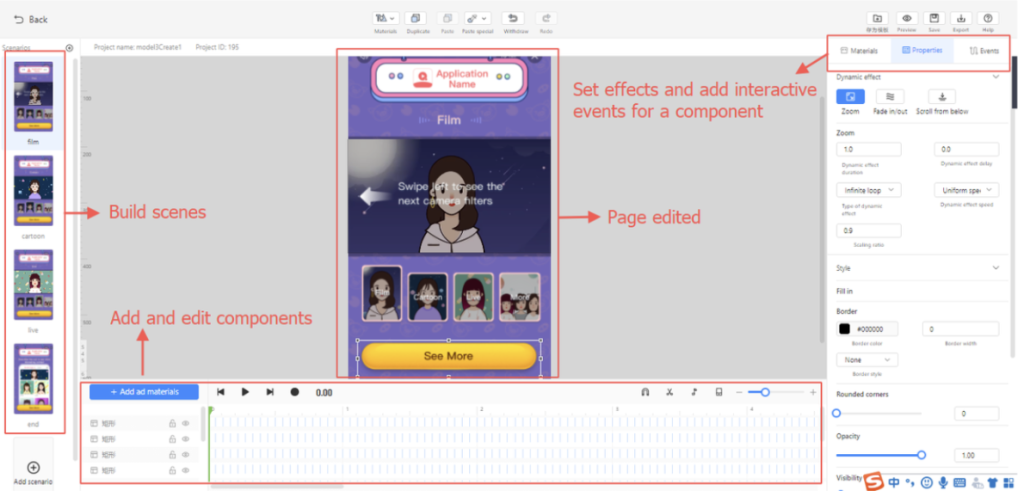
The Interactive Video Tool is like a user-friendly video editor that makes creating interactive content a breeze. You can easily piece together your playable content by dragging and dropping your images and videos into customizable templates. The best part? You don’t need any coding skills – it’s all done with a few clicks of your mouse.
Template Tool
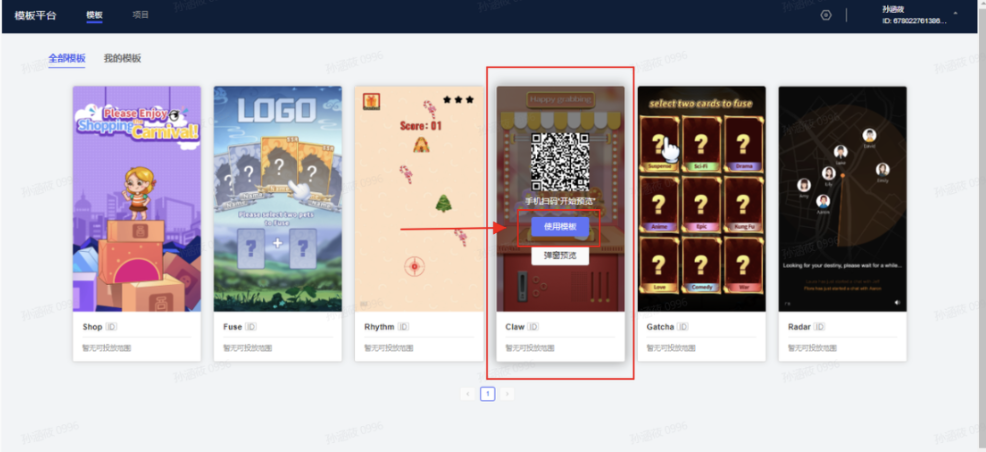
The Template Tool simplifies the process of making interactive ads. It offers pre-made templates that you can customize by changing images, icons, and audio. This tool is great for simple interactive ads that may just involve clicking a button.
Adaptation Tool
The Adaptation Tool is like a conversion wizard. It helps you change your current interactive content into a format that works smoothly on the Pangle Audience Network.
Here’s why you might find it useful:
- File Format Shift: This tool primarily deals with adjusting the type of file you’re using. It makes sure your content matches what Pangle needs.
- Preserve Your Interactive Elements: Don’t worry; it won’t mess with the fun, interactive things you’ve already added to your content.
As of 2026, TikTok continues to enhance Playable Ads với better JS-SDK support and faster loading through asset optimization. Always test new creative trends like short-loop gameplay + strong CTA gestures.
How to set up TikTok Playable Ads?
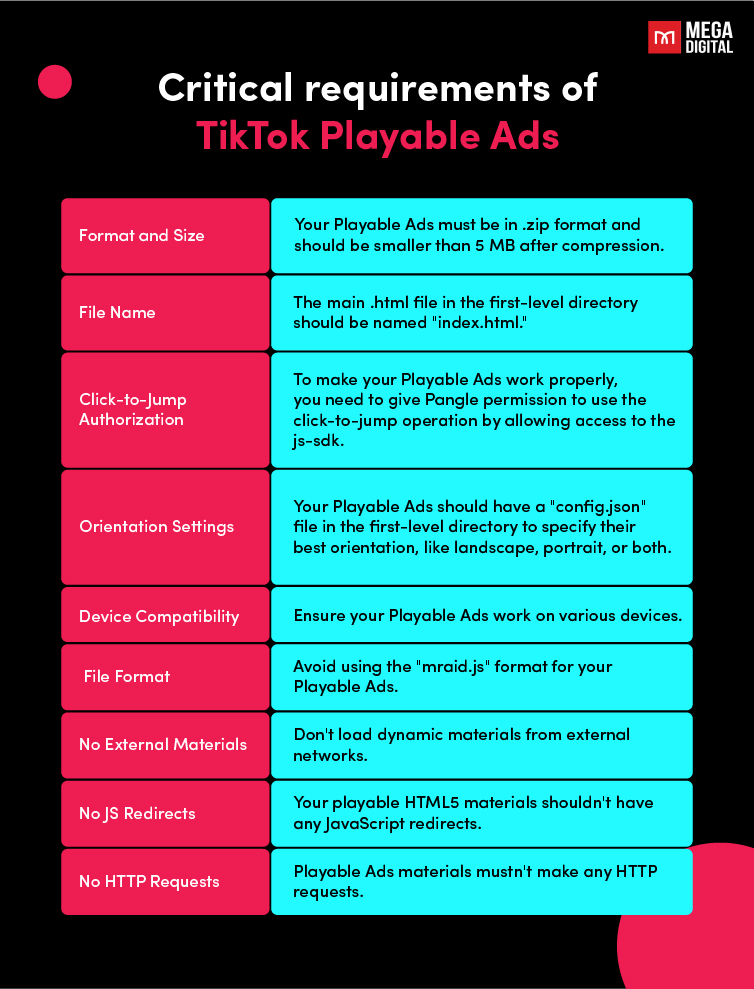
To get your Playable Ads up and running, you’ll need to take care of 2 key things: Uploading the creative and setting up the campaign in the updated 2026 interface.
1. Upload Playable Creative
- Start by logging in to TikTok Ads Manager.
- Go to Tools, click on Creative Library, and choose the Playable tab.
- Hit the Upload button and add your .zip file.
2. Create Playable Ads Campaign
- Log in to TikTok Ads Manager.
- Begin by creating a new campaign.
- Select App Promotion (formerly App Installs) as your Advertising Objective.
- For Placement, ensure you include Pangle as one of the Placements.
- In Targeting, navigate to Demographics, and under Location, choose a market supported by Pangle.
- Check Single video under Ad Format.
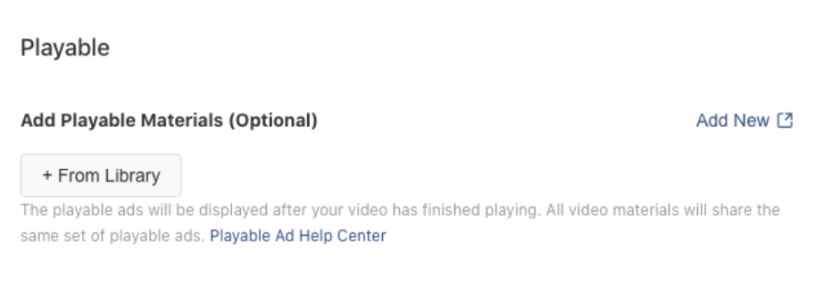
- Then, in the Playable module, click +Add From Library or Add New to add your Playable Materials to the Ad Group.
- If you want to create another ad, simply click +Add. This allows you to associate another video ad with your Playable Material.
Note: All ads within an ad group will be linked to a single Playable Material. If you want ads with different Playable Materials, you’ll need to create a new Ad Group for them.
One more thing, to check how well your Playable Ads are doing, follow these steps:
- Go to Assets.
- Click on Creative.
- Select the Playable Ads list.
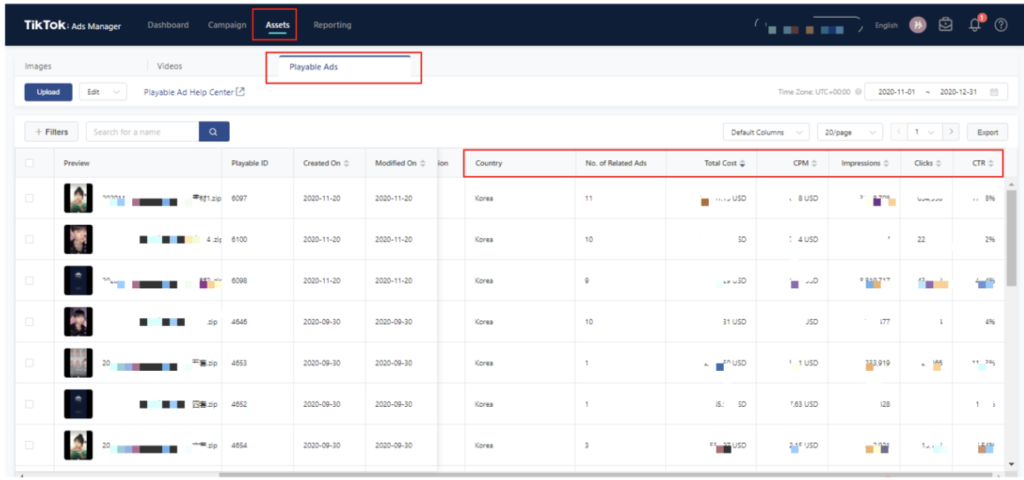
On this page, you’ll find important performance stats for each Playable Ad, like the number of related ads, total cost, CPM (cost per thousand impressions), impressions, clicks, conversions, CTR, CVR, and cost per result.
Playable Ad Specs & Common Troubleshooting
To ensure your ads are approved and run smoothly, keep these technical specifications in mind before uploading:
- Format: The ad must be packaged as a .zip file.
- File Size: The maximum supported file size is generally 5MB. Keep your assets compressed.
- Core File: The root directory of your .zip file must contain an index.html file.
- No External Requests: Your HTML5 Playable ad must be fully self-contained. It cannot make HTTP/HTTPS requests to fetch external resources.
TikTok Playable Ads Examples
To see the power of interactive advertising in action, let’s look at a few highly successful Playable Ad campaigns from top mobile games.
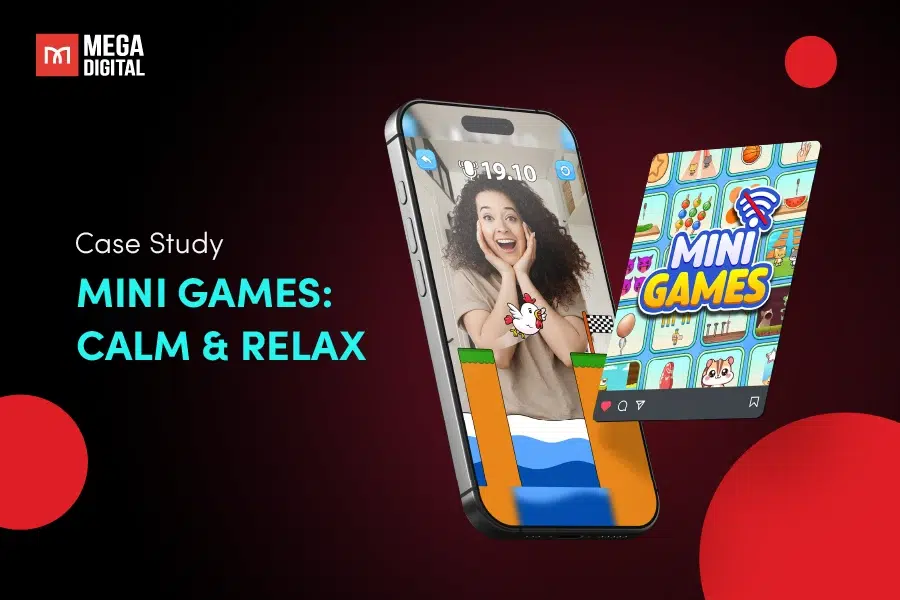
Mini Games: Calm & Relax
In a highly successful campaign managed by Mega Digital, Xgame Studio utilized TikTok Playable Ads for their puzzle collection “Mini Games: Calm & Relax”. The interactive ad allowed users to play a quick, stress-relieving puzzle right on their screen before installing.
By letting players experience the core casual gameplay upfront, the campaign effectively filtered for high-intent users, leading to a significantly lower CPI and boosting Day 1 retention compared to standard video ads.
Clash of Clans
This TikTok ad for Clash of Clans lets you test the game before installing it. It starts with a quick video showcasing the game’s features like base building and troop training. Then, you can play a demo of the game to try it out. This approach helps users download games they’re truly into, making them effective, visually appealing, and attention-grabbing.
Brawl Stars
A TikTok ad for the mobile game “Brawl Stars” shows a video of a player playing the game with friends. The ad is fun and engaging, and it features upbeat music. This ad also includes a button that users can tap to play the game immediately or a link ad that redirects users to the game’s landing page.
Mega Digital’s Tips to Optimize Playable Ads
TikTok Playable ads are a fantastic way to showcase your game, but a poorly designed ad can turn users away before they even get a taste of your gameplay.
To maximize your ROAS, here are 4 actionable optimization tips before rolling out your next campaign:
Simplify the Core Gameplay
Playable ads should never be a complicated tutorial. Jump straight into the most satisfying part of your game, like a massive combo hit or a tricky puzzle to solve.
Keep the interaction time short. Ideally, the gameplay loop should only last between 15 to 25 seconds. The goal is to give users a quick dopamine hit, not a full gaming session.
Design Intuitive Visual Hints
TikTok users scroll incredibly fast. If they don’t know what to do in the first 3 seconds, they will swipe away. Always use animated pointers, glowing highlights, or large text prompts directly on the screen. Make the interaction gesture obvious. Tell them exactly whether they need to “Swipe to cut” or “Tap to shoot”.
A/B Test Difficulty and End Cards
Don’t just test different background colors. Experiment with the psychological triggers of your ad. Try creating an “easy win” version versus a “frustrating fail” version. Often, making the user lose encourages them to download the game to prove they can win.
Testing is crucial. Check out our TikTok Ad Creative Best Practices for more inspiration on designing compelling End Cards and CTAs.
Combine In-Ad Metrics with Smart Targeting
Standard CTR and CPI are important, but you must measure exactly how users play the ad. Track the “Interaction Rate” and identify the exact second where users drop off in the demo to fix usability issues.Once you have a high-performing creative, scale it by reaching the right users. Use precise behavioral targeting to show your ad to audiences who frequently engage with your specific game genre. For deeper insights, refer to our TikTok Targeting Guide.
FAQs about TikTok Playable Ads
No. You can easily use TikTok’s built-in Template Tool or third-party no-code builders.
Primarily on the Pangle Audience Network.
Under 5MB (compressed) in .zip format, with an index.html as the main file.
Keep the interactive gameplay short, ideally between 15 to 25 seconds before showing the download button.
>>> Learn more: TikTok Game Ads: A Winning Strategy for Boosting Downloads
Final word
Ultimately, TikTok Playable Ads have proven to be a game-changer for mobile user acquisition, transforming passive scrolling into active engagement by letting players experience your game before downloading. While this interactive format is essential for driving high-intent installs and lowering CPI, it is just one piece of the larger advertising puzzle.
To help you maximize your overall growth and discover other formats that complement your strategy, we’ve put together a free TikTok Ad Types eBook where you can explore the complete TikTok ad ecosystem.