

Wasting TikTok ad budget on keywords that do not convert can make ad copy feel like guesswork. TikTok’s built-in Keyword Insights tool helps solve this by showing which phrases drive action on the platform. In this blog post, Mega Digital will show you how to leverage this robust data to maximize your return on ad spend and scale your campaigns effectively.
Quick summary:
- The TikTok Keyword Insights tool is a desktop-based feature inside the Creative Center that reveals high-performing keywords used in successful paid advertisements.
- Marketers can track essential metrics like click-through rates and popularity to evaluate the effectiveness of specific phrases over time.
- The platform allows you to filter data by region, industry subcategories, and even keyword types like pain points or calls to action.
- You can apply these data-backed insights directly to your video scripts and text overlays to stop the scroll and boost conversions.
What is the TikTok Keyword Insights tool?
TikTok Keyword Insights is a dedicated research feature located within the TikTok Creative Center. Designed specifically for advertisers, it tracks and reveals the most popular phrases driving conversions across the platform.
Instead of guessing what your audience wants to hear, this tool provides concrete data on high-performing keywords and the best TikTok trends, allowing you to see exactly which words resonate in successful ad campaigns.
According to TikTok, the TikTok Keyword Insights tool is only available on the Desktop version of TikTok Creative Center. All data is collected exclusively from paid TikTok ads and does not include organic posts.
How does the “TikTok Keyword Insights” work?
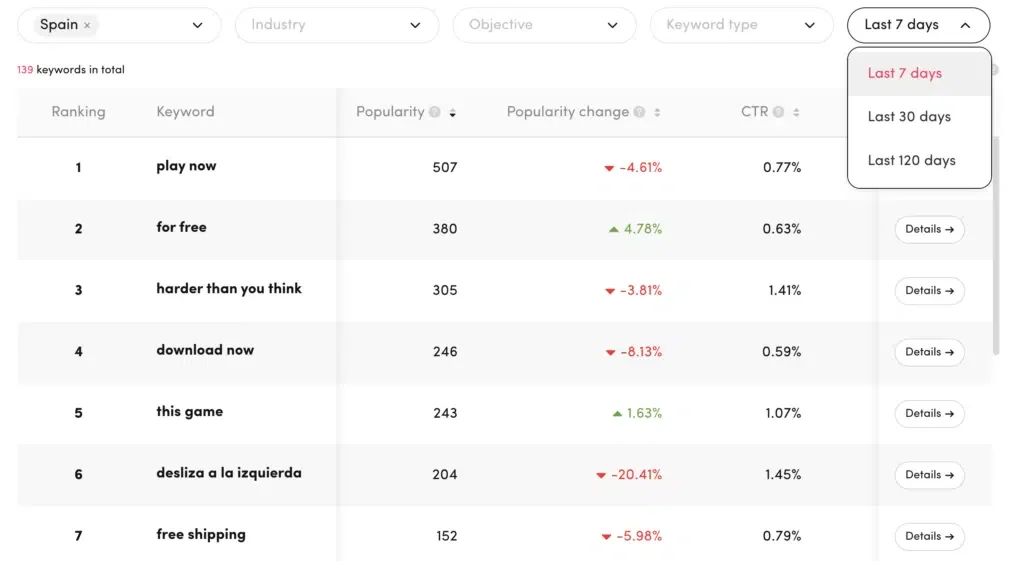
The user-friendly interface displays top phrases used in successful TikTok ads, providing a comprehensive view of the platform’s language landscape. You can filter data over the last 7, 30, or 120 days and track four core metrics:
- Ranking: The phrase’s popularity within a specific country and industry.
- Popularity: The exact number of ads currently using this keyword.
- Change: The percentage shift in popularity over your selected timeframe.
- CTR: The average Click-Through Rate of ads featuring the term.
Beyond basic metrics, the tool offers granular segmentation. You can drill down into highly specific categories to perform real-time market research:
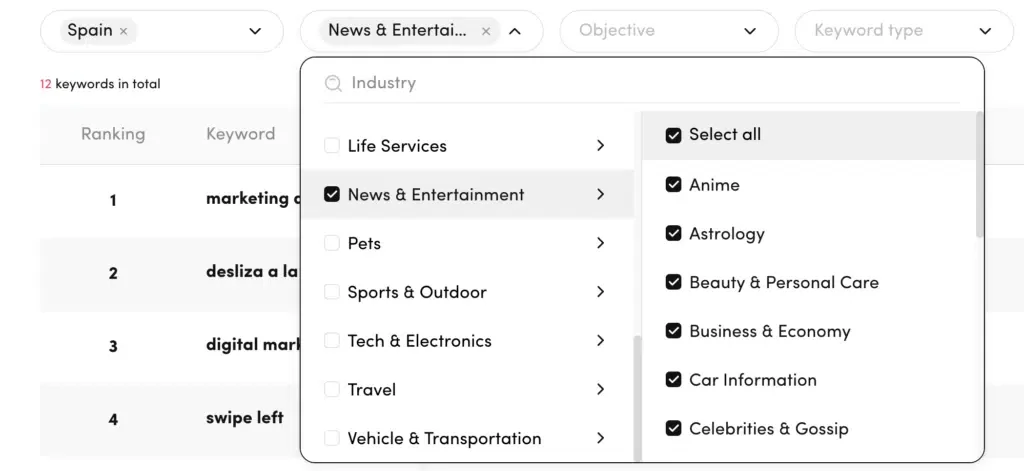
- Industry: Dive into niche subcategories (e.g., within entertainment or beauty) to see exactly where to invest your ad spend.
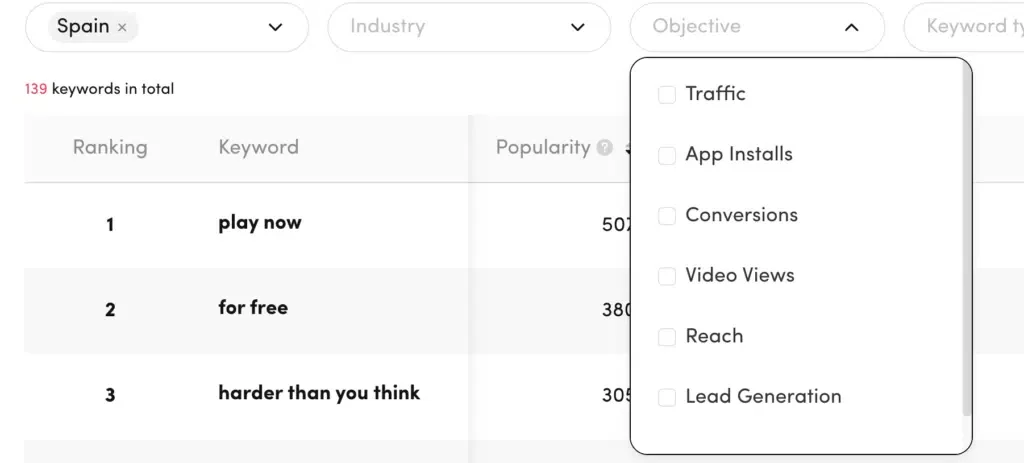
- Targeting Objectives: Analyze keyword performance based on specific business goals to outsmart your competition.
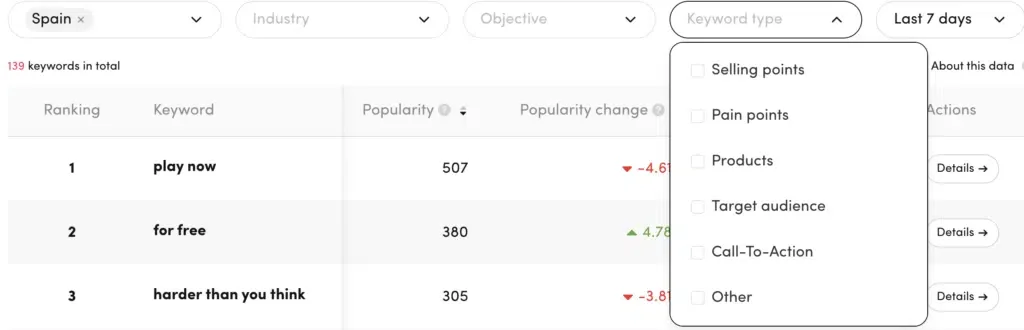
- Keyword Types: Filter by the psychological function of the phrase, such as Selling points, Pain points, Call to action, Target audience, or Products.
Clicking ‘Details’ next to any term reveals if it performs better as a text overlay or voiceover, alongside impressions and engagement rates.
Mega Digital’s Insider Bonus for Sellers: Sellers testing “Product” keywords can join the TikTok Shop Activation Program to earn massive ad credits based on their spend or incremental revenue. It is the perfect way to validate those new high-intent keywords risk-free.
What benefits does TikTok Keyword Insights offer?
TikTok Keyword Insights empowers advertisers with actionable data, serving as a comprehensive real-time market research engine. It directly impacts campaign performance in several key ways:
- Efficient Time Management: It eliminates manual, time-consuming research by delivering ready-to-use, contextual data straight to your dashboard.
- Precise Audience Targeting: By showing the exact terms high-intent users react to, it minimizes targeting mistakes and ensures your ad spend is directed at the most engaged demographics.
- Boosted Ad Relevance: Incorporating proven keywords directly increases your ad’s quality ranking on TikTok, which naturally drives higher engagement rates and lowers your CPA.
- Real-Time Competitive Edge: Granular filtering options let you peek into the exact messaging and calls-to-action that top-performing ads in your niche are utilizing.
- Enhanced Creative Inspiration: Analyzing top keywords helps break creative blocks by suggesting fresh angles, highlighting new customer pain points, and uncovering trending terminology.
How to use TikTok Keyword Insights
Navigating the tool is highly intuitive. Follow these exact steps to start uncovering data for your next campaign:
Step 1: Log in to the TikTok Creative Center on your desktop using your TikTok For Business account.
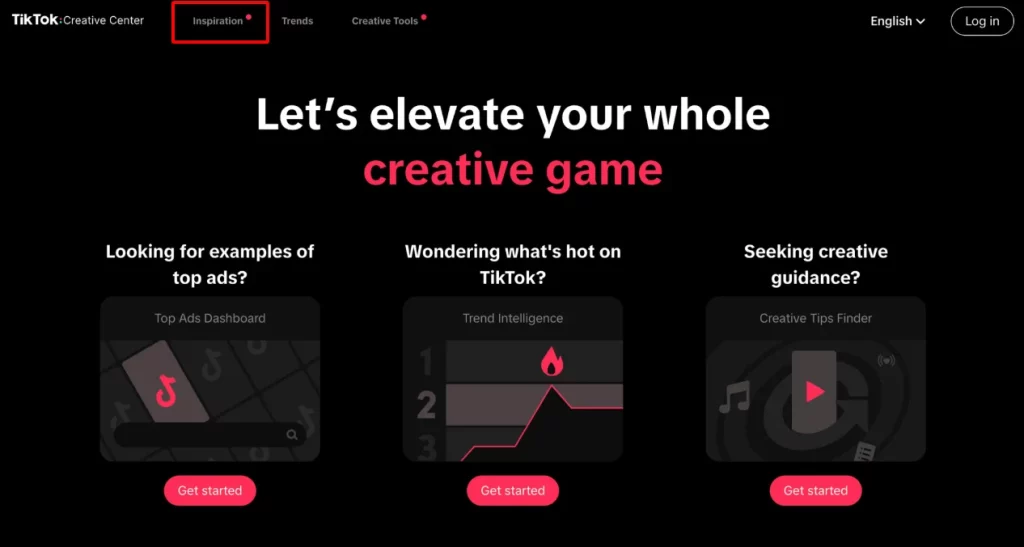
Step 2: Click on the Inspiration tab located in the top menu bar.
Step 3: Select Keyword Insights from the dropdown menu to launch the main dashboard.
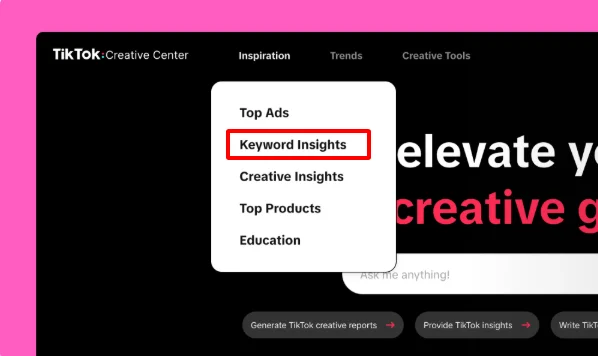
Step 4: Use the search bar to type a core term, or use the drop-down menus to filter keywords by specific countries, industries, or keyword types.
Step 5: Toggle the data visualization options in the top right corner to choose between a detailed table view or a visual wordcloud.
Step 6: While in the table view, you can sort keyword rankings by clicking the small arrows next to any metric column (like CTR or Popularity) to instantly find the highest-performing words.
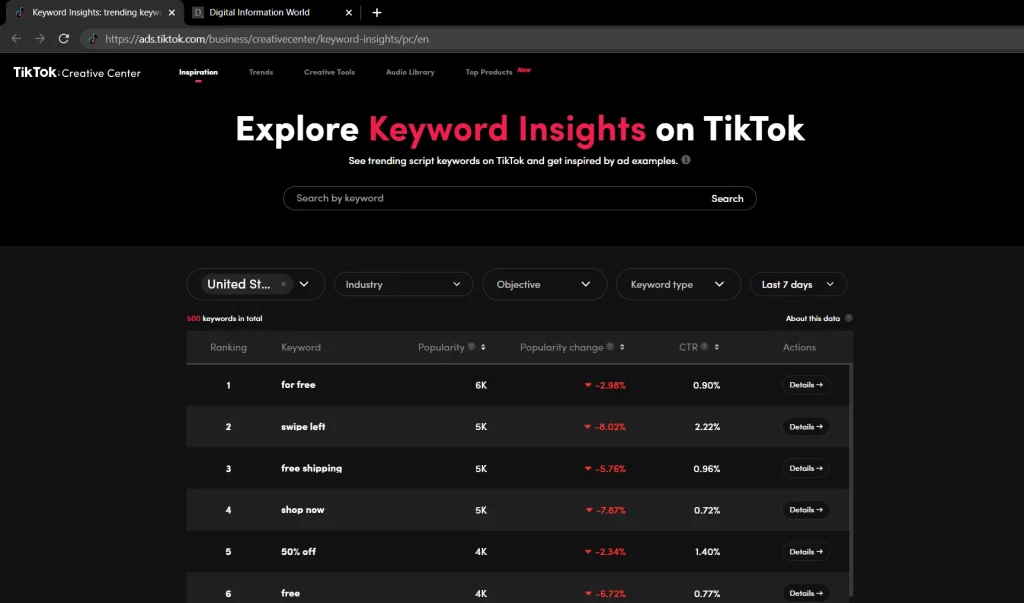
Step 7: Click the Details button next to any specific keyword to view deeper analytics, performance graphs, and watch real ad examples utilizing that phrase.
Strategic Ways to Apply TikTok Keyword Data
Knowing how to extract data is just the beginning. To truly maximize your ROAS, you must strategically weave these proven keywords into the core structure of your ad creatives. Stop guessing and start applying these data-backed tactics:
1. Put keywords in your scripts
Your video script is the foundation of ad relevance and signals directly to the TikTok algorithm. Filter the Insights tool for “Pain points” or “Selling points” relevant to your industry. Take the highest CTR phrases and place them explicitly in the first 3 seconds of your video script. Vocalizing the exact terms your target buyers are searching for instantly stops the scroll.
Pro Tip: Do not just rely on the keyword itself. Click the “Details” button next to a high-performing phrase to watch the actual top ads using it. Reverse-engineer their camera angles, pacing, and visual hooks to build your own winning creative blueprint.
2. Align Visual Text Overlays with Search Intent
The Insights dashboard specifically breaks down whether a keyword performs better when spoken or when used as text on screen. If the data shows a high impression rate for “Text”, you must feature it as a bold text sticker or overlay. Sync these text overlays with the exact moment the word is spoken to reinforce the message.
Pro Tip: Keep your keyword-rich text overlays on the screen for at least 3 to 5 seconds. If the text flashes too quickly, the TikTok algorithm might not index it properly, and users will not have time to process your core selling point.
3. Optimize Captions for the Search Algorithm
Captions and hashtags are crucial signals guiding users to your content. Take the top 2-3 “Product” or “Call to action” keywords you found and weave them naturally into the first line of your caption. Additionally, use these exact phrases to inform your hashtag strategy.
Pro Tip: Pair your top Insights tool keywords with 1-2 broad hashtags (like #fyp or #TikTokMadeMeBuyIt) and 2-3 niche-specific hashtags. This balanced mix helps the algorithm categorize your ad while still reaching a massive audience.
4. Leverage Data to Test Fresh Creative Angles
When your current campaigns start burning out, return to the Keyword Insights tool and filter by “Rapidly rising” popularity over the last 7 days to catch micro-trends early. By swapping out outdated phrases for newly trending terminology in your ad copy, you can refresh your creatives without needing to shoot entirely new video footage.
Pro Tip: When A/B testing new keywords to fight ad fatigue, change only one variable at a time. Keep the video visuals the same but swap out the text overlay and voiceover hook with the newly trending keyword to accurately measure its impact on your CPA.
FAQs about TikTok Keyword Insight
Yes, the tool is completely free and accessible via the TikTok Creative Center. You simply need a TikTok For Business account to log in and unlock the comprehensive analytics dashboard.
While you cannot spy on a specific competitor’s private ad account, you can filter keywords by specific industry subcategories to see the exact terms that the top-performing ads in your specific niche are utilizing.
No, the data provided in this tool is pulled exclusively from paid TikTok advertising campaigns. It is designed specifically to help advertisers optimize their ad spend and creative strategies.
TikTok updates its Keyword Insights metrics continuously. Advertisers can track performance trends and shifts in keyword popularity across rolling 7-day, 30-day, and 120-day timeframes.
>> Read more: TikTok Analytics: What It Is and How to Use It Effectively
Final words
TikTok Keyword Insights helps reduce copywriting guesswork by showing which phrases and search intents are more likely to drive action. When combined with scroll-stopping creatives and a solid media buying strategy, these insights can help you lower CPA and scale campaigns with more confidence.
To test these keyword strategies with a bigger budget, explore Mega Digital’s TikTok Advertiser Activation Program and unlock exclusive “Spend X, Get Y” rebates for new advertisers. Follow Mega Digital’s upcoming blog posts for more platform updates, trending strategies, and expert TikTok advertising guides.