

In 2026, over 70% of TikTok users are under 34, a highly engaged but unpredictable audience. One misplaced ad next to controversial content can damage brand trust overnight. That’s why the TikTok Inventory Filter exists: a powerful brand safety tool that puts you in control of ad placements.
In this complete guide, Mega Digital breaks down exactly what it is, how it works, and proven ways to optimize your campaigns for safety and performance.
Quick Summary:
- The TikTok Inventory Filter is a powerful brand-safety tool that controls which organic videos appear next to your ads.
- It relies on a mix of AI machine learning and human moderation aligned with global GARM standards to classify content.
- Advertisers can select from Expanded, Standard, or Limited tiers to perfectly balance campaign reach with brand protection.
- Combining this filter with a TikTok Agency Account will help maximize your ad performance while safeguarding your brand reputation.
What Is TikTok Inventory Filter?
The TikTok Inventory Filter is a brand-safety control tool inside TikTok Ads Manager. It acts as an extra layer on top of TikTok’s moderation system, letting advertisers choose how much content risk they’re comfortable with for their ad placements.
This filter helps ensure your ads don’t appear next to sensitive or controversial videos while still reaching your ideal audience. TikTok’s classification system follows the Global Alliance for Responsible Media (GARM) standards, which establish a common language and define clear risk levels for digital content monetization.
In short, the Inventory Filter lets advertisers balance brand suitability and campaign reach, making it an essential tool for running professional, brand-safe TikTok Ads.
How Does TikTok Inventory Filter Work?
The TikTok Inventory Filter combines AI technology and human moderation to review and classify videos before showing your ads. This dual approach ensures brand safety while maintaining campaign reach.
- Human Review: TikTok’s moderation team manually reviews videos for violations of its Community Guidelines, such as hate speech, nudity, or violence. Each video is then given a risk level based on GARM’s brand-suitability framework.
- Machine Learning Analysis: Advanced algorithms scan video visuals, captions, audio, and engagement patterns to detect potential risks. These insights are matched with GARM categories to automatically classify each video into one of three tiers: Expanded, Standard, or Limited Inventory.
- Continuous Optimization: As of April 2025, TikTok enhanced the Inventory Filter with advanced machine-learning for real-time adjacency and new controls like Category Exclusion and Vertical Sensitivity. In 2026, these tools allow advertisers to fine-tune placements and exclude specific content categories with higher precision than ever before.
Three Tiers of TikTok Inventory Filter
TikTok categorizes video environments into three inventory tiers based on content suitability and brand-safety risk. Each tier follows GARM’s industry standards to help advertisers decide how strict their ad placement control should be.
| Tier | Description | Recommended for |
|---|---|---|
| Expanded Inventory | Includes most content except that violating TikTok’s Community Guidelines. Ads may appear near videos with mild or implied mature themes. | Gaming, App Installs, or FMCG brands seeking maximum reach, lower CPMs, and higher impressions. |
| Standard Inventory | Excludes all high-risk content, ensuring ads appear next to material suitable for most audiences. | E-commerce, Lifestyle, and Fashion brands balancing reach and safety (Note: This is TikTok’s default setting). |
| Limited Inventory | Excludes all risky content, including low-risk or sensitive educational discussions. Ads only appear beside strictly safe videos. | Finance, Healthcare, and Corporate brands prioritizing absolute brand protection over reach. |
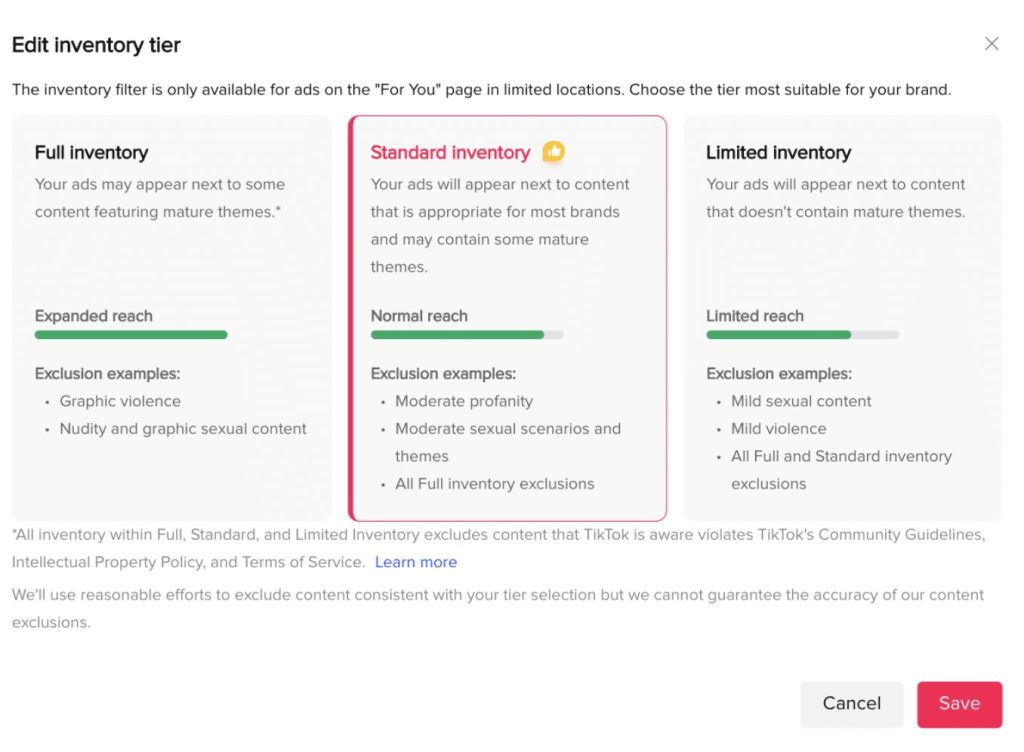
Each tier allows you to control how your ads appear alongside user-generated content. Choosing between them depends on your brand values, target audience, and campaign goals, stricter filters provide safer placement but reduce reach.
Benefits of TikTok Inventory Filter
There are several key benefits to using the TikTok Inventory Filter for your ad campaigns:
Enhanced Brand Safety
- Control the context: You decide the type of content your ads appear next to, aligning them with your brand values and target audience. This protects your brand from association with inappropriate or controversial content.
- Minimize reputational risk: Avoid negative brand perception by excluding potentially harmful or sensitive content.
- Comply with industry standards: Easily adhere to industry-standard brand safety frameworks like GARM, ensuring transparency and accountability for your advertising efforts.
Improved Campaign Performance
- Targeted reach: Target the right audience by filtering out irrelevant or unsuitable video environments. This can lead to higher ad engagement and conversion rates.
- Increased ROI: By maximizing ad relevance and minimizing wasted impressions, you can potentially achieve a better return on your advertising investment.
Many top global brands have successfully utilized the TikTok Inventory Filter to scale their campaigns without compromising brand reputation. According to official case studies:
- Unilever achieved 99.9% in brand safety and suitability rates using the TikTok Inventory Filter.
- Adidas achieved an impressive 99.9% in Brand Safety and Brand Suitability, seamlessly aligning with their campaign goals.
You can further optimize your TikTok Ads performance with our exclusive ebook:
How to use TikTok Inventory Filter
Setting up the Inventory Filter is straightforward, but it’s important to note that this setting is configured at the Ad Group level, not the Campaign level.
Step 1: Log in to your TikTok Ads Manager dashboard.
Step 2: Create a new campaign or navigate to an existing one, then proceed to the Ad Group creation/editing level.
Step 3: Scroll down to the Placements section. Under the “Brand Safety” or “Advanced Settings” dropdown, locate the Inventory Filter option.
Step 4: Select the level of inventory (Expanded, Standard, or Limited) that aligns with your brand’s risk tolerance and campaign objectives. Save and proceed with your ad creatives.
How to optimize your campaigns using TikTok Inventory Filter
Understanding your goals
- Brand safety: If your primary concern is avoiding inappropriate content, choose the “Limited Inventory” option for maximum control. Remember, this might limit reach.
- Brand suitability: Consider your brand values and target audience. Choose the filter tier that best aligns your ads with content that resonates with them.
- Campaign performance: Balance brand safety/suitability with reach and performance goals. Experiment with different filter tiers and track TikTok ads metrics to find the optimal balance.
Expert Tip: Recent case studies in the playbook show that stricter tiers (like Limited) can limit reach but deliver exceptional brand suitability scores of 99%+ (e.g., Adidas and Rexona cases). Always monitor your CPM and CTR.
Targeting strategically
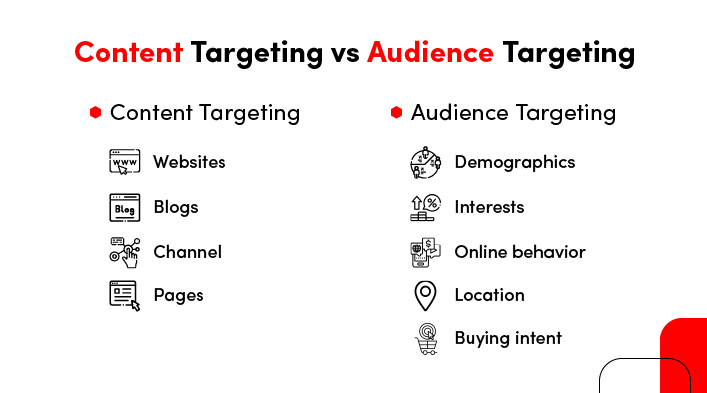
- Leverage audience insights: Use TikTok’s targeting options to reach users who are likely to be receptive to your brand and message, even within a filtered inventory.
- Combine filter with other targeting options: Layer the filter with demographic, interest, and behavioral targeting to further refine your audience and maximize impact.
- Test and iterate: Don’t be afraid to experiment with different filter tiers and targeting combinations to see what works best for your campaign.
Monitoring and adapting
- Track campaign performance: Closely monitor key metrics like impressions, clicks, conversions, and cost-per-acquisition (CPA) to assess the impact of the filter on your campaign performance.
- Refine your approach: Based on your data, adjust your filter tier, targeting, or even creative assets to optimize results and achieve your campaign goals.
- Stay informed: Keep up-to-date with changes to the TikTok Inventory Filter and platform functionalities to adapt your approach as needed.
Nevertheless, you should combine the TikTok Ad Agency account with the TikTok Inventory Filter. They can be a powerful strategy for optimizing your TikTok Ads campaign, especially when focused on brand safety and specific targeting within specific content environments. Here’s why:
- Targeted optimization: Leverage agency features to create and optimize campaigns while using the inventory filter to refine your ad placements for better brand alignment and potentially higher relevance.
- Streamlined workflow: Manage multiple campaigns and filter settings efficiently with agency tools.
FAQs about TikTok Inventory Filter
It is available in 25+ countries across North America, Europe, Asia, and the Middle East. Check TikTok’s official Business Help Center for the full, up-to-date list.
The filter automatically blocks all content violating TikTok’s Community Guidelines, including:
Hate speech and violent extremism
Illegal activities and dangerous acts
Adult content and nudity
Harassment, self-harm, and copyright infringement
AI imperfections: Highly nuanced or sarcastic videos might occasionally bypass the filter.
Trend lag: It takes time for the algorithm to adapt to completely new, borderline video trends.
Reduced reach: Stricter tiers significantly shrink your available ad pool, which may increase your CPA.
TikTok added Category Exclusion and Vertical Sensitivity. These advanced layers allow advertisers to block specific non-standard categories, providing hyper-specific control over brand safety without unnecessarily sacrificing reach.
Final word
The TikTok Inventory Filter is a powerful tool that effectively protects your brand reputation while allowing you to connect with highly engaged audiences. Mega Digital hopes this article helps you understand how to use and optimize this feature in your 2026 media buying strategy. If you have trouble running TikTok Ads, you should contact us, and we will immediately reply and support you.