

Ever had your TikTok ads bring tons of clicks but zero purchases? You’re not alone. Many advertisers see good engagement but poor conversions. At Mega Digital, we’ve analyzed thousands of campaigns and found that non-converting TikTok ads often share a few key issues. Let’s break them down – and show you how to fix each one.
QUICK SUMMARY
- Spot red flags fast: Low CTR, high bounce, weak CVR, negative feedback, flat sales/leads, and cart-drop gaps.
- Diagnose root causes with 9 culprits: Wrong objective, thin budgets, poor bidding/creative, mis-targeting, weak trust/landing page, bad tracking, and neglecting search ads.
- 2026 Best Practices: Sharpen targeting with AI, use UGC-native creatives with strong hooks, leverage TikTok Shop integrations, and run disciplined A/B tests.
- Monitor the funnel: Use Ads Manager to optimize iteratively and consider expert support (agency access) if performance stalls.
7 Warning signs your TikTok Ads aren’t converting
Before you can fix your campaigns, you need to spot the red flags that show your TikTok ads aren’t converting as expected. Here are six warning signs that your campaigns might be underperforming — and what each one means.
Low click-through rate (CTR)
Your CTR is the percentage of people who see your ad and click on it. If your CTR is low, it means that your ads are not resonating with your target audience or that they are not being shown to the right people. For computing the TikTok Click-Through Rate (CTR), use this formula:
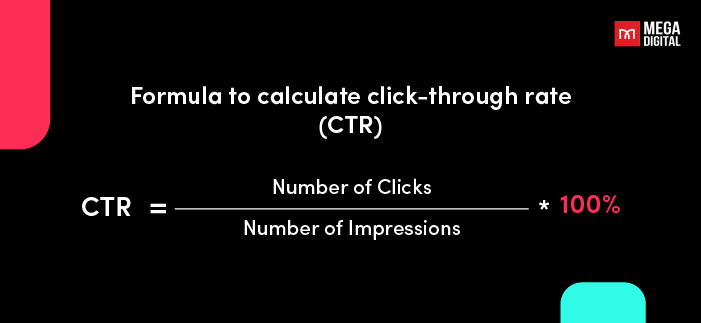
The average CTR on TikTok is generally between 0.5% and 1%. However, it can vary depending on several factors, such as the industry, the target audience, and the quality of the ad.
Here are some signs that you may be having a low CTR on TikTok:
- Your CTR is below the average for your industry.
- Your CTR is lower than it has been in the past.
- Your CTR is lower than the CTR of your competitors’ ads.
- 2026 Update: Your 2-Second View Rate is below 30%. This indicates your hook failed immediately, causing the algorithm to stop distributing the ad before clicks can even happen.
High bounce rate
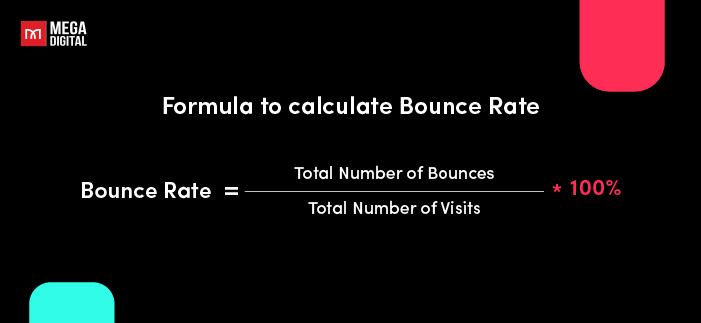
Your bounce rate is the percentage of people who visit your landing page after clicking on your ad and then leave without taking any further action. The average bounce rate on TikTok is around 50%, if your bounce rate is high, it means that your landing page is not relevant to your ad or that it is not providing visitors with the information or value they are looking for. To calculate the bounce rate, you can use the following formula:
Low conversion rate (CVR)
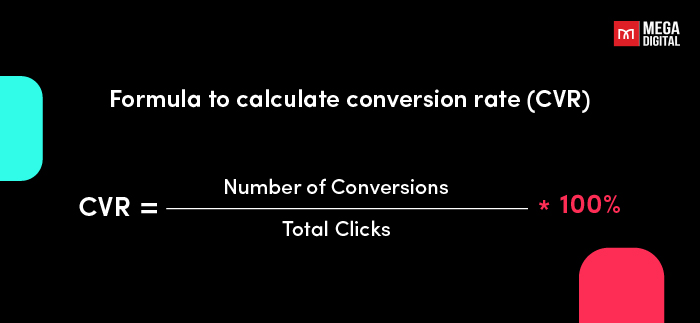
Your CVR is the percentage of people who visit your landing page and take a desired action, such as making a purchase or signing up for your email list.
According to TikTok, the average conversion rate (CVR) for TikTok ads is 1.1%. However, this can vary depending on several factors, such as your industry, target audience, and ad creativity. If your CVR is low, it means that your landing page is not converting visitors or that your offer is not compelling enough.
Negative feedback from customers
If you are receiving negative feedback from customers about your TikTok ads, it is a sign that something is wrong. It could be due to various reasons, such as the ad content being irrelevant, misleading, or annoying to viewers. So, pay attention to the feedback and make adjustments to your ads as needed.
Always keep in mind that excess negative feedback can result in the suspension of your TikTok ads account. Hence, it’s crucial to actively monitor and promptly address any negative feedback to maintain a positive ad performance and ensure a seamless advertising experience for both your brand and your audience.
No increase in sales or leads
If you are not seeing an increase in sales or leads after launching your TikTok ad campaign, it is a sign that your ads are not working. And it can also affect your ROAS.
Tips: To understand your problems and situation, review your campaign’s analytics on TikTok Ads Manager – which offers 3 distinct views to assess your campaign’s performance based on your needs:
- Dashboard Page: Provides an overview of your ad account upon logging in, offering up-to-date metrics, ad spending, and campaign statuses.
- Campaign Page: Allows for detailed performance analysis at the campaign, ad group, and ad level, presenting key metrics like total cost, CPC, impressions, CTR, and more.
- Reporting Page: Enables customization and export of data spreadsheets. Users can select specific data to display, set time ranges, and utilize pre-defined report templates. Additionally, this feature allows you to send your customized reports via email.
High add-to-cart but low purchase rate
If many users add your product to cart but few complete the purchase, your checkout flow or trust elements might be the bottleneck.
Fix it:
- Simplify the checkout (reduce form fields, support multiple payment methods).
- Add trust badges, return policy, or customer reviews near the “Pay Now” button.
- Send automated cart reminder ads via TikTok retargeting to recover lost conversions.
Rapid Performance Decay
Your ad performs great for 48 hours, then suddenly dies. This is a unique characteristic of TikTok in 2026 compared to other platforms.
- Sign of trouble: CPA spikes and conversions drop to zero after just 2-3 days of running.
- Meaning: “Creative Fatigue” has set in. Your ad is not “native” enough for the feed, or the audience has exhausted your creative variation. You need to refresh the hook or visuals immediately.
9 Reasons and Solutions for TikTok Ads Not Converting
#1. Wrong Campaign Objective
One of the most common reasons your TikTok ads aren’t converting is choosing the wrong campaign objective. TikTok optimizes delivery based on your selected goal — so if it doesn’t match your intent, you’ll attract the wrong audience.
For instance, running a Traffic campaign when your goal is sales often brings clicks but no purchases.
How to fix it:
- Match objectives with goals: Traffic for awareness, Conversions for sales, Lead Generation for sign-ups.
- Choose the right optimization event: Start with Add to Cart or View Content to collect data, then shift to Purchase once you’ve reached ~50 conversions.
- Keep each campaign focused on one goal to help the algorithm learn faster.
When your campaign objective aligns with your real outcome, TikTok’s system can target users who are ready to take action — not just click.
#2. Budget & “Learning Phase” Limitations
Many advertisers set a budget that is too small for the algorithm to learn. TikTok requires approximately 50 conversion events per week to exit the “Learning Phase”. If your budget is $20/day but your CPA is $10, you only get 2 conversions a day (14/week). The algorithm remains “stuck” in learning, leading to unstable performance and high costs.
How to fix it:
- Calculate by CPA: Multiply your target CPA by 50, then divide by 7 to get your daily minimum budget. (e.g., $10 CPA x 50 / 7 = ~$70/day).
- Scale Gradually: Once stable, increase the budget by 20% every 24-48 hours. Sudden spikes reset the learning phase.
When your daily budget allows TikTok to gather enough conversion data, the algorithm can properly identify high-value users — making every dollar you spend more likely to convert.
>>> Read more: Set up TikTok ads payment method in 5 steps [Agency walkthrough]
#3. Poor Bidding Optimization
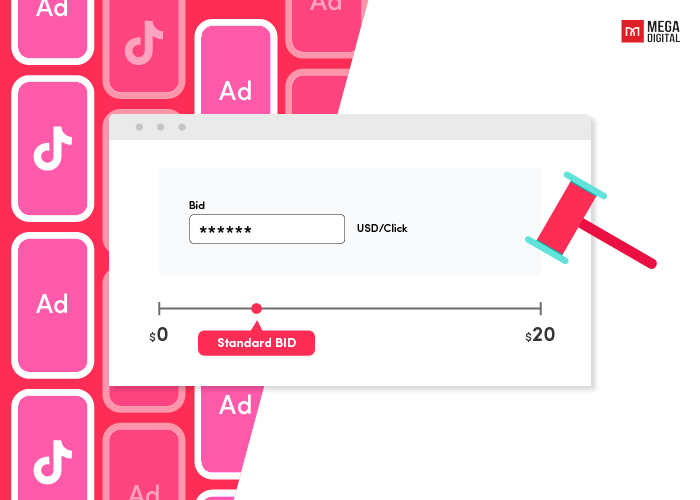
TikTok operates on an auction model. If you bid too low, your ad won’t win impressions in the auction. If you bid too high without a cap, you may overspend. Furthermore, changing bids frequently confuses the algorithm, preventing it from finding a stable conversion path.
How to fix it:
- Use Lowest Cost: Best for new campaigns to ensure full budget delivery and finding the lowest possible CPA initially.
- Use Cost Cap: Switch to this once you have a benchmark CPA. It tells TikTok, “Get me as many conversions as possible, but keep the average cost below $X.”
#4. Weak Ad Creative
Even with perfect targeting, your TikTok ads won’t convert if your creative doesn’t catch attention fast enough. Users scroll in seconds — and weak visuals or messaging can lose them instantly.
Common issues include recycled content from other platforms, weak hooks, and overly polished ads that don’t feel “native” to TikTok.
How to fix it:
- Hook early: Grab attention within 3 seconds using curiosity or emotion. Example: “I wasted $200 on ads until I did this.”
- Tell short stories: Use the formula Hook → Problem → Solution → CTA. Real stories feel authentic and convert better.
- Stay short and native: Keep videos between 9–15s, vertical (9:16), and aligned with TikTok trends.
- Use UGC or creator-style content: Real people drive more trust and engagement than brand-only videos.
- Add brand cues and a clear CTA: Show your logo or product early, and finish with “Shop Now” or “Get Yours.”
Pro tip from Mega Digital: Refresh creatives every 7–10 days — even small tweaks in captions, cuts, or hooks can revive your conversion rate.
#5. Audience Personalization & Overlap
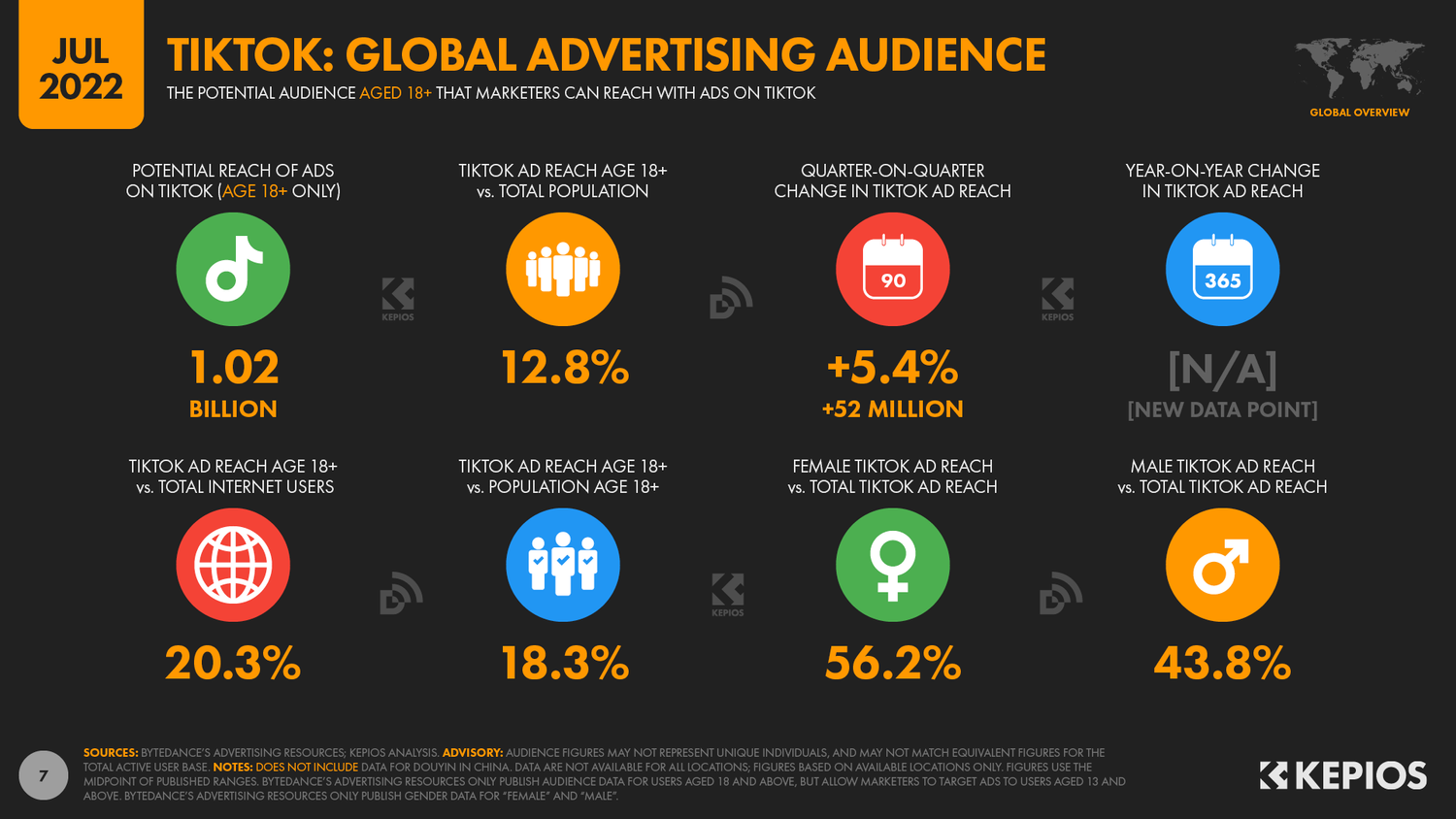
Your TikTok ads can fail to convert simply because they’re reaching the wrong people — or worse, competing against each other. When your targeting is too narrow or overlaps across ad groups, TikTok’s algorithm struggles to find the right audience to optimize for.
How to fix it:
- Check audience overlap:
Use TikTok’s Audience Overlap Tool in Ads Manager. If overlap exceeds 30%, merge or exclude similar audiences. - Use Lookalike Audience:
Build lookalikes from users who’ve purchased or engaged before. This helps TikTok find people with similar behaviors. - Enable Targeting Expansion:
Allow TikTok to go beyond your set filters when performance slows — it gives the algorithm room to discover new converters. - Balance precision and scale:
Too many filters (age, interest, behavior, device, etc.) can limit reach. Keep it broad enough for the system to learn efficiently.
When your targeting and personalization align, your ads attract users who not only watch — but also buy.
#6. Lack of Trust
Even the best TikTok ad won’t convert if viewers don’t trust your brand. On a platform full of new products and impulsive purchases, credibility is everything. If your ads look unfamiliar or too “salesy,” users hesitate — and conversion rates drop.
How to fix it:
- Show real reviews: Feature short testimonial clips or screenshots of customer feedback in your ads or captions.
- Leverage influencers or Spark Ads: Partner with trusted creators or boost authentic UGC videos that already perform well — they add built-in credibility.
- Use trust badges: Display guarantees like “Free returns” or “100% verified store” on your landing page and in video text overlays.
- Keep promises realistic: Overstated claims or clickbait copy can trigger negative feedback and reduce your account’s trust score.
Pro tip from Mega Digital: Audiences decide within seconds whether to trust a brand. Authenticity — not perfection — is what turns skepticism into conversions.
#7. Poor Landing Page Experience
A strong TikTok ad can drive clicks — but only a high-converting landing page turns those clicks into sales. If users click your ad and leave within seconds, chances are your landing page isn’t meeting their expectations.
Common problems include slow loading speed, inconsistent messaging, or too many distractions that delay the purchase.
How to fix it:
- Match ad and page content: Ensure your headline, visuals, and offer are consistent with the ad message. Don’t bait users with one promise and show another.
- Optimize for mobile: Over 90% of TikTok traffic comes from smartphones. Make sure your page loads in under 3 seconds and buttons are easy to tap.
- Reduce friction: Shorten forms, simplify checkout, and keep the call-to-action visible throughout the page.
- Add credibility signals: Include reviews, testimonials, trust badges, and social proof near key CTAs to reinforce confidence.
- Highlight one clear goal: Each landing page should focus on a single desired action — purchase, sign-up, or download.
Pro tip from Mega Digital: Run A/B tests between different headlines, hero images, or CTAs. Even a 1-second faster load time can increase conversion rates by 5–10%.
#8. Tracking & Pixel Setup Errors
Sometimes, your TikTok ads are actually converting — but the data isn’t being tracked correctly, making it look like you’re getting no results.
Broken pixels or missing event setups can cause serious reporting gaps and prevent TikTok’s algorithm from optimizing properly.
How to fix it:
- Verify your pixel setup:
Use TikTok Pixel Helper to confirm your pixel fires correctly on each step — View Content, Add to Cart, Checkout, Purchase. - Map standard events properly:
Match your funnel stages to TikTok’s default events. Avoid custom event names unless necessary. - Integrate with your platform:
Connect your pixel directly with Shopify, WooCommerce, or GA4 to ensure consistent data flow. - Check attribution windows:
TikTok defaults to 7-day click / 1-day view. Adjust these if you sell high-value products with longer decision cycles. - Avoid duplicate pixels:
Having multiple active pixels on one site can split event data and confuse TikTok’s optimization engine.
Pro tip from Mega Digital: After any major change to your pixel or conversion event, let the campaign run for at least 48–72 hours before analyzing results — the algorithm needs time to recalibrate.
#9. Neglecting TikTok Search Optimization
Many brands treat TikTok only as a discovery platform and ignore its role as a search engine. High-intent users actively search for “best reviews” or specific solutions. Ignoring Search Ads means leaving the highest-converting traffic on the table for competitors.
Expert Fix:
- Search Toggle: Ensure the “Search Toggle” is switched ON in your campaign settings to capture search traffic automatically.
- Keyword Campaigns: Run specific campaigns targeting high-intent keywords (e.g., “acne treatment,” “cheap hoodies”) to capture users who are in the research/buying phase.
Best Practices to Boost Conversions
To consistently drive high conversions in 2026, you need to go beyond basic fixes. Here are the advanced strategies that professional media buyers use to scale accounts.
Fine-tune your targeting
Stop over-filtering. In 2026, TikTok’s AI targeting is smarter than manual selection. If your pixel has data (500+ events), move towards Broad Targeting (no age, no gender, no interests). This allows the algorithm to find converters you never thought of.
For example, look at how Mega Digital helped Kyna English overcome targeting limitations:
- Challenge: They were struggling with lead quality and limited scale due to reliance on basic Instant Forms and narrow targeting.
- Solution: We implemented “Pixel Optimization” and integrated cross-platform data. By feeding better data signals to TikTok, we allowed the algorithm to target broader audiences effectively.
- Result: Achieved 2.5x ROAS and maintained an efficient CPA ($7.09), proving that data-driven broad targeting outperforms manual restrictions.
Supercharge your ad creativity
Creative fatigue is the #1 silent killer of TikTok campaigns. A “winning ad” in 2026 only lasts about 7-10 days. The only way to win is to test at least 3-5 new hooks every week and ensure your audio (voiceover/music) drives the narrative, as 90% of users watch with sound.
A great example of this is when Mega Digital partnered with Xgame Studio for the TikTap Challenge:
- Strategy: To combat fatigue in the highly competitive gaming niche, we deployed a “Creative Scaling Strategy,” maintaining a minimum of 10 active creatives per ad group to fight saturation.
- Result: This allowed the client to achieve a Day-0 ROAS of 60–100% (smashing the 40% target) and successfully scale budgets to $10,000/week while reaching break-even by Day 4.
Leverage TikTok’s Creative Tools
Don’t guess what’s trending, use data. Visit the TikTok Creative Center to inspect the “Top Ads Dashboard” and analyze what your competitors are running successfully this week. Then, speed up production with CapCut for Business, using pre-made commercial templates to churn out high-quality ads in minutes, not hours.
Run A/B Tests
A/B testing is your secret weapon for optimizing TikTok ad performance. Create multiple ad variations with slight differences — such as headlines, visuals, or CTAs — and run them simultaneously. Analyze the results to identify which elements are driving conversions. Over time, refine your ads based on these insights.
Embrace TikTok Shop
If you sell physical products, TikTok Shop is a cheat code for conversion rates because it removes the friction of leaving the app. Users can buy with a single tap. To maximize this, run Video Shopping Ads (VSA), these look like viral TikToks but include a clickable product card, consistently outperforming traditional “Traffic to Website” ads.
Leverage Agency Accounts for Stability
Scaling is impossible if your account gets banned or capped. Standard ad accounts often face random spending limits. Accounts provided by TikTok Partners (like Mega Digital) are “whitelisted,” offering unlimited spend caps and a lower risk of suspension. Plus, if an ad gets rejected, you get priority support to appeal directly to a TikTok rep, resolving issues in hours instead of days.
FAQs about TikTok Ads Not Converting
Use ABO for testing new creatives. It ensures every ad group gets a fair amount of budget to gather data. Use CBO only when you are scaling winning audiences, as it tends to favor the best performer too quickly and “starves” other potential winners during the test phase.
A: No, this usually indicates your audience is too narrow (Audience Overlap) or your creative has been flagged for low quality. Try switching to Broad Targeting and upload fresh creatives immediately. If the issue persists, your ad account might be “shadow-banned”, consider switching to a new ad account.
If you are converting but losing money, the issue is likely your Offer or AOV (Average Order Value), not just the ad. TikTok traffic is “colder” than Google. Try bundling products to increase AOV (e.g., “Buy 2 Get 1 Free”) or offering a limited-time upsell at checkout to cover your ad costs.
In final words
Fixing non-converting TikTok ads isn’t about finding one “magic button”, it’s about systematic diagnosis. In 2026, the advertisers who win are those who leverage AI targeting, prioritize Creative Velocity, and embrace the frictionless funnel of TikTok Shop. Remember, high traffic with zero sales is just a signal to refine your offer or landing page. If you need expert guidance or stable agency accounts to scale faster, contact Mega Digital today!