

Imagine your dental clinic popping up on the first page of Google when someone searches for dental services nearby. With Google Ads for dentists, you can make this a reality. It’s a top-notch marketing strategy to attract high-quality clients and grow your clinic. If you haven’t already, now’s the time to implement a Google Ads strategy for your dental practice. In this article, we’ll discuss how to use Google Ads to get more clients for your clinic.
Quick summary:
- Google Ads can help dental clinics reach patients who are actively searching for local treatments and services.
- Search Ads, call assets, and Local Services Ads can support different goals such as appointment bookings, phone inquiries, and local visibility.
- Dental campaigns can be competitive, so success depends on high-intent keywords, accurate conversion tracking, and smart location targeting.
- Clinics should optimize toward qualified appointments and patient value rather than focusing only on clicks or CPC.
Why Google Ads for Dentists?
Google Ads gives dental practices access to a massive search audience. As of July 2026, Google holds around 91% of the global search engine market, making it a key channel for reaching patients actively looking for dental care.
Reason #1: Draw in Your Ideal Patients
When you advertise dental on Google Ads, your ads reach potential patients who are actively searching for the services you provide.
Reason #2: Quick Results
Google Ads allows you to set up a campaign and begin receiving clicks within hours of launching your ads. We’ve assisted numerous clients in setting up new campaigns, with some receiving their first patient inquiries on the same day!

Reason #3: Minimal Risk
Many dental practices mistakenly believe that running successful Google Ads campaigns requires a significant investment. However, you can start with a modest budget. Google Ads doesn’t have a minimum spending requirement, and you only pay when potential patients click on your ads.
Now that you grasp the benefits of investing in Google Ads, it’s time to take action! Here are 10 steps to create a profitable Google Ads campaign that enhances your visibility in search engines, attracts qualified patients, and boosts your bottom line.
How Do Google Ads for Dentists Work?
When you create Search ads on Google, you bid on keywords to target your audience. Higher bids and more relevant ads rank higher.
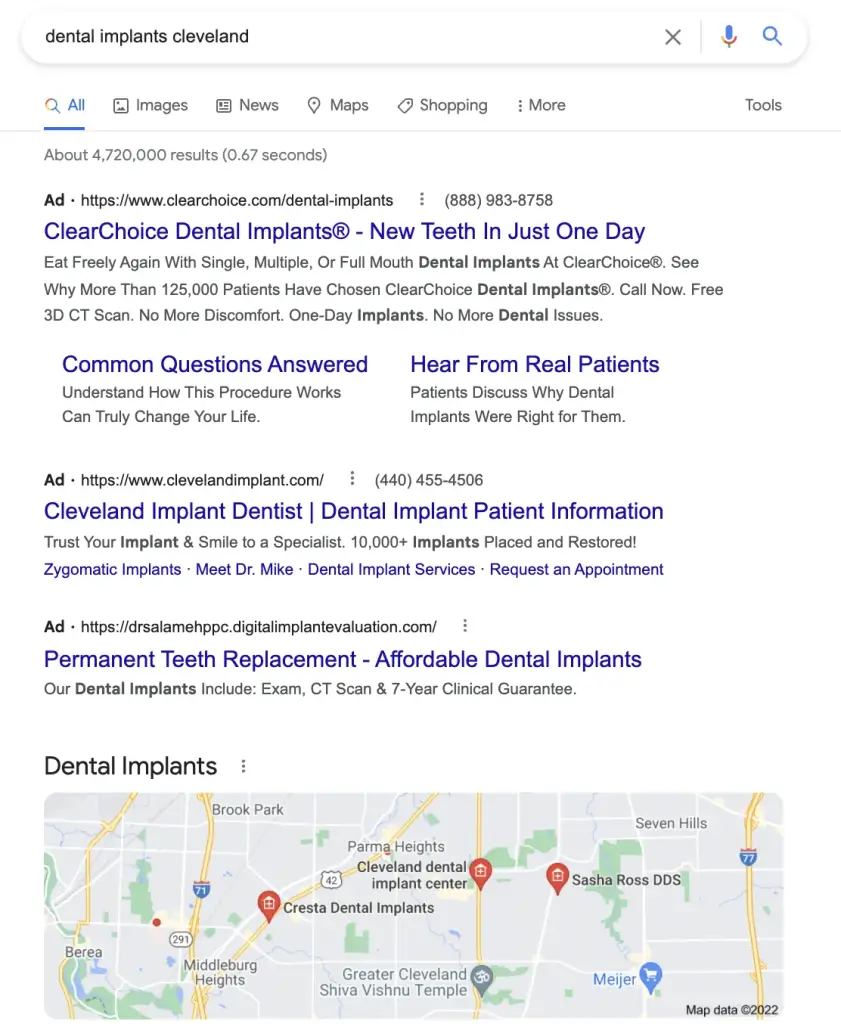
For example, if you offer dental implants in Cleveland, bidding on “dental implants Cleveland” can help clients find you. Google prioritizes ads based on relevance and past browsing history. The top four paid ads appear above organic search results, and higher bids increase your chances of clicks. See an example of ads for “dental implants Cleveland” below.
Which Ad Type is Best for Dentists?
There isn’t a single “best” ad type for dentists on Google Ads, but rather a combination of options that work best together depending on your goals and target audience. Here’s a breakdown of some popular ad types and how they can benefit dentists:
1. Search Network Ads
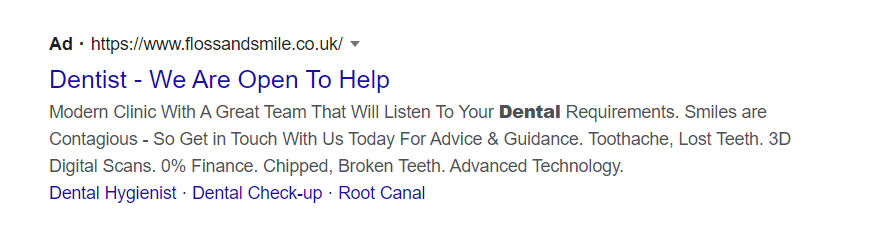
- Perfect for: Targeting people actively searching for dental services in your area.
- How it works: Your text ads appear on Google Search Engine Results Pages (SERPs) when users search for relevant keywords like “dentist near me” or “[dental procedure] cost”.
- Benefits for Dentists: Highly targeted, reaches high-intent users actively considering dental work, allows for showcasing specific services, and highlighting unique selling points.
2. Responsive Search Ads with Call Assets
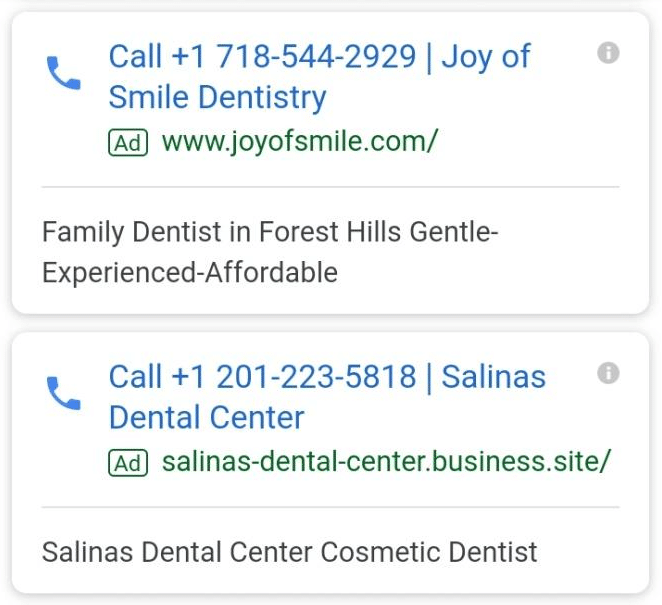
Responsive Search Ads with call assets are a strong option for dental clinics that rely on phone calls for appointments and consultations. A clickable call button can appear alongside your ad on eligible devices, making it easier for high-intent patients to contact your clinic directly.
Why it works:
- Direct contact: Patients can call your dental clinic directly from the search ad.
- High-intent conversions: Calls work particularly well for emergency dentistry, same-day appointments, and treatment consultations.
- Measurable results: Call reporting and conversion tracking help you identify which campaigns generate valuable phone inquiries.
3. Local Services Ads
- Perfect for: Highlighting your practice at the very top of Google search results in a prominent display with contact details and star rating.
- How it works: Your practice information appears above traditional PPC ads and organic listings when users search for dentists in your area.
- Benefits for Dentists: Attracting people with a strong intent to schedule appointments, unlike some other advertising methods that might reach a broader audience with less immediate interest.
Google Ads Keywords for Dentists
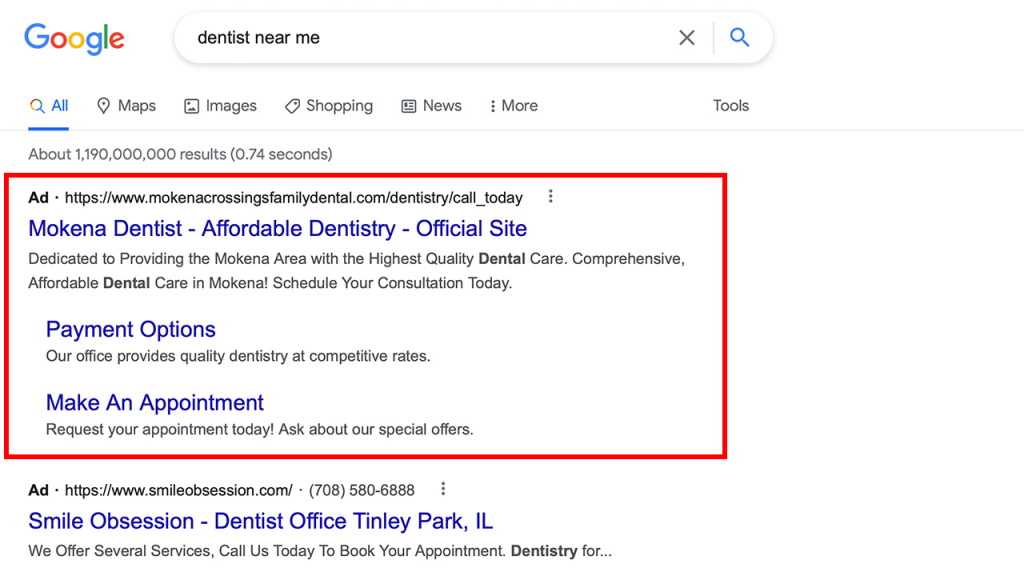
General Search Terms:
- dentist near me
- dental clinic [your city]
- teeth cleaning cost
- best dentist in [your city]
- emergency dentist
Procedure-Specific Keywords:
- teeth whitening near me
- dental implants cost
- wisdom teeth removal cost
- dentures cost
- [procedure name] dentist [your city] (e.g., cosmetic dentist, pediatric dentist)
Problem-Focused Keywords:
- chipped tooth dentist
- toothache relief
- dental anxiety treatment
- [dental problem] dentist (e.g., root canal dentist, gum disease dentist)
Long-Tail Keywords:
- [procedure name] for [target audience] (e.g., same-day dental implants, sedation dentistry for children)
- best dentist for [specific need] (e.g., best dentist for dentures, gentle dentist with evening hours)
- [your unique selling point] dentist [your city] (e.g., financing available dentist, bilingual dentist)
Additional Tips from Mega Digital:
- Consider Reviews: Sprinkle in some keywords related to positive reviews, like “dentist with excellent reviews” or “top-rated dentist”.
- Highlight Specialties: If your practice focuses on specific procedures (e.g., orthodontics, oral surgery), incorporate those terms into your keyword mix.
- Negative Keywords: Block irrelevant searches to avoid wasted ad spend. For example, “dental school” or “DIY teeth whitening”.
How to Create a Google Ads for Dentists Campaign?
Step 1: Choose your business
Before setting up your ad campaigns, you’ll need a Google Ads account. You can either create your own account or consider using a Google Ads agency account from a trusted Google Partner, like Mega Digital, to get started faster with expert support and optimized campaign management.
After logging in to your Google Ad account, then scroll to the bottom of the page and opt for “Switch to Expert Mode”.
Suppose you’re entirely new to Google Ads; in that case, you can select “Get more visits to your physical location”.
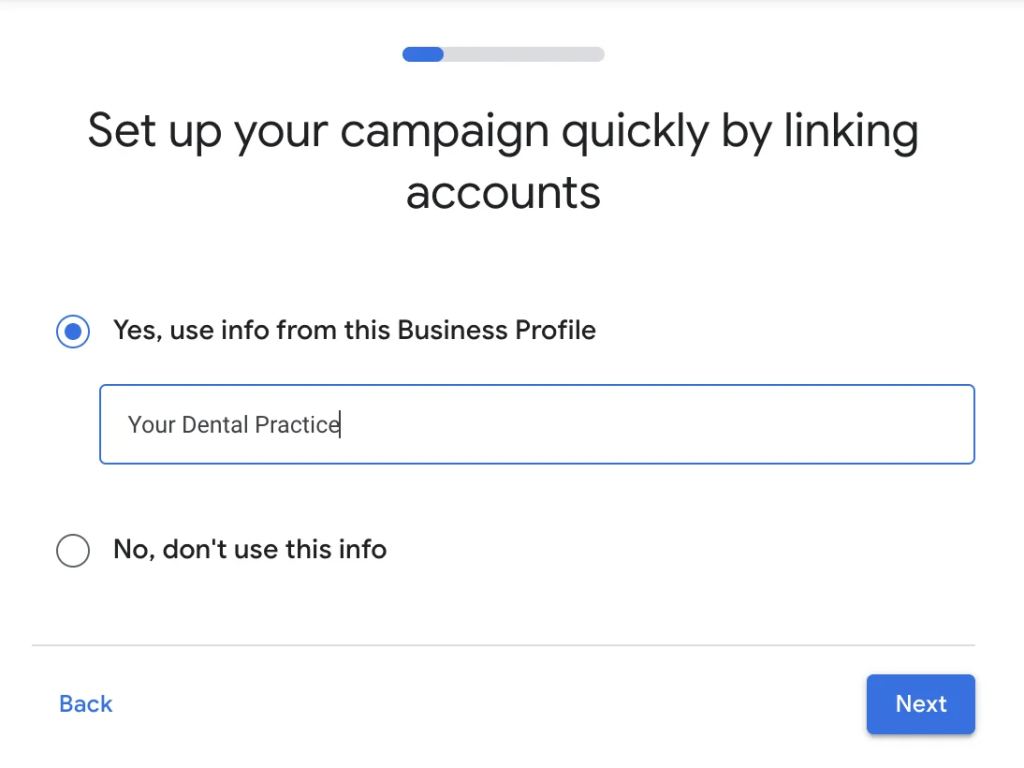
For the next step, ensure that you have already created a Google Business Profile for your business.
If you have already set up a Google Business profile, you can choose your business from the list provided and proceed by clicking “next”.
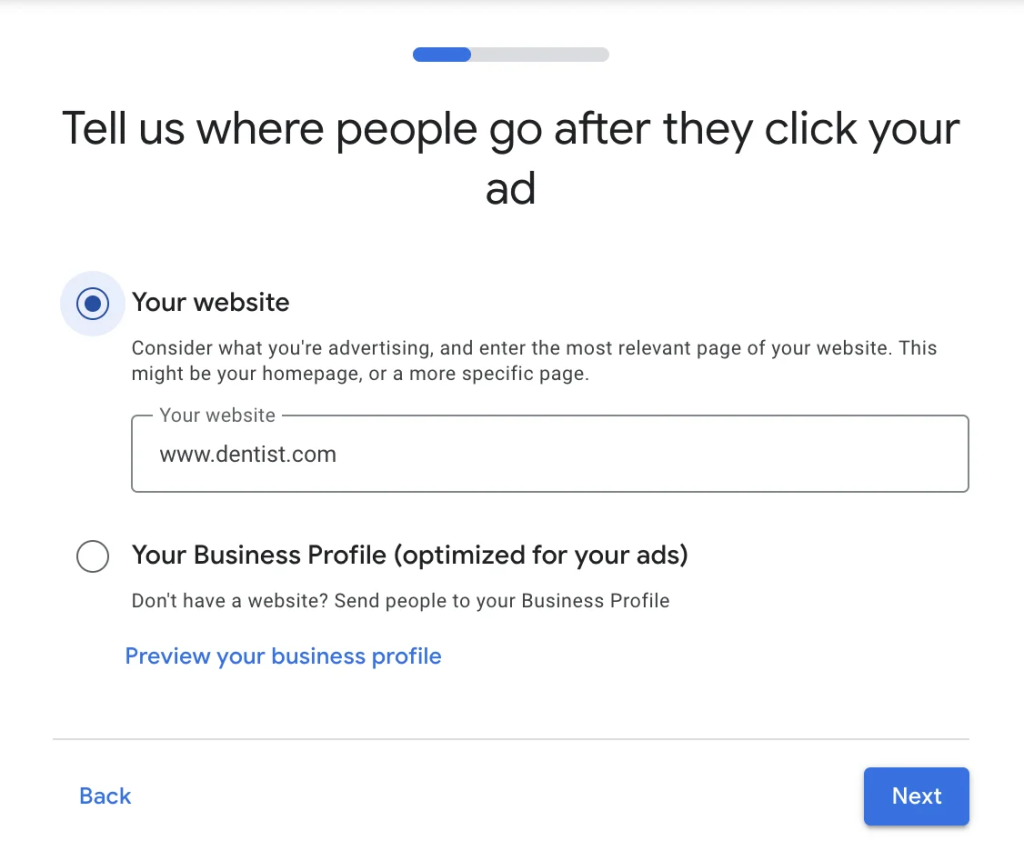
On the following page, you will be prompted to select your website or business profile if you do not have a website. In today’s modern era, it’s safe to assume that you will have a website for your dental practice.
Choose your website and proceed by clicking “next”.
After selecting your website and clicking “next”, you will be presented with both a mobile and desktop version of your website. If everything appears to be in order and it is indeed your website, simply proceed by clicking “next”.
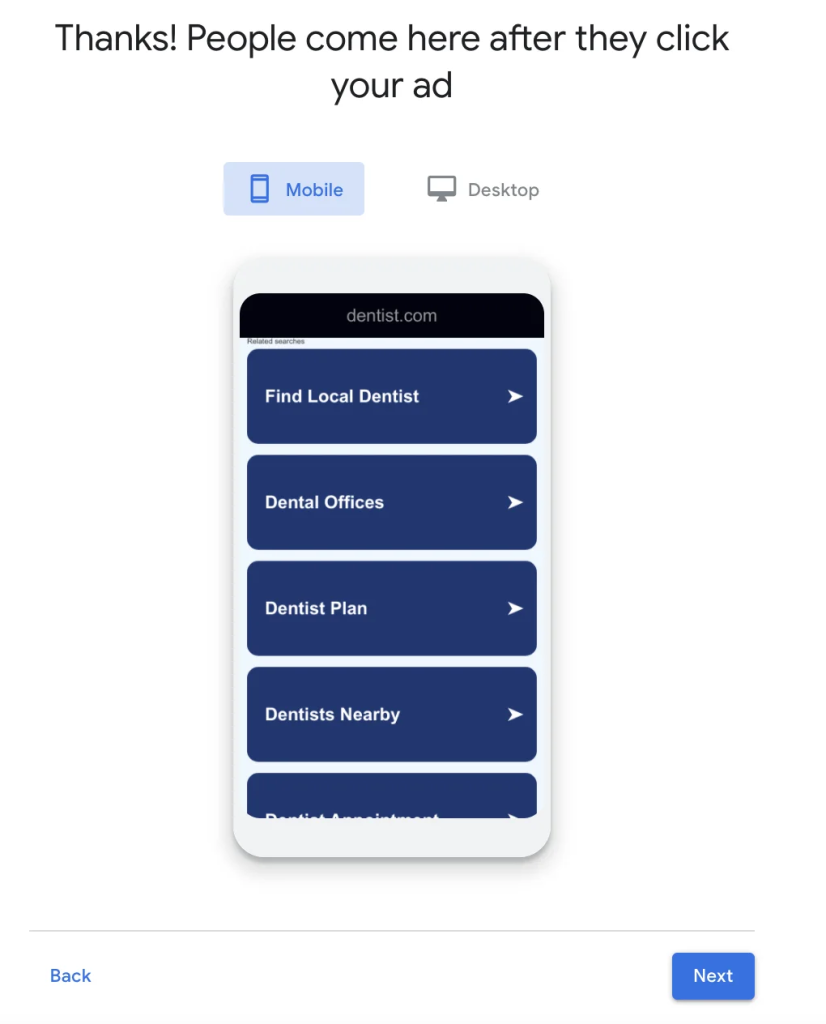
Step 2: Write your advertisement
In your search ad, use 3 headline spaces to highlight what sets your dental practice apart. Incorporate keywords for better results.
For instance, emphasize awards or 5-star reviews to attract attention. Offer first-time discounts to entice new clients.
Use the 2 description sections to showcase your dental office’s benefits and provide incentives for potential clients to contact you.
Ensure the call button and location are checked to maximize visibility and provide multiple contact options.
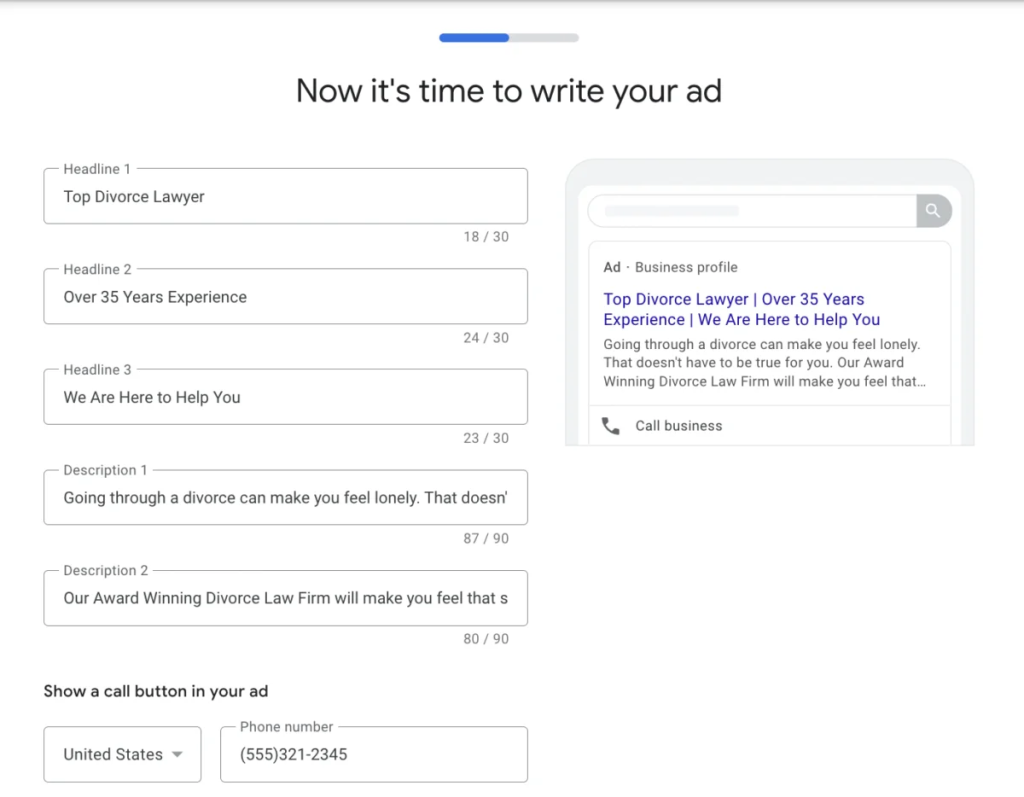
Step 3: Choose Keywords
With most of the setup complete, the next step is to choose the keywords for your campaign.
Continuing with the previous example, select keywords that align with the goal of your campaign, which is client acquisition.
Choose keywords such as:
- dentist
- dental check up
- dental clinic
- dentist office
- family dentist
- walk-in dentist (if this is something you offer)
- cosmetic dentist
- emergency dentist
Once you’ve selected your keywords, proceed by clicking “next”.
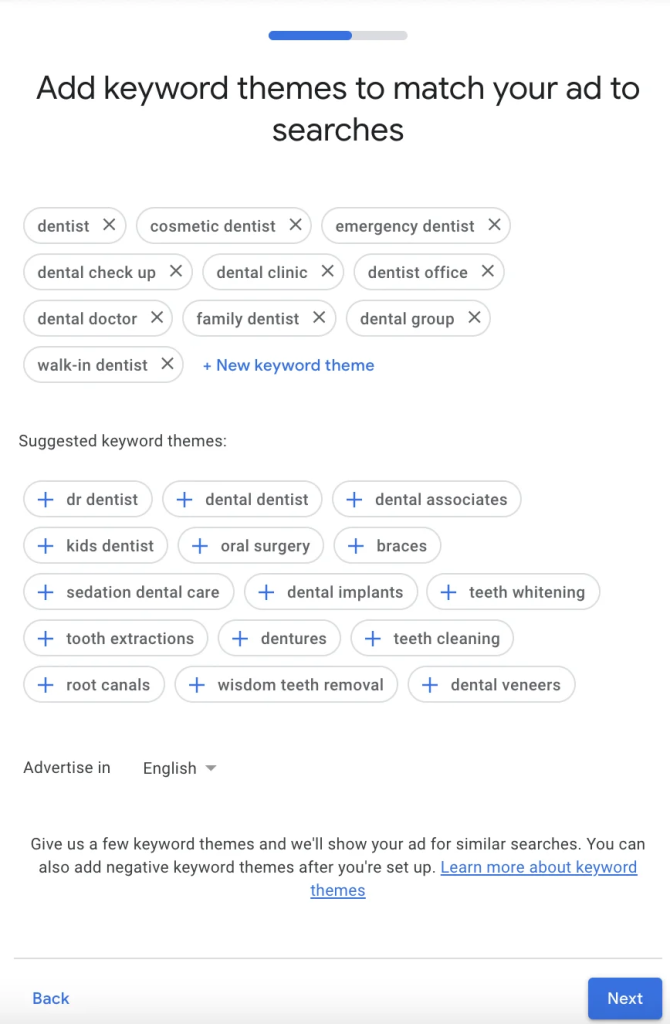
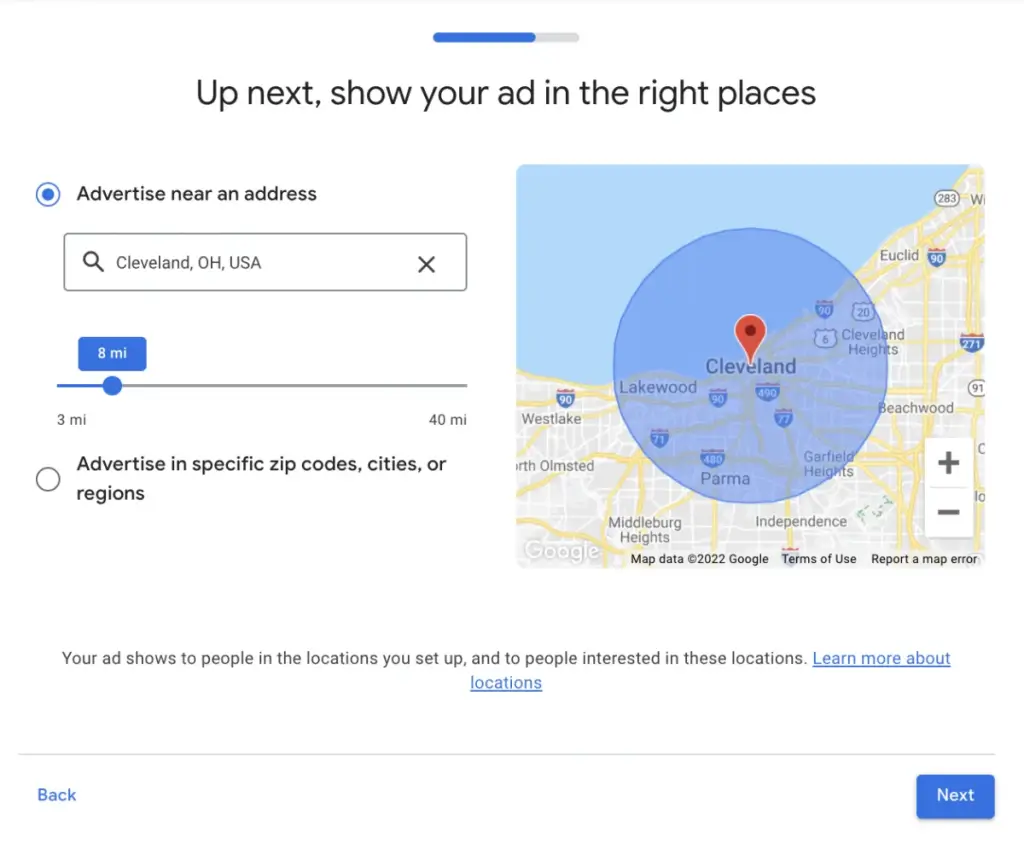
Step 4: Select What Cities See Your Dental Ad
Google simplifies the next step.
You’ll need to decide where your potential customers are likely to come from, based on your knowledge of your business.
A straightforward way to determine this is by reviewing your records to identify where most of your current customers reside. You’ll want to target these locations for advertising, and perhaps expand slightly beyond if you anticipate customers are willing to travel.
You’ll have 2 options for choosing where your ads are displayed:
- Advertise near an address: Use the miles bar to select the desired radius for advertising.
- Advertise in specific zip codes, cities, or regions: Choose this option to target specific areas.
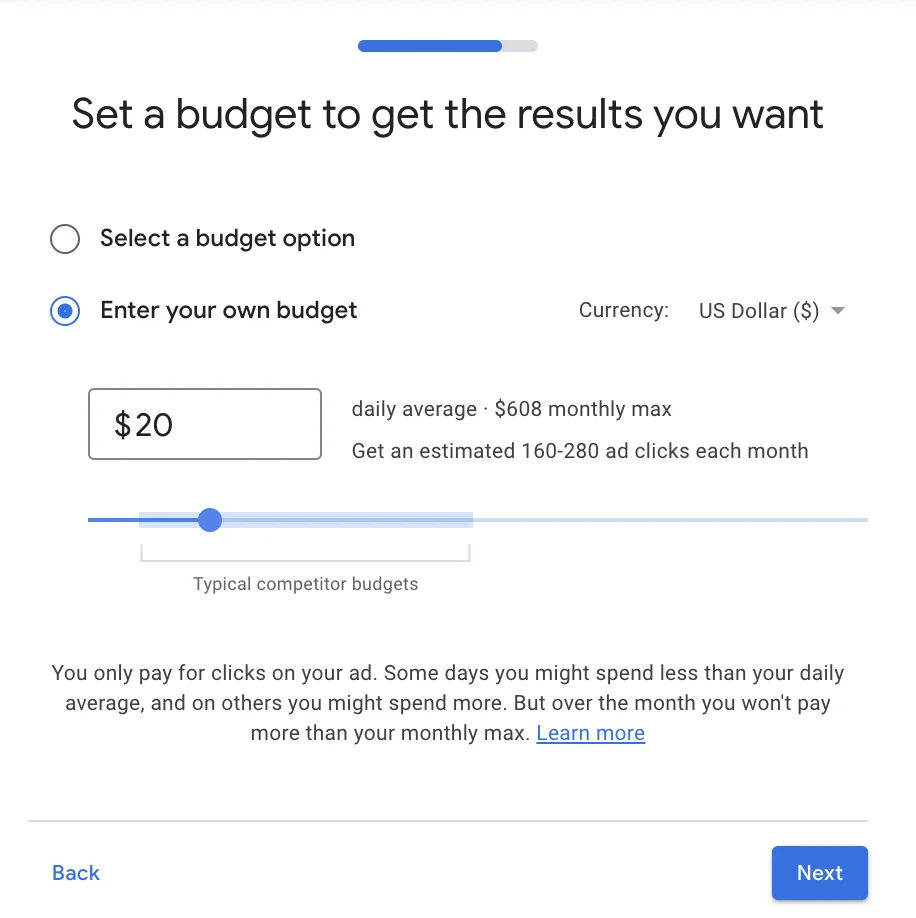
Step 5: Choose Campaign Budget
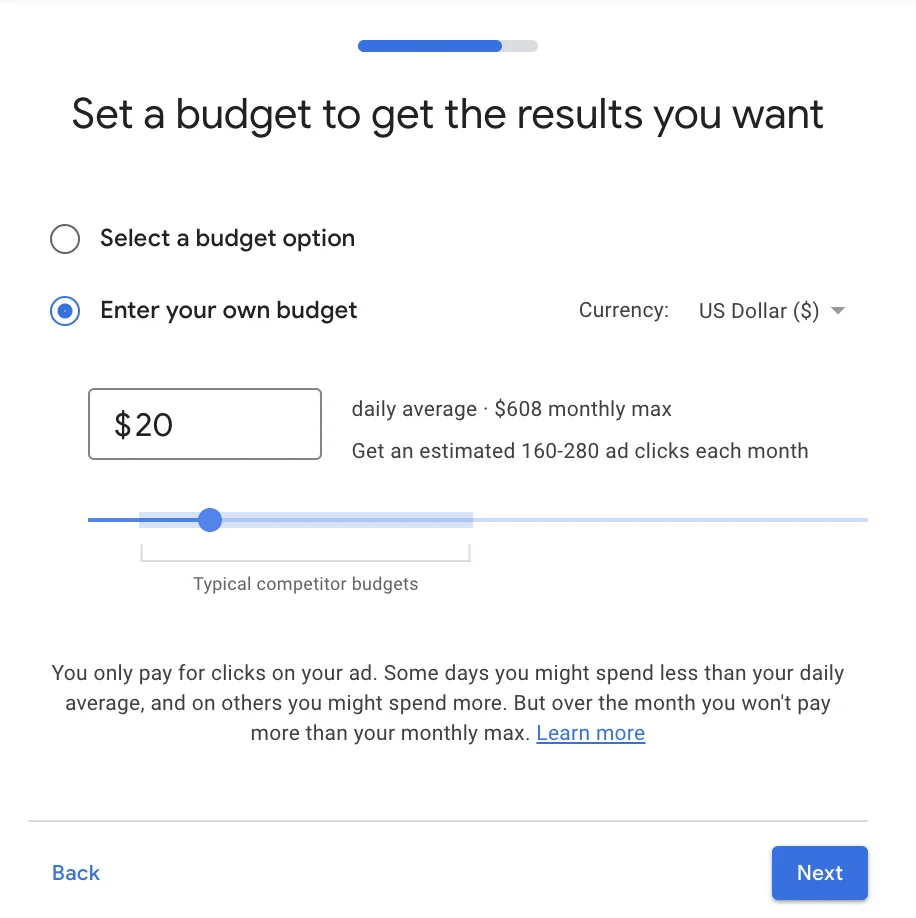
With Google Ads for dental clinic, you have the flexibility to choose a budget that suits your needs, ranging from $5 to $5,000 per day.
Start with a budget that ensures at least 5-10 clicks per day, such as $20, and monitor results for three to four weeks. Make sure your receptionists are aware of the Google Ads campaign to track how new clients found your dental practice.
Step 6: Review and Save
Well done!
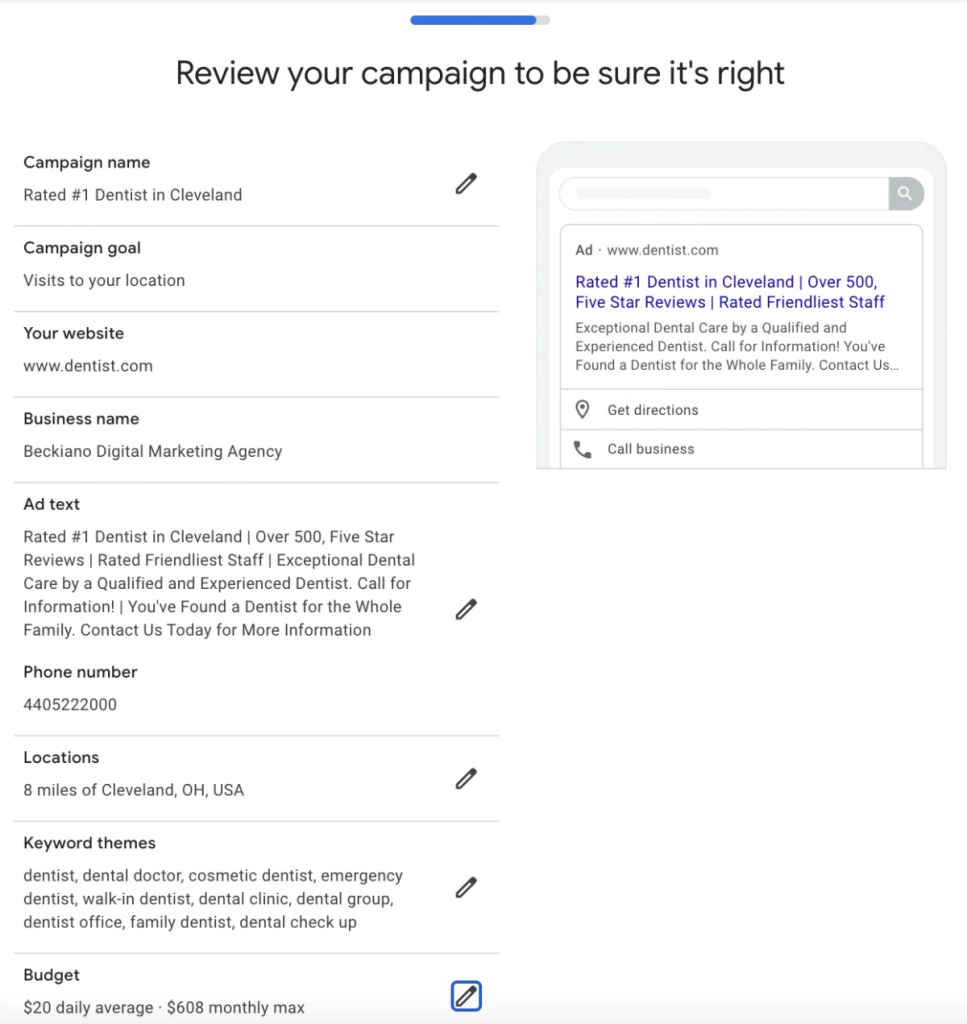
If you’ve reached this stage and find yourself on the review page, you’ve successfully crafted your inaugural Google Ads Campaign for your dental practice.
Take a moment to review your ad for any typos, ensure your budget is set appropriately, and double-check the wording.
Once you’re satisfied that everything is in order, go ahead and submit your ad!
Upon submission, you’ll need to add a credit card for your ad to start running. Simply input your credit card details, and you’re good to go! New calls can start coming in as soon as the same day you launch your campaign!
Do you want your advertisements to stand out? Let Mega Digital lend a hand by creating tailored campaigns for your business. As a Google Premier Partner, we have exclusive access to Google’s tools, like Looker Studio (currently the sole agency in Asia with such access). With this privilege, we can monitor real-time data and industry trends, assisting you in running campaigns that generate the highest returns while keeping costs optimized.
Dentist and Dental Services Search Ads Benchmarks
Dental Search Ads tend to be relatively expensive, but they can also generate strong conversion rates when campaigns reach patients with clear treatment intent. According to WordStream’s benchmark, Dentists & Dental Services recorded an average CTR of 5.44%, CPC of $7.85, conversion rate of 9.08%, and cost per lead of $83.93.
Cost per Click (CPC)
The average CPC for Dentists & Dental Services is $7.85, compared with the overall Google Ads average of $5.26. This reflects the strong competition for high-value searches related to treatments such as dental implants, cosmetic dentistry, and emergency care.
Click-through Rate (CTR)
Dental Search Ads have an average CTR of 5.44%, below the overall benchmark of 6.66%. A lower CTR does not necessarily indicate poor performance, so dental clinics should also evaluate whether clicks are turning into qualified calls and appointment bookings.
Conversion Rate
Dentists & Dental Services achieve an average conversion rate of 9.08%, higher than the overall benchmark of 7.52%. This suggests that dental searches can carry strong patient intent when the keyword, ad message, and landing page closely match the treatment being searched for.
Cost per Lead (CPL)
The average CPL for dental advertisers is $83.93, compared with $70.11 across all industries. Rather than focusing only on getting cheaper leads, clinics should track which campaigns generate qualified patients and higher-value treatments.
FAQs about Google Ads for Dentists
There is no fixed budget for every dental clinic. Your starting spend should depend on local CPCs, treatment value, target appointment volume, and how much you can profitably pay to acquire a new patient.
Yes, emergency dental searches often show strong and immediate intent. Use tightly targeted keywords, call assets, accurate business hours, and location targeting to make it easy for patients to contact your clinic quickly.
Usually, a service-specific landing page works better than a generic homepage. Match the page to the treatment being advertised and make booking, calling, pricing information, and trust signals easy to find.
Track booked appointments, qualified calls, and treatment value instead of relying only on clicks or form submissions. These metrics show whether the campaign is generating patients who contribute real revenue.
Read more: Google Ads for Doctors: Why is It Important for Healthcare?
Wrap up
Google Ads for dentists is the best way for dentists to advertise online. It helps dentists reach the right people, is not too expensive, and brings in qualified new patients. With Google Ads, dentists can get more people to notice them online and get more patients, making their business better.